Call intercept problem

Status
Not open for further replies.

JulienM

Platinum Partner
Advanced Certified
Joined
Jan 4, 2022
Messages
66
Reaction score
32
Hi,
Our client is unable to perform call interception from their Yealink T41P with BLF keys. When you press a key that flashes red to take the call, the phone displays "Ø not found". This is what shows up in the server logs :

Exception: ParseException ../../rutil/ParseBuffer.hxx:230, Parse failed unexpected eof in context:
*20*409

ㅤㅤ^ @ ../../rutil/ParseBuffer.hxx:230

IPBX is hosted by 3CX (v18.0 Update 3).
Do you have an idea ? Thank you in advance
 
Hi,

Please start by telling us whether the phone is in STUN or SBC mode, and what firmware version it is running
 
Hi,
Phones are in SBC mode, with firmware 36.83.0.130.
 
Hi,
Ok, I see to do that as soon as possible, I'll let you know.
 
Thanks. Also please keep in mind Julian that the message you posted will always appear when you try to pick-up a call that no longer exists using * 20 * code.

So if the message appeared, someone tried to pickup a call unsuccessfully at some point.
 
Hi,
Below the requested information :

3CX Version : Pro Annual 18.0.3.461
3CX Server : Hosted by 3CX
IP Phone : Yealink T41P version 36.83.0.130
Provisioning Method: SBC
SBC Version : 18.1.36
SBC Type : VM
Trunk Provider : Custom SIP-Trunk
Are custom Phone Templates being used : NO

Thanks. Also please keep in mind Julian that the message you posted will always appear when you try to pick-up a call that no longer exists using * 20 * code.

So if the message appeared, someone tried to pickup a call unsuccessfully at some point.

During the tests carried out with the client, I confirm that the call was indeed existing, because after having tried to intercept the call on another extension (in vain), we were still able to pick up the call on the phone.
I want to clarify that we only tested the interception of an external call, not an internal call.
 
Ok you should also try internal too, just so we have a good idea of the behavior.

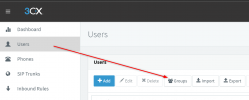
There are also rights for pickup (which that extension may be missing), but there are also Groups that extensions belong to, and if your extensions are not both in the same Group and with the correct rights they may not be allowed to pick up calls of others.

You could always test your T41P extension by unplugging the phone, then logging in via Webclient, and attempting to pick up the calls from there (bypassing the Yealink entirely). If this still doesn't work then your best bet is to review the Groups, and Extension Rights as this would be the primary reason pick up is blocked (ie. cannot see the calls, or does not have the right for pickup).
1651655693161.png


This will give you a better idea of how one thing affects the other when it comes to Rights management:
https://www.3cx.com/3cxacademy/videos/intermediate/extension-groups/
 
Ok thanks I'll look into that.
On the other hand, it seemed to me that Extension Rights applied only for the softphony part. For me, as long as you have a BLF from a remote phone (on a Yealink phone), it is possible to intercept a call, even without having special rights.

I am wrong ?
 
That would wrong, because rights apply on the extension level, regardless of whether you use the softphone or a hardware phone to access your extension.

That's why I suggested you test via webclient with the Yealink unplugged to see if we can confirm that the same applies (eliminating the phone being the issue).
 
Hi,
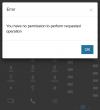
I just had a return from our client, who tells me that he tried to intercept a call via the Desktop client (with his Yealink disconnected), and when he clicks on the yellow BLF, nothing happens, no message. However, both users are in the same group and have interception rights.
If it is indeed a rights problem, there should be a warning message on 3CX App, right ? An idea ?
 
Hi Julien,

If it is indeed a rights problem, there should be a warning message on 3CX App, right
Correct, you will see a message.


when he clicks on the yellow BLF, nothing happens
Also correct, because a Yellow BLF means that the call is already answered so there is nothing for them to pickup.
 

Attachments

  • 1652948988236.png
    1652948988236.png
    31.5 KB · Views: 5
Error on my part, the BLF flashes red when clicked (not yellow) but nothing happens.
 
Hi Julien,

We need to get a good base-line of how the system reacts, and to do this we must perform a clean test if you are able to do so.

  1. Access the customer's dashboard, and create 3 brand new extensions.
  2. The only thing you need to add is your email address and First Name (call them "One", "Two" and "Three")
  3. When done, edit all 3 together, and add them as BLFs to each other, so that they can "see" each other
  4. Send yourself the welcome emails and you can now start testing
  5. Provision Ext.1 on a mobile, Ext.2 on Webclient, Ext.3 in Desktop App
  6. Make a call to *777 from each, just to confirm they work ok.
  7. Now the test: have Ext.1 call Ext.2, and while ringing look at Ext.3 dialler and see if you can click the BLF belonging to 2
So basically you are replicating the customer's scenario on their system, with fresh default extensions to see what happens. No IP phones involved.

Let me know if my instructions were not clear, and also if you were able to test this successfully.
 
Hello,
I just did a fairly simple test, by creating 2 users (softphone only, no IP phones involved), in the "DEFAULT" rights group with "User" privileges.
Without any particular right, the 2 users can intercept each other via *20*XXX. Is this normal?
 
Status
Not open for further replies.

Members Online Now

No members online now.

Forum statistics

Threads
111,832
Messages
589,284
Members
164,662
Latest member
DejanMDS