Call Journaling to Quotevine CRM

Status
Not open for further replies.

Waldoppen

Gold Partner
Advanced Certified
Joined
Jan 26, 2022
Messages
72
Reaction score
42
Hi, we have been playing around with contact lookup and call journaling to a CRM called quotevine. We have got the contact lookup working and I then used 3CX CRM template generator to try get inbound calls to log to the CRM. No joy on this.

The 3CX is on v18 Update 6 - self hosted in AWS

Below is the current XML file - please be kind, I have zero past experience with it!

I have used a syntax checker which says it's ok and 3CX accepts the XML - nothing is logged however. We can use Postman to log data to the CRM - this works fine.

<?xml version="1.0"?>
<Crm xmlns:xsi="http://www.w3.org/2001/XMLSchema-instance" xmlns:xsd="http://www.w3.org/2001/XMLSchema" Country="UK" Name="Call Journaling" Version="1" SupportsEmojis="true">
<Number Prefix="AsIs" MaxLength="[MaxLength]" />
<Connection MaxConcurrentRequests="2" />
<Parameters />
<Authentication Type="No" />
<Scenarios>
<Scenario Id="ReportCall" Type="REST">
<Request Url="https://customername.quotevineapp.com/qvine/quotevine/api/v2/telephone_calls/" MessagePasses="0" RequestContentType="application/json" RequestEncoding="Json" RequestType="Post" ResponseType="Json">
<Headers>
<Value Key="api-key">xxxxxxxxxx</Value>
</Headers>
<PostValues>
<Value Key="call_date" Passes="1" Type="String">[DateTime]</Value>
<Value Key="direction" Passes="1" Type="String">I</Value>
<Value Key="source_number" Passes="1" Type="String">[Number]</Value>
<Value Key="destination_number" Passes="1" Type="String">[AgentFirstName]</Value>
<Value Key="internal_flag" Passes="1" Type="String">N</Value>
</PostValues>
</Request>
</Scenario>
</Scenarios>
</Crm>

It's probably completely wrong so forgive my ignorance with XML... Is there a log I can access on 3CX that will show me if it attempts to log and any errors etc?

Thanks in advance,
 
Quick update to this, I have found the specific error it's throwing:

POST to /telephone_calls/ failed with message: call_date 03/16/2023 11:57 is not a valid datetime

May need some help reformatting the date time - I'm not sure where to start on that!
 
If you need further assistance, don't hesitate to DM me.
 
Thanks for this, I don't see any examples in that link for changing the datetime format?

The CRM wants the format in this way:

"call_date":"2023-02-16 13:00:00"

also i've changed the direction value key to this:

<Value Key="direction" Passes="1" Type="String">[IIf([CallDirection]==Inbound,I,O)]</Value>

Will that now determine if the call is inbound and return a I and outbound will return a O ?

thanks for the help!
 
also i've changed the direction value key to this:

<Value Key="direction" Passes="1" Type="String">[IIf([CallDirection]==Inbound,I,O)]</Value>

Will that now determine if the call is inbound and return a I and outbound will return a O ?
Yes.

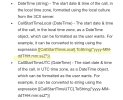
For the call datetime, see below:
IMG_2965.jpeg

You need to use the same format, with a space instead of T and remove the Z.

Check if your CRM uses UTC or local time.

The DateTime variable is just a string (text.)
 
  • Like
Reactions: Waldoppen
Ah sorry I missed that CallStartTimeLocal variable. It's now working!

That IF expression was very helpful as I have now also changed the source and destination keys to populate the correct number or agent name depending on the direction of the call:

<Value Key="source_number" Passes="1" Type="String">[IIf([CallDirection]==Inbound,[Number],[AgentFirstName])]</Value>
<Value Key="destination_number" Passes="1" Type="String">[IIf([CallDirection]==Inbound,[AgentFirstName],[Number]</Value>

Now I need to get the call duration formatted to seconds but I think there is an example on that in the 3CX link you sent so i'll give that a try!

thanks again. I'll post the full XML once it's all working for future reference.
 
Yes, check the Duration variable, it has the get_TotalSeconds().ToString("F0")

Also, why use the agent name when you can use their extension or email and even match that and assign the Activity "owner" to the actual user (check out how HubSpot, ConnectWise and Salesforce do the ReportCall.)
 
  • Like
Reactions: edossantos
Yes, check the Duration variable, it has the get_TotalSeconds().ToString("F0")

Also, why use the agent name when you can use their extension or email and even match that and assign the Activity "owner" to the actual user (check out how HubSpot, ConnectWise and Salesforce do the ReportCall.)

I've input this:

<Value Key="call_duration_seconds" Passes="1" Type="String">[[[DurationTimespan].get_TotalSeconds()].ToString("F0")]</Value>

However it doesn't like it, calls don't log at all with that set, possibly ive formatted it wrong?

For the source number I now have this, which works but how can I pass the 2 name variables? I tried adding [AgentLastName] and putting them both in brackets but no joy - apologies I am fumbling in the dark here but am very close to having it fully working! I could possibly use agent email instead like you said.

<Value Key="source_number" Passes="1" Type="String">[IIf([CallDirection]==Inbound,[Number],[AgentFirstName])]</Value>
 
You would need [AgentFirstName]+[AgentLastName] but again, this would concat them without a space. Maybe @edossantos has an idea here.

The duration expression looks good to me. Put the system in verbose, and then do a couple test calls, then go to Activity Log > Logs > Instance > 3CXSystemService.log, and search for "CRM:". You'll see the full request/response and what is being sent to the CRM.
 
Brill thanks!

It shows the full name now, no space as you say but thats probaby fine for now.

Also I added the call duration seconds back in with no changes and it works now...

Here is the full XML for anyone else looking here in future:

Code:
<?xml version="1.0"?>
<Crm xmlns:xsi="http://www.w3.org/2001/XMLSchema-instance" xmlns:xsd="http://www.w3.org/2001/XMLSchema" Country="UK" Name="Call Journaling" Version="1" SupportsEmojis="true">
  <Number Prefix="AsIs" MaxLength="[MaxLength]" />
  <Connection MaxConcurrentRequests="2" />
  <Parameters />
  <Authentication Type="No" />
  <Scenarios>
    <Scenario Id="ReportCall" Type="REST">
      <Request Url="https://customer.quotevineapp.com/qvine/quotevine/api/v2/telephone_calls/" MessagePasses="0" RequestContentType="application/json" RequestEncoding="Json" RequestType="Post" ResponseType="Json">
    <Headers>
        <Value Key="api-key">XXXXXXXXXXXXX</Value>
    </Headers>
       <PostValues>
          <Value Key="call_date" Passes="1" Type="String">[[CallStartTimeLocal].ToString("yyyy-MM-dd HH:mm:ss")]</Value>
          <Value Key="call_duration_seconds" Passes="1" Type="String">[[[DurationTimespan].get_TotalSeconds()].ToString("F0")]</Value>
          <Value Key="direction" Passes="1" Type="String">[IIf([CallDirection]==Inbound,I,O)]</Value>
          <Value Key="source_number" Passes="1" Type="String">[IIf([CallDirection]==Inbound,[Number],[AgentFirstName]+[AgentLastName])]</Value>
          <Value Key="destination_number" Passes="1" Type="String">[IIf([CallDirection]==Inbound,[AgentFirstName]+[AgentLastName],[Number])]</Value>
          <Value Key="internal_flag" Passes="1" Type="String">N</Value>
        </PostValues>
        </Request>
    </Scenario>
  </Scenarios>
</Crm>
 
Last edited:
The final thing i'd like to get working is to add back in the contact lookup, i've added it to the above but it doesn't seem to have an effect. The calls still log but contact lookup doesn't work.

Can you advise how I can nest these 2 scenarios so both run through, the number is looked up and the call is logged to the CRM?

Code:
<?xml version="1.0"?>
<Crm xmlns:xsi="http://www.w3.org/2001/XMLSchema-instance" xmlns:xsd="http://www.w3.org/2001/XMLSchema" Country="UK" Name="CallsContacts" Version="1" SupportsEmojis="true">
  <Number Prefix="AsIs" MaxLength="[MaxLength]" />
  <Connection MaxConcurrentRequests="10" />
  <Parameters />
  <Authentication Type="No" />
  <Scenarios>
    <Scenario Id="ReportCall" Type="REST">
      <Request Url="https://customer.quotevineapp.com/qvine/quotevine/api/v2/telephone_calls/" MessagePasses="0" RequestContentType="application/json" RequestEncoding="Json" RequestType="Post" ResponseType="Json">
    <Headers>
        <Value Key="api-key">XXXXXXXXXXXXX</Value>
    </Headers>
       <PostValues>
          <Value Key="call_date" Passes="1" Type="String">[[CallStartTimeLocal].ToString("yyyy-MM-dd HH:mm:ss")]</Value>
          <Value Key="call_duration_seconds" Passes="1" Type="String">[[[DurationTimespan].get_TotalSeconds()].ToString("F0")]</Value>
          <Value Key="direction" Passes="1" Type="String">[IIf([CallDirection]==Inbound,I,O)]</Value>
          <Value Key="source_number" Passes="1" Type="String">[IIf([CallDirection]==Inbound,[Number],[AgentFirstName]+[AgentLastName])]</Value>
          <Value Key="destination_number" Passes="1" Type="String">[IIf([CallDirection]==Inbound,[AgentFirstName]+[AgentLastName],[Number])]</Value>
          <Value Key="internal_flag" Passes="1" Type="String">N</Value>
        </PostValues>
        </Request>
        <Scenario Id="" Type="REST">
      <Request Url="https://customer.quotevineapp.com/qvine/quotevine/api/v2/relationships/search?mobile_number=[Number]" MessagePasses="0" RequestEncoding="UrlEncoded" RequestType="Post" ResponseType="Json">
    <Headers>
        <Value Key="api-key">XXXXXXXXXXXXX</Value>
    </Headers>
    </Request>
      <Rules>
        <Rule Type="Any">relationship_id</Rule>
      </Rules>
      <Variables>
        <Variable Name="ContactID" Path="relationship_id">
          <Filter />
        </Variable>
        <Variable Name="FirstName" Path="forename">
          <Filter />
        </Variable>
        <Variable Name="LastName" Path="surname">
          <Filter />
        </Variable>
        <Variable Name="Email" Path="email_address">
          <Filter />
        </Variable>
        <Variable Name="PhoneMobile" Path="mobile_number">
          <Filter />
        </Variable>
      </Variables>
      <Outputs AllowEmpty="false">
        <Output Type="ContactID" Passes="0" Value="[ContactID]" />
        <Output Type="FirstName" Passes="0" Value="[FirstName]" />
        <Output Type="LastName" Passes="0" Value="[LastName]" />
        <Output Type="Email" Passes="0" Value="[Email]" />
        <Output Type="PhoneMobile" Passes="0" Value="[PhoneMobile]" />
        <Output Type="EntityId" Passes="0" Value="[ContactID]" />
        <Output Type="EntityType" Passes="0" Value="Contacts" />
      </Outputs>
    </Scenario>
    </Scenario>
  </Scenarios>
</Crm>
 
You would need [AgentFirstName]+[AgentLastName] but again, this would concat them without a space. Maybe @edossantos has an idea here.
Have you tried using just a space between? Like this:
[AgentFirstName] [AgentLastName]

The final thing i'd like to get working is to add back in the contact lookup, i've added it to the above but it doesn't seem to have an effect. The calls still log but contact lookup doesn't work.

Can you advise how I can nest these 2 scenarios so both run through, the number is looked up and the call is logged to the CRM?
The closing tag for the </Scenario> element is in a wrong location. You have 2 </Scenario> almost at the end. You need to close 1 scenario, and then start the next. Something like this:
XML:
<?xml version="1.0"?>
<Crm xmlns:xsi="http://www.w3.org/2001/XMLSchema-instance" xmlns:xsd="http://www.w3.org/2001/XMLSchema" Country="UK" Name="CallsContacts" Version="1" SupportsEmojis="true">
    <Number Prefix="AsIs" MaxLength="[MaxLength]" />
    <Connection MaxConcurrentRequests="10" />
    <Parameters />
    <Authentication Type="No" />
    <Scenarios>
        <Scenario Id="ReportCall" Type="REST">
            <Request Url="https://customer.quotevineapp.com/qvine/quotevine/api/v2/telephone_calls/" MessagePasses="0" RequestContentType="application/json" RequestEncoding="Json" RequestType="Post" ResponseType="Json">
                <Headers>
                    <Value Key="api-key">XXXXXXXXXXXXX</Value>
                </Headers>
                <PostValues>
                    <Value Key="call_date" Passes="1" Type="String">[[CallStartTimeLocal].ToString("yyyy-MM-dd HH:mm:ss")]</Value>
                    <Value Key="call_duration_seconds" Passes="1" Type="String">[[[DurationTimespan].get_TotalSeconds()].ToString("F0")]</Value>
                    <Value Key="direction" Passes="1" Type="String">[IIf([CallDirection]==Inbound,I,O)]</Value>
                    <Value Key="source_number" Passes="1" Type="String">[IIf([CallDirection]==Inbound,[Number],[AgentFirstName]+[AgentLastName])]</Value>
                    <Value Key="destination_number" Passes="1" Type="String">[IIf([CallDirection]==Inbound,[AgentFirstName]+[AgentLastName],[Number])]</Value>
                    <Value Key="internal_flag" Passes="1" Type="String">N</Value>
                </PostValues>
            </Request>
        </Scenario>
        <Scenario Id="" Type="REST">
            <Request Url="https://customer.quotevineapp.com/qvine/quotevine/api/v2/relationships/search?mobile_number=[Number]" MessagePasses="0" RequestEncoding="UrlEncoded" RequestType="Post" ResponseType="Json">
                <Headers>
                    <Value Key="api-key">XXXXXXXXXXXXX</Value>
                </Headers>
            </Request>
            <Rules>
                <Rule Type="Any">relationship_id</Rule>
            </Rules>
            <Variables>
                <Variable Name="ContactID" Path="relationship_id">
                    <Filter />
                </Variable>
                <Variable Name="FirstName" Path="forename">
                    <Filter />
                </Variable>
                <Variable Name="LastName" Path="surname">
                    <Filter />
                </Variable>
                <Variable Name="Email" Path="email_address">
                    <Filter />
                </Variable>
                <Variable Name="PhoneMobile" Path="mobile_number">
                    <Filter />
                </Variable>
            </Variables>
            <Outputs AllowEmpty="false">
                <Output Type="ContactID" Passes="0" Value="[ContactID]" />
                <Output Type="FirstName" Passes="0" Value="[FirstName]" />
                <Output Type="LastName" Passes="0" Value="[LastName]" />
                <Output Type="Email" Passes="0" Value="[Email]" />
                <Output Type="PhoneMobile" Passes="0" Value="[PhoneMobile]" />
                <Output Type="EntityId" Passes="0" Value="[ContactID]" />
                <Output Type="EntityType" Passes="0" Value="Contacts" />
            </Outputs>
        </Scenario>
    </Scenarios>
</Crm>
 
Have you tried using just a space between? Like this:
Yeah no joy on that, it just doesn't log calls at all when using that. I tried inserting \u0020 which is apparently the unicode character for space but no dice. Not a big issue but would be nice to fix.

The closing tag for the </Scenario> element is in a wrong location. You have 2 </Scenario> almost at the end. You need to close 1 scenario, and then start the next. Something like this:
Ah, yep obvious now when looking again, I needed a break from looking at that XML earlier! It's working now - many thanks indeed for your help.
 
  • Like
Reactions: edossantos
Yeah no joy on that, it just doesn't log calls at all when using that. I tried inserting \u0020 which is apparently the unicode character for space but no dice. Not a big issue but would be nice to fix.
Try this:

[AgentFirstName]+" "+[AgentLastName]
 
  • Like
Reactions: edossantos
  • Like
Reactions: Evolute IT
No luck on either of those, this is what was logged in the CRM:

Instead of FirstnameLastname, we just got: " "+Lastname
 
Yeah, I think we won't get better than that.
 
Yeah, I think we won't get better than that.

No problem, it's fine as it is to be honest - you have been massively helpful thanks so much.

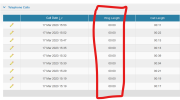
The CRM does have a 'Ring Length' attribute, but it doesn't look like 3CX has a predefined variable to pass that data to the CRM?

1679068556796.png
 

Attachments

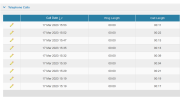
  • 1679068527267.png
    1679068527267.png
    83 KB · Views: 0
No problem, it's fine as it is to be honest - you have been massively helpful thanks so much.

The CRM does have a 'Ring Length' attribute, but it doesn't look like 3CX has a predefined variable to pass that data to the CRM?

View attachment 34703
No, the ring time is not available in the CRM integration at the moment.
 
  • Like
Reactions: Waldoppen
Status
Not open for further replies.