- Joined
- Sep 18, 2019
- Messages
- 6
- Reaction score
- 7
Hallo,
Unfortunately, the picking up of calls no longer works with our system.
Our System:
When picking up calls, "Not Found" is displayed on the phone, tried both with *20* and with *20*<ext> .
This happens regardless of the phone used (we have Yealink T48S, T46S and Fanvil X210 in use),
the phone configuration templates are all left in the original version of 3cx.
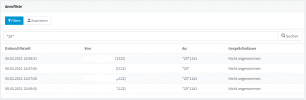
These pick-up calls are also displayed in the call list of the admin dashboard (see attachment).
The subscribers in question are all in the same group and all have the "Perform actions (forwarding, transferring, picking up)" authorization.
My guess is that it may be due to the current 3cx update? Otherwise nothing has changed.
Unfortunately, the picking up of calls no longer works with our system.
Our System:
- 3CX Version: 16.0.9
- OS: Linux 3cx 4.9.0-14-amd64 (Debian 4.9.246-2)
- is Self-Hosted
When picking up calls, "Not Found" is displayed on the phone, tried both with *20* and with *20*<ext> .
This happens regardless of the phone used (we have Yealink T48S, T46S and Fanvil X210 in use),
the phone configuration templates are all left in the original version of 3cx.
These pick-up calls are also displayed in the call list of the admin dashboard (see attachment).
The subscribers in question are all in the same group and all have the "Perform actions (forwarding, transferring, picking up)" authorization.
My guess is that it may be due to the current 3cx update? Otherwise nothing has changed.