Call Pickup not working

Status
Not open for further replies.

stephan23

Customer
Joined
Sep 3, 2020
Messages
67
Reaction score
6
We got a ring group (hunt)with extension 800 and all incoming calls go to this group.
We got fanvil x210 phones and we programmed a blf button to pick up any incoming calls using *20*800
This always worked but suddenly stopped working.
I read on another post that someone had same problems but after upgrading phones to latest firmware this worked again. So tried that but still not working.
Any suggestion?
We are on a hosted 3cx plan.

Thanks.
 
Hi,

Can you pick up the call from a webclient using *20*800 ?

- Make sure you login to the webclient using an extension that is currently assigned to a X210
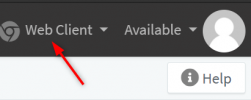
- Make sure from the Webclient drop-down you choose "Webclient" - NOT the X210
1619685324997.png
 
Stupid question is web client and browser extension the same? If so still doesn't work.

Also when I try from the x210, you can see first *20*800 and then it changes really quickly to Not Found.
Also the x210's in question and that I use to test are on the latest
 
Then we have eliminated the phone as being the culprit. It's most likely to do with extension/group rights.

We will move your thread to the general section since this is not a deskphone issue.
 
I changed the order of the hunt group and it doesn't make a difference either.

How can it be an extension/group rights issue if it worked perfectly fine yesterday and all of a sudden it stopped? No changes we made on the phone system in a while.
 
As a quick test, please access the Management Console and navigate to Settings >> General. If "Limit Call Pickup to calls received in their extension group" is enabled, disable it and apply settings. Try it again and let us know if it makes a difference.
 
Checked and it was already disabled.
tried enabling then saving and then disabling and saving.
No change. still not working.
 
If the said option is checked and you still get the "Not Found" error, go to Settings >> Dial codes and make sure that the pickup dial-code is in fact set to *20*. If it is, also check for overlapping dial-codes and remove them if any.
 
Checked and yes Pickup a Call is *20*.
No other dialcode is either *20* or *2

Anything else that I can check / test / try
Thanks for help provided so far
 
Could you try making an extension to extension call, then try to pickup that call while it is ringing from an affected X210 device using *20*EXT where EXT is the ringing extension number?
 
Tried this in different combinations and different extensions and this does seem to work.
 
This is very strange since picking up a direct call to an extension works fine.

Check all the following:

1. "Limit Call Pickup to calls received in their extension group" in Settings >> General is disabled.

2. The call you are trying to pick up is actually ringing extensions of that ring group while you are trying to pick-up (has not been answered and has not been routed to the destination if no answer of that ring group)

3. You are in fact using a Ring group and not anything else such as a Call Queue.

4. All involved extensions are in the same Extension group.

5. There is presence between the involved extensions("Extensions >> Edit >> Rights"):
• Ringing extensions have "Show presence to Group members" and "Show Calls to group members"
• Extension performing the pickup has "Can see group members" and "Can see group calls"

6. The dial codes for pick-up is correct and there are no overlapping dial-codes.

If all the above has been checked but still the issue persists I would recommend contacting one of our 3CX Partners as this would definitely need a more in-depth investigation.
 
Hi,

1. Yes, disabled
2. Yes the extensions are ringing. I also changed the priority order of extensions.
3. Yes, Prioritized Hunt Group,
4. the Group is extension 800, first extension in this group is 226 and I try picking up from 223. All extensions are 2**
5. Checked and yes all enabled.
6. Yes, cant see any issues.

Will contact 3cx partner.

is there anything else I can try/check while I contact a partner?
 
In regards to configuration, that is mainly it. The only additional thing I can suggest is to create a few test extensions and a test ring group and try to reproduce the exact issue using those in order to narrow the issue down to your existing extensions/ring groups configuration. However, regardless if it works or not, you would still need to investigate further preferably with the help of a partner for identifying the actual culprit on your current configuration.

Note: I do also recommend rebooting the 3CX services once before seeking help just in case. Preferably during out of office hours to avoid downtime.
 
Status
Not open for further replies.