CALL QUEUE DISTINCTIVE RINGER

Status
Not open for further replies.

sonnyh1

SOHO User
Joined
Jan 18, 2023
Messages
112
Reaction score
16
I have several Call Queues setup for various purposes.
How can I set a distinctive ring for each of the queues?
The phones in the system are X5U, X6U, X2U, and Yealink W70B
 
Hi @sonnyh1 you can set a separate ringtone for the queues.

To do so, go to the pbx management console ---- phones --- options ---- select Use custom ringtones per queue. Note: Each agent will configure distinctive ringtones for the queues. Non configured queues will play the ringtone used for normal calls --- apply the changes.

1699722853179.png


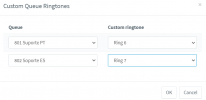
Then edit the user that is part of the queue --- phone provisioning --- and you will see the following field: Specify a different Ringtone for a particular Queue

1699722944946.png

Set the custom ringtone for each queue:

1699723009337.png


Have a nice day!
 
  • Like
Reactions: IrinaP_3CX
Thank you.
Is there an easy to preview the available ringtones?
 
no, you will need to provisioning and test.
 
Thank you.

That would be too easy:)
 
you are welcome, have a great week ahead!
 
  • Like
Reactions: jed
Status
Not open for further replies.

Forum statistics

Threads
111,973
Messages
590,079
Members
164,897
Latest member
ferpeba83