Solved Call queue OOH setting

Status
Not open for further replies.

KatrineHelena

Silver Partner
Basic Certified
Joined
Mar 16, 2021
Messages
9
Reaction score
2
Hello,
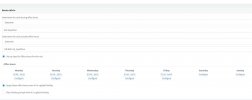
I have a Call queue with af DDI, under the Indbound rules i've 'Set up specific Office Hours for this rule' and set the 'Destination for calls outside office hours' to the DR i've made for this queue.
But it wont activate outside the business hours. The call doesn't go through, but it wont let me hear the OOH DR prompt I recorded.

What am I missing?
 

Attachments

  • Udklip.JPG
    Udklip.JPG
    72.7 KB · Views: 12
Hi @KatrineHelena,

But it wont activate outside the business hours. The call doesn't go through, but it wont let me hear the OOH DR prompt I recorded.
To clarify, the call doesn't make it to the OOO DR? Or it does make it but you don't hear the prompt?
 
Hi @KatrineHelena,


To clarify, the call doesn't make it to the OOO DR? Or it does make it but you don't hear the prompt?
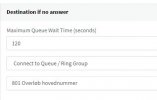
Hi, I can see on the call log, that it goes to the 'Destination if no answer' setting.
But wont the OOO setting override this outside opening hours??
 

Attachments

  • US.JPG
    US.JPG
    18.2 KB · Views: 10
Yes, it will override the everything if you're using global office hours.

I'm not fully understanding how this is set up. Can you describe how this has been set up? For example:
  1. Call comes in to DR
  2. If not answered, it should forward to 801 Overlob (Call Queue).
  3. Next steps you've set up and so on.
Also, this was not addressed in your last reply. To clarify, the call doesn't make it to the OOO DR? Or it does make it but you don't hear the prompt?
 
Last edited:
Yes, it will override the everything if you're using global office hours.

I'm not fully understanding how this is set up. Can you describe how this has been set up? For example:
  1. Call comes in to DR
  2. If not answered, it should forward to 801 Overlob (Call Queue).
  3. Next steps you've set up and so on.
Also, this was not addressed in your last reply. To clarify, the call doesn't make it to the OOO DR? Or it does make it but you don't hear the prompt?
Hello,

First: no it never make it to the OOO DR.

The call is setup so if the agent on the Call queue dont answer, the calls go to a Ring group 801.
But the call never goes that far, the agents always answer on the call queue.

So how do I set it up so that the calls made out of the call queues opening hours goes to the OOO DR?

Do I replace the Destination if no answer from 801 to OOO DR ?
But what if the call comes within opening hours and for some reason doesnt get answered, do they then end up in the OOO DR?
 
Hi @KatrineHelena,

First let me summarise what I understood of what you're wanting. Two scenarios:

  1. In office hours: Calls come in to Queue >> Destination if not answered forwards to Ring Group
  2. Out of office hours: Calls come in to Queue >> Destination if not answered forwards to Out of Office Digital Receptionist
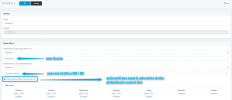
Because scenario 2 won't have anyone in the queue (out of office), why not bypass the queue entirely just using the Inbound Rule's options to route within office hours and outside of office hours. It will adhere to the global office hours set.

1619530929044.png
 
Hi @KatrineHelena,

First let me summarise what I understood of what you're wanting. Two scenarios:

  1. In office hours: Calls come in to Queue >> Destination if not answered forwards to Ring Group
  2. Out of office hours: Calls come in to Queue >> Destination if not answered forwards to Out of Office Digital Receptionist
Because scenario 2 won't have anyone in the queue (out of office), why not bypass the queue entirely just using the Inbound Rule's options to route within office hours and outside of office hours. It will adhere to the global office hours set.

View attachment 21805
Hello,

Thank you for your quick reply.

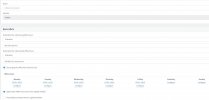
I have set this up, but even then the call never goes to the 805 OOO DR as set up.
It only ends up in the destination if no answer group. Even outside the office hours.
 

Attachments

  • usi.JPG
    usi.JPG
    84.4 KB · Views: 8
Hi again @KatrineHelena,

Go to Settings --> Dial Codes, is there a value set in "Force 3CX Phone System to IN or OUT of office"?

If the value is e.g. "*64", from an extension dial *640 and you will hear a prompt. Once done, try again to call the DID outside office hours.
 
Hi again @KatrineHelena,

Go to Settings --> Dial Codes, is there a value set in "Force 3CX Phone System to IN or OUT of office"?

If the value is e.g. "*64", from an extension dial *640 and you will hear a prompt. Once done, try again to call the DID outside office hours.
IT WORKS! THANK YOU! :-D
 
  • Like
Reactions: VasilisV_3CX
Great to hear it worked KatrineHelena, feel free to open another thread if you require any further assistance.
 
Status
Not open for further replies.

Forum statistics

Threads
111,974
Messages
590,081
Members
164,899
Latest member
mazet