


- Joined
- Apr 26, 2024
- Messages
- 1
- Reaction score
- 0
Hello everyone
I am having issues with permissions as it pertains to giving queue managers access to the queue reports in the web client. The manager can see the 'Reports' tab when going to Admin > Reports in the web client. They can also see all the available reports and can run reports for call logs and extensions stats. However, when they run the call queue reports or ring groups, no selections are available. For example, if they click the 'Agent in Queue Statistics' report they don't see any data. When they click the filter, the 'Queue' dropdown is empty. I get similar results for ring group reports.
Am I missing a step?
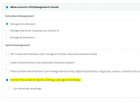
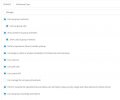
I gave the user the 'Manager' role with access to recordings and reports and access to the management console with 'Monitor' to give access to reports, call logs, and recordings. They are also setup as a queue manager.
I am on version 18 update 9.
Any help is greatly appreciated!
I am having issues with permissions as it pertains to giving queue managers access to the queue reports in the web client. The manager can see the 'Reports' tab when going to Admin > Reports in the web client. They can also see all the available reports and can run reports for call logs and extensions stats. However, when they run the call queue reports or ring groups, no selections are available. For example, if they click the 'Agent in Queue Statistics' report they don't see any data. When they click the filter, the 'Queue' dropdown is empty. I get similar results for ring group reports.
Am I missing a step?
I gave the user the 'Manager' role with access to recordings and reports and access to the management console with 'Monitor' to give access to reports, call logs, and recordings. They are also setup as a queue manager.
I am on version 18 update 9.
Any help is greatly appreciated!
Attachments
Last edited:


