- Joined
- Dec 22, 2020
- Messages
- 93
- Reaction score
- 23
Try what I might, I can't get SMB archiving of call recordings to work. Whatever I type in the "Network Path (No spaces are allowed)" field, absolutely no traffic egresses the PBX (packet sniff on both the PBX and on the switch it's connected to both show no packets) and the web page immediately returns "Cannot connect to SMB".
I know the SMB server is accessible as mounting the share from the command line works perfectly:
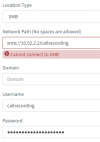
So, if SMB from the PBX works from the command line, but the recording archiving web page doesn't even try to connect to the SMB server, it must be me entering the network path incorrectly. I have hunted for documentation, but can't find anything detailing what format it should be in. I have tried:
smb://10.52.2.2/callrecording
smb://10.52.2.2/callrecording/
10.52.2.2/callrecording
10.52.2.2/callrecording/
smb://10.52.2.2
smb://10.52.2.2/
10.52.2.2
10.52.2.2/
I have tried leaving the domain empty and as the name of the workgroup.
Whatever I do, I just get an immediate "Cannot connect to SMB" and no network traffic egresses the PBX.
So, does anybody have any idea what I'm doing wrong?
(System is Debian installed from the 3CX ISO)
I know the SMB server is accessible as mounting the share from the command line works perfectly:
root@rad:~# ping -c 1 10.52.2.2
PING 10.52.2.2 (10.52.2.2) 56(84) bytes of data.
64 bytes from 10.52.2.2: icmp_seq=1 ttl=62 time=16.0 ms
--- 10.52.2.2 ping statistics ---
1 packets transmitted, 1 received, 0% packet loss, time 0ms
rtt min/avg/max/mdev = 16.030/16.030/16.030/0.000 ms
root@rad:~# apt install cifs-utils
<snip>
root@rad:~# mkdir -p /mnt/test
root@rad:~# mount -t cifs //10.52.2.2/callrecording /mnt/test -o user=callrecording,password=XXXXXXX
root@rad:~# df
Filesystem 1K-blocks Used Available Use% Mounted on
<snip>
//10.52.2.2/callrecording 10567819168 8368834636 2198984532 80% /mnt/test
root@rad:~# ls -l /mnt/test
total 0
root@rad:~# touch /mnt/test/test.out
root@rad:~# ls -l /mnt/test
total 0
-rwxr-xr-x 1 root root 0 Feb 10 12:31 test.out
root@rad:~# rm /mnt/test/test.out
root@rad:~# umount /mnt/test
root@rad:~# rmdir /mnt/test
So, if SMB from the PBX works from the command line, but the recording archiving web page doesn't even try to connect to the SMB server, it must be me entering the network path incorrectly. I have hunted for documentation, but can't find anything detailing what format it should be in. I have tried:
smb://10.52.2.2/callrecording
smb://10.52.2.2/callrecording/
10.52.2.2/callrecording
10.52.2.2/callrecording/
smb://10.52.2.2
smb://10.52.2.2/
10.52.2.2
10.52.2.2/
I have tried leaving the domain empty and as the name of the workgroup.
Whatever I do, I just get an immediate "Cannot connect to SMB" and no network traffic egresses the PBX.
So, does anybody have any idea what I'm doing wrong?
(System is Debian installed from the 3CX ISO)