Solved Call recording remote archiving - correct format for SMB network path?

Status
Not open for further replies.

NicholasBarnes

Customer
Advanced Certified
Joined
Dec 22, 2020
Messages
93
Reaction score
23
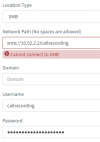
Try what I might, I can't get SMB archiving of call recordings to work. Whatever I type in the "Network Path (No spaces are allowed)" field, absolutely no traffic egresses the PBX (packet sniff on both the PBX and on the switch it's connected to both show no packets) and the web page immediately returns "Cannot connect to SMB".

I know the SMB server is accessible as mounting the share from the command line works perfectly:
root@rad:~# ping -c 1 10.52.2.2
PING 10.52.2.2 (10.52.2.2) 56(84) bytes of data.
64 bytes from 10.52.2.2: icmp_seq=1 ttl=62 time=16.0 ms
--- 10.52.2.2 ping statistics ---
1 packets transmitted, 1 received, 0% packet loss, time 0ms
rtt min/avg/max/mdev = 16.030/16.030/16.030/0.000 ms
root@rad:~# apt install cifs-utils
<snip>
root@rad:~# mkdir -p /mnt/test
root@rad:~# mount -t cifs //10.52.2.2/callrecording /mnt/test -o user=callrecording,password=XXXXXXX
root@rad:~# df
Filesystem 1K-blocks Used Available Use% Mounted on
<snip>
//10.52.2.2/callrecording 10567819168 8368834636 2198984532 80% /mnt/test
root@rad:~# ls -l /mnt/test
total 0
root@rad:~# touch /mnt/test/test.out
root@rad:~# ls -l /mnt/test
total 0
-rwxr-xr-x 1 root root 0 Feb 10 12:31 test.out
root@rad:~# rm /mnt/test/test.out
root@rad:~# umount /mnt/test
root@rad:~# rmdir /mnt/test
Screenshot 2021-02-10 123828.png
So, if SMB from the PBX works from the command line, but the recording archiving web page doesn't even try to connect to the SMB server, it must be me entering the network path incorrectly. I have hunted for documentation, but can't find anything detailing what format it should be in. I have tried:

smb://10.52.2.2/callrecording
smb://10.52.2.2/callrecording/
10.52.2.2/callrecording
10.52.2.2/callrecording/
smb://10.52.2.2
smb://10.52.2.2/
10.52.2.2
10.52.2.2/

I have tried leaving the domain empty and as the name of the workgroup.

Whatever I do, I just get an immediate "Cannot connect to SMB" and no network traffic egresses the PBX.

So, does anybody have any idea what I'm doing wrong?

(System is Debian installed from the 3CX ISO)
 
The IP address you are entering is a "private" non-routable addresses, so I assume your 3CX is hosted on-prem. and is in the same network as your share. Is that correct? Naturally, if your 3CX server is hosted externally, you would need to provide port forwarding on your firewall for SMB, and use the public IP address. I suspect this is all obvious to you, but I thought I would mention it.
 
The IP address you are entering is a "private" non-routable addresses, so I assume your 3CX is hosted on-prem. and is in the same network as your share. Is that correct? Naturally, if your 3CX server is hosted externally, you would need to provide port forwarding on your firewall for SMB, and use the public IP address. I suspect this is all obvious to you, but I thought I would mention it.
Yup, it's on-prem, but on a different (but routable) network. The networking's fine and tested working (this is why I did the test from the command line as I wanted to rule out any configuration errors). Thank you though.
 
Add a \ to the end of the smb path i.e. smb://192.168.35.2\3CXRecordings\

On the domain, try adding the computer name
 
Hi Nicholas,

You are running as root from the command line, and you also installed cifs-utils. The PBX does not rely on either of those, so the test above only proves that is it is reachable from that machine (which is good as a minimum). This does not guarantee that 3CX can connect though so let's look a bit further.

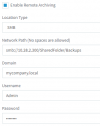
For reference, here is a sample that works:

1612963300064.png

You should check to see why the connection fails by looking at the 3CX logs.

1. Go to Management Console > Activity Log > Settings and set your logging to Verbose

2. Restart your Management console service

3. Now try to enable SMB archiving, and when it fails you can then go back to Activity log page.

4. Click the Logs > Instance > and download the ManagementConsole.log

Try to look through the logs for anything that can inform you as to why it failed.
 
You are running as root from the command line, and you also installed cifs-utils. The PBX does not rely on either of those, so the test above only proves that is it is reachable from that machine

Yes, I didn't think it did rely on these (otherwise they would already have been installed). My test was only to determine a) The correct connectivity existed, and b) The user authentication worked.

You should check to see why the connection fails by looking at the 3CX logs.

I had already done this, but there is nothing obvious other than a
"[Microsoft.AspNetCore.Cors.Infrastructure.CorsMiddleware] No CORS policy found for the specified request."
message which, I think, has nothing to do with this problem.

Add a \ to the end of the smb path i.e. smb://192.168.35.2\3CXRecordings\

Blimey, that works. Thank you. That would never have occurred to me. Where did you find out how to do this?

Nicholas.
 
Thanks. Now that it worked, try swapping back to this format:

smb://192.168.35.2/3CXRecordings/

and let us know if it continues to work (even though it was previously rejected)
 
let us know if it continues to work (even though it was previously rejected)
I can confirm that the first time it's set up it has to have the '\' on the end and then once that is accepted, it can be changed to '/' - even after archiving is removed/changed and re-added.
 
Thank you very much Nicholas, this is useful feedback and we will investigate further.

Glad to hear it is working for you now.
 
  • Like
Reactions: NicholasBarnes
Status
Not open for further replies.

Forum statistics

Threads
111,974
Messages
590,081
Members
164,899
Latest member
mazet