Call Terminated

Status
Not open for further replies.

Jeff Koertzen

Premier Customer
Joined
Jan 29, 2019
Messages
38
Reaction score
7
One of our extensions has been inexplicably going directly to voicemail. I've checked status and registration settings, and all appears to be fine. The user is not using an IP phone, just a Windows and iPhone softphone.

In looking at the logs, I see this strange entry:

03/12/2019 2:39:54 PM - Leg L:117.1[Line:10000<<1xxxxxxxxxx] is terminated: Cause: CANCEL from 107.6.13.77:5060


This IP address appears to be a Canadian telecommunications company called Corego. We are located in San Francisco, CA and the end user's wireless provider is US-based and not related to Corego.

Any suggestions how this cancel request could be coming from an external line? Could it be related to our SIP trunk. (This line is a test line using DIDLogic)

Thanks for any help on resolving this!
 
It appears that the IP address is associated with the SIP trunk. Other successful calls include the IP address.

The question then is why the call for the extension is receiving a CANCEL request. I assigned a different DID to the extension, and it continued to go directly to voicemail. The settings on this extension are exactly the same as the successful extension.
 
Does this happen for internal calls to that extension as well?
 
No, it only happens when going through the sip trunk. Internal calls extension to extension ring through properly.
 
So you can have different behavior for internal vs external calls in the forwarding rules. I'd confirm the current status and the rules for that status.
 
On the server and on the user's web client, settings are set to ring 60 seconds and then go to voicemail.

The user's status is set to available on iphone, windows, and web clients.
 
Another strange thing: the extension isn't showing on the Phones menu, even though I have confirmed he is available, and he is able to dial out from all three of the clients. I tried re-registering the phones, but they still aren't showing.
 
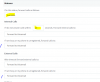
So you confirmed the items highlighted but what about the ones with the blue marks? Direct to VM would seem to indicate an unregistered behavior which would match up with the fact that you don't see them in the phones menu. My thought is that when you moved your instance from PBXExpress to your local Windows VM this extension might still be registered to PBXExpress.
 
I'm not sure what you are referring to when you say "the ones with the blue marks." Where am I looking for that? Thanks!
 
Doh.. that's what i get for late night posting. Forgot to paste the image.

9800
 
Got it. Thanks! :)

I had tested those previously. I just tried resetting those to redirect to my extension (which is working), but it still forwards to voicemail.
 
Well at this point you'd want to bump up the logging verbosity, make a test call, then filter the log to that call and see what rules it's following to make this happen.
 
  • Like
Reactions: JohnS_3CX
Hi Jeff,

Do you have any exceptions defined in the forwarding tab of the extension by any chance?
 
Hey all... not exactly sure what happened, but now it is suddenly working again. The issue is closed.

Of course I'm still curious as to what caused it and what solved it, but I can't replicate at the moment, so I'm just setting it aside for later review should it come up again.
 
Status
Not open for further replies.

Forum statistics

Threads
111,916
Messages
589,722
Members
164,786
Latest member
supuni_rathnayake