Caller ID not working after changing voip provider to ATT flex

Status
Not open for further replies.

Song

Bronze Partner
Basic Certified
Joined
Nov 12, 2018
Messages
379
Reaction score
24
We used to have siptrunk.com as our voip provider and the incoming caller ID are working fine. After we switch our provider to ATT flex. the caller ID is not showing up. Is there a setting I need to do in 3cx? or is this a att issues? Do we just need to call ATT to enable caller ID on their end on the flex line? is that how it goes?

pleaes advise if anyone deal with ATT flex before.

thank you
 
Call AT&T. 3CX will display whatever is sent from the provider.
 
I would start with ATT flew first, to see if there are passing the caller id

Have you check the activity, to see if you can see the caller id
 
You can verify AT&T is sending caller ID or that it is in a different field by running a capture while calling in. I recently had to do this on an issue with Net2Phone.
 
  • Like
Reactions: JohnS_3CX
I would start with ATT flew first, to see if there are passing the caller id

Have you check the activity, to see if you can see the caller id
i'mlooking at the activities log. which field should i be seeing:? any example to see the caller ID field?
 
Yes. i see callerd ID on the activitiees log. . So why is it not displaying on the call log?
07/28/2020 12:01:16 PM - L:30.1[Line:10000<<909800xxxx] got Terminated Send Req BYE from 0.0.0.0:0 tid=fabb2f13f77d7a73 Call-ID=8847942329448717@c2b07_2_2:
BYE sip:1.1.2.1:5060;transport=udp SIP/2.0
Via: SIP/2.0/ ;branch=z9hG4bK-524287-1---fabb2f13f77d7a73;rport
Max-Forwards: 70
Route: <sip:[email protected];lr>
Contact: <sip:[email protected]:5060>
To: "E TYLER " <sip:[email protected]:5060>;tag=3858100396483234_c2b07.2.2.1591078969501.0_6054434_12050054
From: <sip:[email protected]:5060>;tag=15aa0b10
Call-ID: 8847942329448717@c2b07_2_2
CSeq: 2 BYE
User-Agent: 3CXPhoneSystem 16.0.5.619 (619)
Content-Length: 0

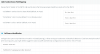
As you can see the caller ID for that phone number showed up on the activites log. But for some reason it is not showing up on the call Log. Any reason for this? Attached is the default ATT setting. Any changes I need to make to test this out?
 

Attachments

  • inbound1.png
    inbound1.png
    15.5 KB · Views: 6
capture and post the invite of the call, from AT&T to 3CX
 
capture and post the invite of the call, from AT&T to 3CX
ok doing a capture now on a inbound call.. thank you with the activities log..
 
Last edited:
Activity Log -> CAPTURE
 
i got the pcap. how do i search for the invite?
 
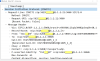
attached is the invite from att to 3cx. so it does show the caller id. but why is 3cx not displaying it? please advise..
 

Attachments

  • inbound2.png
    inbound2.png
    74.6 KB · Views: 10
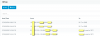
fixed my issues with caller ID. since ATT is passing the caller ID it is a 3cx setting. For some reason ATT default trunk setting under the trunk inbound parameters. The callerName by default = From: User Part. Which is wrong. I set it to From:Display Name and the caller ID showed up on the phone now. Hopefully this help someone who have issues like me.
thank you
 
  • Like
Reactions: YiannisH_3CX
ok i seem to got the caller ID to come in but another issues is the system added my phone number to the inbound call. Is there a way not to display that? So this is what we have now
CALLERID:562XXXXXXX (626XXXXXXX)
we would like it to come in like this
CALLERID(626XXXXXXX)
Just like that? On my other system it come in like that. I am comparing the inbound advance setting and I cannot get rid of the 562xxxxxxx from attaching to the caller ID. please advise..
 

Attachments

  • inbound3.png
    inbound3.png
    18.1 KB · Views: 2
Is this a DID number (DID rule), and do you have 3CX set to append the DID rule name to the caller ID?
 
Is this a DID number (DID rule), and do you have 3CX set to append the DID rule name to the caller ID?
There is no DID rule. where do i check if the DID rule name append to the caller ID?
 
ok the inbound rule. with the DID is just a name. so i just remove it becuase it was using 562xxxxxxx as the name i just remove it.. and it is showing it correctly now..
 
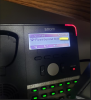
strange thing is on the yealink phone it display the caller ID and caller ID number. But on the SNOM phone it display First:Second: callerID number. Why does the SNOM phone do that? what is the first: Second thing? this must be a snom phone setting?
 

Attachments

  • inbound4.png
    inbound4.png
    262.2 KB · Views: 14
One field is the number (numeric) and one is the name (alpha-numeric), some sets allow you to change the order, and/or format of these fields to suit the user.
 
One field is the number (numeric) and one is the name (alpha-numeric), some sets allow you to change the order, and/or format of these fields to suit the user.
I wonder why the caller ID is not coming out on the snom phone?
 
Status
Not open for further replies.

Members Online Now

Forum statistics

Threads
111,832
Messages
589,282
Members
164,662
Latest member
DejanMDS