Caller information looks blank in Queue Manager tab

Status
Not open for further replies.

cagansamsun

Forum User
Joined
Aug 27, 2020
Messages
2
Reaction score
1
Hello,

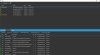
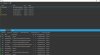
Today we have just received an update to our Windows client and downloaded it. But after downloading that update, while our agents are speaking to customers, caller information on some of the calls are blank. We can see who is calling while the phone is ringing but as soon as our agent picks up the call, it goes blank, at least on some of the calls, which are seemingly random. We have also checked call logs to see if the caller information looks blank there as well but there are no problems in the call logs.

Thanks in advance for any help.

Edit: We have just realized that people who are using the phone app are the ones having this issue. We made sure their applications are up to date, but that did not solve our issue.
 

Attachments
  • Adsız.jpg
    Adsız.jpg
    152 KB · Views: 19
Last edited:
  • Like
Reactions: SkyWireDavis
Hello,

We are also experiencing the same problem in the 3cx windows client.
We can not see the caller but in the web client and in the call logs, the caller appears.
This happened after the latest update a few days ago (version: 16.3.0.172)
 
Last edited:
  • Like
Reactions: SkyWireDavis
Hi,

-Does the trunk's inbound parameters tab point at the right fields to extract the information?

-Can you look at the specific calls that have the issue? Perhaps capture some calls if you can replicate it and see the invites from the provider, exactly what content they have for confirmation

-Do you have inbound rules defined?
-Do they have a name or are they blank?
-In your Contacts section, under Options, do you append/prepend anything under " Add Group, Queue or DID/DDI Names to Caller ID "
 
Hi,

-Does the trunk's inbound parameters tab point at the right fields to extract the information?

-Can you look at the specific calls that have the issue? Perhaps capture some calls if you can replicate it and see the invites from the provider, exactly what content they have for confirmation

-Do you have inbound rules defined?
-Do they have a name or are they blank?
-In your Contacts section, under Options, do you append/prepend anything under " Add Group, Queue or DID/DDI Names to Caller ID "

Hello John,

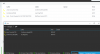
-I believe it does, here is a picture but while we were installing the system we didn't do any configurations to that field and we weren't having any issues until the last update.

Resim 1.jpg

-This issue doesn't necessarily happen to specific callers, but to specific agents. The agents who are using the phone app are the ones having this issue, whilst the agents who are using the windows client are not. I have checked our providers logs anyway but didn't see any irregularities.

-We don't have any inbound rules defined.
-I will reupload the picture I did when I was creating the post, above, the caller information is completely blank but below, in the agent status section, you can see who the agent is connected to for some reason.

Adsız.jpg

-Yes, we Append Name. Again, we also didn't configure this field while we were installing the system and it was working fine before the update.

When I actually install the previous version of the Windows client the problem disappears but if I update it to the latest version the issue happens again.

Thank you for your time.
 
@JohnS_3CX Any update on this?

We've a few cases with this.
 
Same issue here, do you have any update on that?
 
Hi,

We are also experiencing an issue with call information missing from the switchboard view in the Windows 3CX client. We have observed many instances of partial information or calls missing completely from the Windows client.

These issues have only shown up with the last few updates to v16.

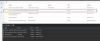
Screenshot of caller info missing from Windows client - with comparison to WebClient switchboard:
missing_details_with_web.png

Screenshot of entire call record missing from Windows client:
mising_call_2.png

As this is having a significant negative impact on our organisation (the switchboard is used quite heavily), I'm more than happy to provide any additional information that could help in a speedy resolution to this issue.

-Logan
 
  • Like
Reactions: SkyWireDavis
Hi all,

Thanks for reporting the issue. We were able to replicate it and should be fixed in the next release of the Windows client.
 
Hi all,

Thanks for reporting the issue. We were able to replicate it and should be fixed in the next release of the Windows client.
What is the anticipated time frame?
It seems that this started when the Windows app updated to 16.3.0.172
The previous ver. 16.3.0.144 did not have this problem. Can we roll back and if so how?
This is of utmost importance and immediate attention would be appreciated.
Thanks.
 
Last edited:
  • Like
Reactions: SkyWireDavis
Unfortunately, we are still seeing entire calls missing from the windows client.

misssing_call_3.png

3cx_16-3-0-179.png
 
Unfortunately, we are still seeing entire calls missing from the windows client.

Hi Logan,

Did you ever get a resolution for this?

We seem to be having the same issue, especially if calls go to an 'overflow' Digital Receptionist - we can see the call in the webclient, but not in the Windows app.

Ed
 
We also had this issue but it went away after the latest updates on the 3cx and the windows client (16.3.0.179).
 
We also had this issue but it went away after the latest updates on the 3cx and the windows client (16.3.0.179).

Thanks Ronin, Strange, we're on latest version & .179 too.

Ed
 
Hi Logan,

Did you ever get a resolution for this?

We seem to be having the same issue, especially if calls go to an 'overflow' Digital Receptionist - we can see the call in the webclient, but not in the Windows app.

Ed

We are still having this issue. It looks like if the call drops out of the Queue and falls to a ring group it disappears from the list.
 
Status
Not open for further replies.

Forum statistics

Threads
112,349
Messages
592,026
Members
165,512
Latest member
gmacinit