Calls end at 32 seconds

Status
Not open for further replies.

Eagle2469

Bronze Partner
Advanced Certified
Joined
Aug 6, 2018
Messages
35
Reaction score
4
3CX Professional 16.0.982
Polycom VVX500 - firmware 5.6.0.1735

3CX server is hosted in cloud on Vultr VPS.
Office is using Ubiquiti network equipment. DHCP server has TFTP for phones to auto provision.
Office has a Raspberry Pi running latest Rasbian and 3CX SBC pointed to 3CX server.
Phones are using SBC with IP address and router is port forwarding UDP and TCP port 5090 to Raspberry Pi.
SIP ALG is disabled.

No matter what calls are made, they always drop at 32 seconds. They can be ext to ext calls, incoming external calls, or outgoing external calls.

[CM503021]: Call(C:3): ACK is not received from sip:[email protected]

I have tried everything I can think of. My provider, who is not the problem, has tried earnestly to help. I am not yet an MSP with 3CX, so they won't talk to me. I am at my whits end and would appreciate any help or guidance.
 
Call ending after 32 seconds is normally 99% of the time SIP ALG related.

Ensure your firewall does not have a CLI command required to disable this feature as it can in some cases be hidden. If you want to confirm if it is definitely firewall put your system public facing.
 
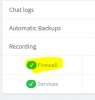
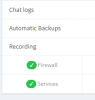
Did you run the 3CX Firewall Checker? Did all pass?
 
On the firewall, I have checked the USG at the office. The GUI shows it is disabled. Is there a way to run an external test, like checking for open ports?

Yes, the Firewall Checker passed.
 
So you don't need to port forward anything on the USG in your office. The SBC initiates the connection out. You still haven't answered if the firewall checker (run from the dashboard in 3CX) is passing. That is step one. Make sure it passes (and fix it if it doesn't) and remove the port forwarding on the USG for 5090 as it's not needed and then test again. SIP ALG is not a factor if the phones are properly provisioned to use the SBC.
 
I did answer about the firewall checker. It's in the post right before yours.

I will remove the port forwarding though. I only added it to see if it would resolve this issue.

Thanks
 
I don't think you understand or I'm misunderstanding your response. Not asking about the firewall settings on the USG. In the 3CX dashboard have you run the firewall checker?

9933


https://www.3cx.com/docs/firewall-checker/
 

Attachments

  • 1553286087835.png
    1553286087835.png
    6.5 KB · Views: 1
Yes, the 3CX Firewall Checker is what I was referring to.

9934

On another note, I took one of his phones and brought it to my office. I setup another raspberry pi here with same settings as one at his office. My network is using same equipment as his. But, I have no problems making calls that last longer than 32 seconds.

The only thing I can think is maybe the raspberry pi at his office is having issues. What do you think?
 
The only thing I can think is maybe the raspberry pi at his office is having issues. What do you think?
Anything is possible, swap it out, and see if there is a difference. If it doesn't, work with the
Pi that you've got working at your office, then suspect the router/firewall at that end.
 
Last edited:
So there's always the possibility it's a trunk issue. Do extension to extension calls, or even to the echo test number on 3CX also drop after 32 seconds?
 
It's kinda weird. So, yes extension to extension do drop, if they are in the same office. But, the extension that I brought to my office does not drop when calling one of their extensions. So, I feel it's either something in the USG router or the raspberry pi.
 
Also, when I first setup the extension at my office it dropped calls at 32 seconds. The only change that I made before it started working was to factory reset it. After it reset, it, using tftp settings, provisioned itself and automatically upgraded firmware to 5.6.0.

I thought this would fix it at other office. I tried replicating this by downgrading firmware to one of the extensions to 5.5 and then factory reset it. It did provision itself and did automatically upgrade the firmware. But, calls are still dropping.
 
Looks like it's ALL calls...
No matter what calls are made, they always drop at 32 seconds. They can be ext to ext calls, incoming external calls, or outgoing external calls.
 
Looks like it's ALL calls...

I was able to get one extension working. But, it's on a different network and using a different raspberry pi. Network equipment is same type (Unifi USG) though. Pi at office is a 3 and at my location is a 3+. Not sure that would make a difference.
 
Other than speed, and perhaps memory (from what i can remember, looking at a comparison), should not make a big difference unless overloaded. I would move the working Pi, to the new office as is, See if that works, then put the SD card from the non-working Pi, into the new unit, see if that works.
 
I was able to get one extension working. But, it's on a different network and using a different raspberry pi. Network equipment is same type (Unifi USG) though. Pi at office is a 3 and at my location is a 3+. Not sure that would make a difference.

Nah, not a hardware issue. Maybe double check the config to make sure there isn't a typo or something. Or what about the local subnet of the Pi that's not working. Does it overlap with the 3CX local subnet?
 
Update: so, I found an executable that will test local network for SIP ALG. I ran it on my network and found SIP ALG was enabled. I checked the webui and sure enough, it was on. I disabled it and then calls started dropping at 32 seconds. I turned back on and calls worked for longer than 32 seconds. I went back and forth a few times testing and after 3 switches, it didn't matter if it was on or off. Now all calls drop after 32 seconds on this phone which is on my network.

I am on my way to customer site for more testing. Any suggestions are extremely helpful. Thank you!
 
Status
Not open for further replies.

Latest Posts

Forum statistics

Threads
112,358
Messages
592,092
Members
165,530
Latest member
kevlaboom