Calls not routing as expected from new external number

Status
Not open for further replies.

MPServeline

Bronze Partner
Basic Certified
Joined
Mar 1, 2022
Messages
115
Reaction score
14
Hi all,

We're trying to work out why calls on a new DDI seem to be going to the wrong queue.

A DID was created for the new external number and one extension set to receive the calls as a test with calls outside office hours going to the new intended group.
The only member of the call group the out of office hours calls should go to is the one test extension.
We can't tell why the calls are going to a completely different ring group.

I've just added the same as a CID as well as the DID so trying that.

Any ideas at all otherwise?
 
Last edited:
  • Like
Reactions: MPServeline
Thanks Pierre, I've tried now also adding the number without 0 in front to the SIP Trunk as it was there already as the full 01 number and still the same.
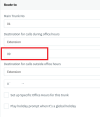
Below is the inbound rule (blanked out), the inbound number is in the format 01234567890:
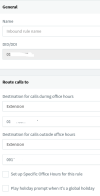
1669299908506.png

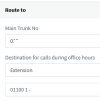
under the Trunk Details for the Trunk being used I did see that group it was going to on here:
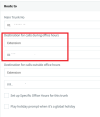
1669300400295.png

There is a call flow app which I'm thinking may be the issue possibly:
using CallFlow.CFD;
using CallFlow;
using MimeKit;
using System.Collections.Generic;
using System.IO;
using System.Linq;
using System.Threading.Tasks.Dataflow;
using System.Threading.Tasks;
using System.Threading;
using System;
using TCX.Configuration;

namespace PQ_DID_LOOKUP
{
public class Main : ScriptBase<Main>, ICallflow, ICallflowProcessor
{
private bool executionStarted;
private bool executionFinished;
private bool disconnectFlowPending;

private BufferBlock<AbsEvent> eventBuffer;

private int currentComponentIndex;
private List<AbsComponent> mainFlowComponentList;
private List<AbsComponent> disconnectFlowComponentList;
private List<AbsComponent> errorFlowComponentList;
private List<AbsComponent> currentFlowComponentList;

private LogFormatter logFormatter;
private TimerManager timerManager;
private Dictionary<string, Variable> variableMap;
private TempWavFileManager tempWavFileManager;
private PromptQueue promptQueue;
private OnlineServices onlineServices;

private void DisconnectCallAndExitCallflow()
{
if (currentFlowComponentList == disconnectFlowComponentList)
logFormatter.Trace("Callflow finished...");
else
{
logFormatter.Trace("Callflow finished, disconnecting call...");
MyCall.Terminate();
}
}

private async Task ExecuteErrorFlow()
{
if (currentFlowComponentList == errorFlowComponentList)
{
logFormatter.Trace("Error during error handler flow, exiting callflow...");
DisconnectCallAndExitCallflow();
}
else if (currentFlowComponentList == disconnectFlowComponentList)
{
logFormatter.Trace("Error during disconnect handler flow, exiting callflow...");
executionFinished = true;
}
else
{
currentFlowComponentList = errorFlowComponentList;
currentComponentIndex = 0;
if (errorFlowComponentList.Count > 0)
{
logFormatter.Trace("Start executing error handler flow...");
await ProcessStart();
}
else
{
logFormatter.Trace("Error handler flow is empty...");
DisconnectCallAndExitCallflow();
}
}
}

private async Task ExecuteDisconnectFlow()
{
currentFlowComponentList = disconnectFlowComponentList;
currentComponentIndex = 0;
disconnectFlowPending = false;
if (disconnectFlowComponentList.Count > 0)
{
logFormatter.Trace("Start executing disconnect handler flow...");
await ProcessStart();
}
else
{
logFormatter.Trace("Disconnect handler flow is empty...");
executionFinished = true;
}
}

private EventResults CheckEventResult(EventResults eventResult)
{
if (eventResult == EventResults.MoveToNextComponent && ++currentComponentIndex == currentFlowComponentList.Count)
{
DisconnectCallAndExitCallflow();
return EventResults.Exit;
}
else if (eventResult == EventResults.Exit)
DisconnectCallAndExitCallflow();

return eventResult;
}

private void InitializeVariables(string callID)
 
OK, so I changed this field to the new call queue and it's going through to that call queue correctly:

1669301027330.png
 
I tried deleting the DID and CID and then it allowed me to attach the external 01 number to the call queue but still going to the wrong call queue as set on the SIP Trunk above.
Once I had attached the number to the Call Queue I think couldn't add it as a DID?
 
I've tried adding the DID to the SIP Trunk as *123456 (last 6 digits of the number) but still doesn't seem to be working.

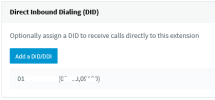
The DID is under the Call Queue as the full 01 number though:
1669303166439.png

Do the services need restarting for the changes to take effect.
 
Hi
No need to restart service.
if you change the format DID in sip trunk, the did under call queue will change (or at least F5 if you already are in the queue you want to modify)
 
Thanks Pierre, I removed the full 01*** DID Under the SIP Trunk and replaced it with *123456 for the last 6 digits of the number. I checked under the call queue the calls are intended for and under DID on there it had disappeared so clicked Add DID and selected the *123456 entry which is in there now.
I checked the call queue that the calls are going through and the only DID in there is a totally different number in the format 01234567890.

I've just noticed though that the DID under the Call Queue receiving the calls is the same as the one under Main Number on the SIP Trunk:
1669373520441.png
I'm thinking that call queue needs to be assigned a different DID and the issue is that the DID it has in the Call Queue is the one for the SIP Trunk? What I don't understand is there are DIDs associated with call queues for other locations and the calls go through to them ok.
 
Let's try this.
*123456 is in trunk DID
If you remove the DID *123456 from call queue.
Create an inbound rule DID *123456 to "extension test" in/out office hours.
Move the rule to the top (up).

The call goes to the main trunk number destination ?
 
  • Like
Reactions: MPServeline
Thanks Pierre, sorry tried that and still the same happened. It took a while to get the DID rule to the top of the list as there were 4 pages of them but unfortunately still going to the main trunk number destination.
 
No problem,
With all the test you already perform, you should ask your trunk sip if everything is okay with this DID. The trunk may redirect DID to the main SDA before coming to pbx for some reasons ?
You can also open a ticket to the support 3cx from your portal (https://portal.3cx.com/login).
 
Thanks Pierre, appreciate the advice on this one. I'll check with the SIP Trunk provider.
 
Yes it was the SIP Trunk provider, when I checked the new numbers that had been assigned there were showing as Invite Format SIP Account Number whereas the others were DDI National Format. Changed Invite Format to DDI National Format and that sorted it straight away as below. Thanks again for the help.

1669634660203.png
 
Thanks for letting us know about this issue, I'm glad you find a solution.
 
Status
Not open for further replies.

Forum statistics

Threads
111,974
Messages
590,081
Members
164,899
Latest member
mazet