Solved CALLS TO ANDROID SMART PHONES

Status
Not open for further replies.

maleyk

Forum User
Joined
Aug 4, 2020
Messages
12
Reaction score
1
Hi,
I need help in this one.
I run 3CX on a vm in oracle virtual box, did all necessary configs. I installed a soft-phone in my PC and installed 3CX App on two android phone connected to office wifi in different subnets (172.16.104.0/24 and 172.16.101.0/24).

1. I tried call from Andorid device to PC soft-phone it was okay.
2. From PC to android it goes to Voice Mail and
3. Android phone 1 to Phone 2 goes to V Mail as well.

Where did I go wrong here?
 
Let's remove any variables from the mix first: delete the android extensions and create fresh new ones.

Leave all settings default - do no change anything at all on those extensions

Provision the android phone and try again to call its extension from the PC.

The PC softphone must be the 3CXPhone for Windows, don't try it with a 3rd party voip softphone.

Let us know how it goes. And above all, ensure the two subnets can properly talk to each other (even if one direction seemed to work, you should still make sure there isn't some type of isolation)
 
Hi,
I have done the following above but that hasn't solve anything?
1. Both subnets can talk to each other.
2. Windows soft phone indicates that phone is On Hook.
3. Android 3CX app showing Ready for Calls

I can call from my android phone to PC Windows Soft-phone phone. From Windows Soft-Phone to android 3CX is ringing but not show on phone. From adroind 3cx I can see registered miss calls from PC phone.
172.16.1.0.jpg
 

Attachments

  • 172.16.101.0.png
    172.16.101.0.png
    28.2 KB · Views: 4
  • Android 3cx.jpg
    Android 3cx.jpg
    57.1 KB · Views: 5
  • Windows Soft Phone.png
    Windows Soft Phone.png
    84.3 KB · Views: 5
Ok then it looks like the issue is more to do with receiving PUSH messages on your Android.

If the PUSH message does not arrive, the phone will not ring.

However, as you said you can make calls from Android to Windows just fine, meaning that the subnets are not blocking you in any way so we can ignore that for now.

1. What phone and android version are you using now?

2. Will it ring if you switch of WiFi and only use LTE?


Note: You are using the old softphone by the way, please uninstall that use this one instead:
https://www.3cx.com/user-manual/
 
Hi,

Thank you for your response,

1. What phone and android version are you using?
I am using Samsung S20 with android OS version 10.
2. Will it ring if you switch off Wi-Fi and only use LTE?
Let us drop LTE for now and focus on WiFi as this is a test using trial version of 3CX I am doing in office.

I am planning to replace the entire phone systems for the organization if this works great and it will. I know.


Coming back to my question, I am thinking

1. Android Phone to PC is included in trial version.
2. PC to Android Phone and Android phone to Android phone is not included.

Please correct me if I misunderstand it and if there's a way around to do this test.

Thank you,

Kevin
 
Hi Kevin,

That is not correct, the trial and free version of 3CX does not have any restrictions like the ones you describe in point so please do not consider them to be a problem at all.

As I was saying earlier, the problem seems to be with PUSH messages. Remember what you said originally:

1. I tried call from Andorid device to PC soft-phone it was okay.
2. From PC to android it goes to Voice Mail and
3. Android phone 1 to Phone 2 goes to V Mail as well

The issue is that android phones cannot receive incoming calls and go to voicemail.

Reason: Android phones receive a push message when you call them, and they start ringing. If the message does not arrive, they will never receive incoming calls. Outgoing calls to the PC work, because no push message is needed there.

Next steps:

a) in you extensions list, do the android extensions have a green dot or a red dot?

b) Would you be able to run a capture from the Activity Log page and then call one of the android extensions so we can see if the push message is delivered to Google?
https://www.3cx.com/docs/capture-network-traffic/

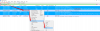
After the capture is downloaded, we can open it in Wireshark and the correct filter would be frame contains "google" in order to see what IP the google API server resolves to
1597239754169.png
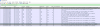
Then you will notice the PBX sending a Client Hello to that first resolved IP and you can right click that destination IP it to turn it into a IPv4 conversation filter so we can see the complete conversation
1597239953325.png
.. and in my example we see a normal conversation so you can have a reference.

If yours shows any failures we will know why the phones never rang
 
Hi John,

Thanks, I managed to fix it.

The issue was with the license, I claimed it with my Customer's portal and was able to make calls from android to android phones and from android to PC, internally.

However, after sometime, I came across another issue where, I tried to connect my phone from outside of my network and make calls but android App kept on indicating "Conneting..." and not downloading configs.

From web browser I can access it and make calls from outside in but with Phone App, I cannot. I try to solve this by coming back in office removing user on my phone and test with my internal network but same issue persist. Kept on indicating "Connecting...".

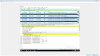
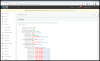
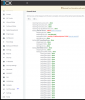
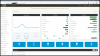
Find attached image, I captured from wireshark plus image of Firewall which I suspect one of the causes.

Thank you,

Kevin
 

Attachments

  • 1.png
    1.png
    167.9 KB · Views: 6
  • 2.png
    2.png
    124.2 KB · Views: 6
Seems like you have major issues with the firewall blocking a lot of traffic including the tunnel port, and also the google firebase responsible for push messages (effectively taking out your mobile apps entirely).

I suggest you take care of the firewall first, to save wasting any time troubleshooting problems caused by the above.

Here is a list of ports with their descriptions that must be either open (outgoing traffic) and/or forwarded (incoming traffic). https://www.3cx.com/docs/ports/

Begin by allowing all outgoing communications, and then forwarding the relevant ports for incoming.

Note 1: We do not officially support VirtualBox as a hypervisor https://www.3cx.com/docs/manual/phone-system-installation-windows/#h.5hoy5wwhhk5c

Note 2: You must disable your Windows guest VM firewall entirely, and manage security from a main firewall
 
Hi John,

I managed to fix, Firewall issue.
Step taken: Allow all required on Edge Firewall router.

I know I am closer to get everything correct.

Now I can call from home to office.

There is one minor error in 3CX Firewall checker that I do not understand. Find attached image.
1597463676293.png

The error message is "Starting Port 5060 ..used by"3CXPhoneSystem":5996

Please help me with that.

Thank you,

Kevin
 
When you installed 3CX, did you change the SIP port or did you leave the default 5060?
 
I left the Port has it is 5060.
 
Ok, in this case if the firewall checker detected port 5996 I would suspect that the firewall forwarding was not successful. I would check my firewall first and foremost.

There's also the possibility that your internet provider does not allow you to use 5060 (if they reserved it), so it would be good to ask them.

You need 5060 for external calls usually (for your SIP trunk) or for remote phones. This might not be a problem if you don't use internet based SIP trunks or remote phones and rely on a gateway. Also your internal calls should not be affected by this.
 
Hi John,

I manage to get everything right now with Port Forwarding.

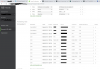
I can call office extension in my PC from outside however, the green icon that shows status indication is grey and I also cannot see status of other extensions in my android phone.
 

Attachments

  • Dashboard right.png
    Dashboard right.png
    159.5 KB · Views: 5
  • Firewall Right.png
    Firewall Right.png
    134.9 KB · Views: 6
  • Port Forwarding.png
    Port Forwarding.png
    114.1 KB · Views: 4
  • phone.png
    phone.png
    113.5 KB · Views: 4
Hi @maleyk

That's excellent news, I'm glad it worked.

Ok for the status to work, you need port 5001, and i think your forwarding needs a small correction there

1597828223655.png

Should be from 5001 to 5001
Not 443 to 5001
 
Note:
This is assuming of course that you kept the default 5001.
If you used 443, then both boxes should be 443
 
  • Like
Reactions: AWS2P
Thank you John,

I manage to get everything right.

Now,,, Is there a way I subscribe to call from my extension to any outside numbers?
 
Hi John,

I manage to find a provider on 3CX list of supported SIP Trunk providers.

I did a successful test, calling out to local numbers using the international line however, some minutes later 3CX Blocked me.There was red warning indication on Trunk on dashboard, where when I click a message poped up saying
"You are using Unsupported SIP trunk providers which may cause issues.
For a list of supported SIP Trunks visit this page."


I do not understand this because on 3rd Party supported SIP Trunk Providers, DIDWW is one of the 2nd on the list.

Is there anyway I can resolve that issue and remove the Warning sign on dashboard.

Find attached screen shots.

Regards,

Kevin
 

Attachments

  • SIP Trunk Error message.png
    SIP Trunk Error message.png
    88.9 KB · Views: 5
  • Trunk Issue.png
    Trunk Issue.png
    134.3 KB · Views: 5
Last edited:
So 3CX did not BLOCK you. That is a warning message nothing more. It's unclear if you actually had an issue such as being unable to make calls, or if it was just the message. As far as the warning, it means exactly that. 3rd party supported means a 3rd party (not you and not 3CX) handles the support. Only supported providers in 3CX that have templates will eliminate that message.
 
  • Like
Reactions: JohnS_3CX
Since these are uncertified providers, they will run on a generic template.

Generic templates will give you the warning, but it does not block or disable any features.

More or less it just means that they have not been tested through the 3CX interoperability so if you face any issues with their trunks you will have to contact them directly for support, rather than opening a ticket with 3CX.
 
Thank you John. Greatly appreciate your help.
 
  • Like
Reactions: JohnS_3CX
Status
Not open for further replies.

Members Online Now

No members online now.

Forum statistics

Threads
111,831
Messages
589,277
Members
164,660
Latest member
RJenkinsROCK