Can IN or OUT of office dial codes be applied only to a call queue

Status
Not open for further replies.

hostcake

Free User
Joined
Oct 25, 2021
Messages
17
Reaction score
3
I have a customer with TWO of 6 extensions in a call queue accepting the incoming trunk calls. When the customer goes on lunch or closes for the day they use the *641 and *642 codes to set IN or OUT of office. This was fine with the previous Grandstream PBX but now they have 3CX and some extensions using the app they still want to be able to use those app extensions.

What is the best way of achieving such an outcome? I can not see where a queue only or it's individual extensions can be put into IN or OUT of office mode just with say a dial code on either handset. They have office hours but these are not fixed so they prefer manually putting their incoming queue into out of office mode WITHOUT stopping the other extensions from making calls still.

Any suggestions on how to achieve this configuration gratefully accepted!


3CX Version, Professional 16.0.8.9
Server OS, Debian
Is the 3CX Server Hosted and where? Hosted by 3CX Reseller
IP Phone Make/Model/Firmware version, Grandstream GXP2160
Provisioning Method: SBC
Trunk Provider or VoIP Gateway Make/Model, NetVault SIP Trunk
Has the Firewall Checker passed: YES
Are custom Phone Templates being used: NO
 
I have a customer with TWO of 6 extensions in a call queue accepting the incoming trunk calls. When the customer goes on lunch or closes for the day they use the *641 and *642 codes to set IN or OUT of office. This was fine with the previous Grandstream PBX but now they have 3CX and some extensions using the app they still want to be able to use those app extensions.

What is the best way of achieving such an outcome? I can not see where a queue only or it's individual extensions can be put into IN or OUT of office mode just with say a dial code on either handset. They have office hours but these are not fixed so they prefer manually putting their incoming queue into out of office mode WITHOUT stopping the other extensions from making calls still.

Any suggestions on how to achieve this configuration gratefully accepted!


3CX Version, Professional 16.0.8.9
Server OS, Debian
Is the 3CX Server Hosted and where? Hosted by 3CX Reseller
IP Phone Make/Model/Firmware version, Grandstream GXP2160
Provisioning Method: SBC
Trunk Provider or VoIP Gateway Make/Model, NetVault SIP Trunk
Has the Firewall Checker passed: YES
Are custom Phone Templates being used: NO
They can just put themselves in DND, and on the admin side, check the "Logout from Queues" from their extension > Forwarding Rules > Do Not Disturb. Otherwise, they can manually logout from queues in the user menu of the app and webclient, or even explictly logout from specific queues in Panel > the queue > Logged In link.

I suggest you go over the Academy to help you grasp the 3CX way of doing things: https://www.3cx.com/3cxacademy/
 
@Frederick Marcoux I think they are looking for a dial code to do so. Yes, status's can be changed in the voicemail menu so you could dial in and navigate that way, but I think the real ask is for a dial code that applies to the user to set themselves out of office.

I also think this is an XY Problem and the real need is what needs to be understood.
 
@Frederick Marcoux I think they are looking for a dial code to do so. Yes, status's can be changed in the voicemail menu so you could dial in and navigate that way, but I think the real ask is for a dial code that applies to the user to set themselves out of office.

I also think this is an XY Problem and the real need is what needs to be understood.
There's the dial code for profile status change... no need for VM. You can even set them as BLF.
 
There's the dial code for profile status change... no need for VM. You can even set them as BLF.
thanks for the helpful comments. I do have a custom dial code in the BLF but that turns the entire system to out of office. I am going to try the suggestion of DND as they only have two handsets in the queue so as long as they ensure that both are set to DND at lunch breaks, after hours etc then that should leave the app based extensions still active which is what the customer wants to be the status. Thanks for the tip about the academy too, that will help my knowledge and understanding of 3CX. Appreciate it.
 
  • Like
Reactions: Evolute IT
thanks for the helpful comments. I do have a custom dial code in the BLF but that turns the entire system to out of office. I am going to try the suggestion of DND as they only have two handsets in the queue so as long as they ensure that both are set to DND at lunch breaks, after hours etc then that should leave the app based extensions still active which is what the customer wants to be the status. Thanks for the tip about the academy too, that will help my knowledge and understanding of 3CX. Appreciate it.
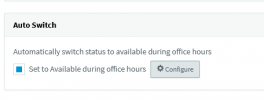
You can automate a users status too if you want to set up hours for them under Extension > Forwarding Rules

1635405396791.png

https://www.3cx.com/3cxacademy/videos/intermediate/time-day-routing/ Slide 11
 
I am going to try the suggestion of DND as they only have two handsets in the queue so as long as they ensure that both are set to DND at lunch breaks
Just remember to also check the "Logout from Queues" checkbox in the extension settings for DND as @ConceptsWeb mentioned. Alternatively, you could just configure a logout/login BLF key instead of switching profile statuses.
 
Status
Not open for further replies.

Forum statistics

Threads
111,975
Messages
590,084
Members
164,903
Latest member
dross