Solved Cannot access 3cx Management Console externally

Status
Not open for further replies.

kalpesh

Joined
Jul 3, 2017
Messages
10
Reaction score
0
Hi,

I am running 3cx v15.5 and I cannot access the management console from an external browser. I have tried using the following url https://companyfqdn:5001/#/login and I cannot access it.

I have checked the port forwarding on the DrayTek 2960, which seems fine and passes the firewall checker.

Any thoughts?

Thanks

Kal
 
On a external network, does companyfqdn resolves to the correct IP address ?

Have you tried IP address instead of companyfqdn

Check the draytek portforwarding as you need port tcp port 5001

Also check to see if you have any blacklisted ip addresses
 
Last edited:
On a external network, does companyfqdn resolves to the correct IP address ?

Have you tried IP address instead of companyfqdn

Check the draytek portforwarding as you need port tcp port 5001

Also check to see if you have any blacklisted ip addresses


Hi

I have tried the local IP address which resolves fine on the LAN, the static IP address does not resolve but nslookup points to the correct IP/FQDN...

Port 5001 is forwarded correctly on the DrayTek and 3cx passes the firewall checker as well
Checked blacklisted IP addresses and I have some in there - shall I remove them?

Thanks
 
Hi

Checked blacklisted IP addresses and I have some in there - shall I remove them?

Thanks

You can remove them - does one correspond to the wan IP address you are trying to access the management console from
 
No - they do not - I just blacklisted them because they were 3cx was blacklisting them.

I think it is a port forwarding issue of some sort as even if I try port 443 it does not forward to the 3cx server
 
3CX does not use port 443 unless you specified it - it uses port 5001 for external use.

Are you using a 3CX FQDN or your own FQDN. If your own FQDN have you installed a SSL certificate for it

Info on setting up a draytek - https://www.3cx.com/docs/draytek-firewall-configuration/
 
Port 5001 works fine but not with external access
I am using a 3cx provided fqdn
My router is slightly different - it is the 2960 model but I have set it up correctly as far as I am aware
 
Your internet connection , does it have a fixed or dynamic IP address ?

Under Settings - Network - External IP address check your settings

On https://www.yougetsignal.com/tools/open-ports/ does it pass for the wan ip and wan fqdn on port 5001
 
Fixed static IP
Tested - it passes the wan IP but all the ports I have listed including 5001 are advising they are closed
 
I would say this is Draytek firewall issue
 
Please note that the firewall checker does not check port 5001 so make sure that the port is correctly forwarded. Also check if all 3CX services are running to avoid any issues there.
 
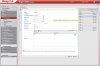
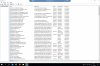
I have attached screenshots of both the services running and also the port forwards - which is how DrayTek recommend
 

Attachments

  • 3cx_5001.jpg
    3cx_5001.jpg
    581.1 KB · Views: 60
  • 3cx-Services.jpg
    3cx-Services.jpg
    1.1 MB · Views: 54
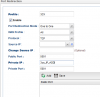
You've defined an object called "3CX" in your source IP. Is this object the WAN IP you're trying to remotely access MGMT console from?
 
Hi

The object is an IP Object that I set up which contains the local IP address of the 3cx server - that's the way in which DrayTek advised - although I could easily put the IP address manually as well

I am trying to access the mgmt console through the WAN IP
 
.
 
Last edited:
Hi,

source IP refers to where the traffic is coming FROM.

if you leave that blank and try again it should work.

you can remove 5001 from "more ports" too as you've defined it already in the public and private.
 

Attachments

  • Capture.PNG
    Capture.PNG
    13.3 KB · Views: 61
as above you need to remove '3cx' from source, and also remove the same setting on any other 3cx port forwarding configured
 
Hi,

source IP refers to where the traffic is coming FROM.

if you leave that blank and try again it should work.

you can remove 5001 from "more ports" too as you've defined it already in the public and private.

Hi

That works perfectly now - thank you very much

Thanks
 
as above you need to remove '3cx' from source, and also remove the same setting on any other 3cx port forwarding configured

Hi

That works perfectly now - thank you very much

Thanks
 
Glad to see the issue has been resolved.
 
Status
Not open for further replies.