Cannot access full admin area

Status
Not open for further replies.

martytheman

Customer
Joined
Jun 5, 2009
Messages
11
Reaction score
4
So I just upgraded to V20. All of the users are type "User" and one of them is type "Manager"

I distinctly remember having to set a use to be the owner previously .. but I have tried 3 different users that could have been the owner but each one is limited in the admin area ( i.e. only Dashboard, Users , Office Hours reports and Event Log ) . All the rest of the options that I have seen in some videos do not exist. I received an email with the following.

Your 3CX Debian OS was successfully updated and all 3CX Services are up and running as normal.
Login here https://sadfsafsadfdas.3cx.co.nz:5001 using the System Owner account.
etc..

EDIT: I have edited this URL, be careful what you post here as you give hackers too much info.

What am I missing..?
 
Last edited by a moderator:
You need to login as system owner. This is the main admin user. If you dont know the extension, use the email adress of this user and password.
 
  • Like
Reactions: N_G
Sorry - I should have said... yes I understand that you need to log in as the main admin user... I just don't know how to ( or more to the point how to find out what it is ).

There are only 3 possible extensions that I would have thought are the main admin user and none of them give me any more access whether I use the email or the extension to log in.

How can I find out what it is?
 
Sorry - I should have said... yes I understand that you need to log in as the main admin user... I just don't know how to ( or more to the point how to find out what it is ).

There are only 3 possible extensions that I would have thought are the main admin user and none of them give me any more access whether I use the email or the extension to log in.

How can I find out what it is?
Try to use "admin" as user and your password. If its not working try to reset the password.
 
Nope.. not working. admin and my password used to work before I upgraded to V20.. now it doesn't
 
Never mind - I found it. Looks like I used a separate email and forgot about it. I reset the password on that email and was able to log in and see the extra access.
 
  • Like
Reactions: jed and bitn2
Per 3CX, if the email used is not unique 3CX doesn't send the password reset email. Logging in is via the system owner extension number.
 
You could always log in to your customer portal and do a reset on that email?
 
Some months ago I had to create a system owner account. I forgot that I had used a different email for that and I am fairly sure it forced me to use a unique email address. To log into the new V20 - I could not use "admin" any more and I had to use the email that I chose ( and I could reset the password of that one ). so it finally worked for me.

Alternatively - you could roll it back using your backup.. I actually moved from Google to Digital Ocean ( for a more powerful instance for a similar price ) using this page https://marketplace.digitalocean.com/apps/3cx . It has to be the easiest thing I ever did with this sort of config - it set up pretty much everything including certs , FQDN etc. Once set up .. make sure you have your system owner email and all of your user emails are unique.. and then upgrade.

Anyway .. good luck.
 
The old management console is gone. It's all the Admin section of the web client. 3CX has been talking about that for quite a while. re: edit trunks, there are some features that will be added in the first couple of updates, after v20 is released: https://www.3cx.com/blog/releases/v20-release-candidate-2/
 
  • Like
Reactions: Geo71
FYI
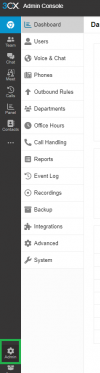
- If you are logged in as the system owner you will get a menu like this ( by clicking on Admin down the bottom )
- If you are not logged in as the system owner then you get a menu with about 4 items in it.


3cxadmin.png
 
  • Like
Reactions: Geo71
Status
Not open for further replies.

Forum statistics

Threads
112,326
Messages
591,901
Members
165,479
Latest member
Senergia