Cannot answer call using Sennheiser SC165USB headset with 3CX Windows App

Status
Not open for further replies.

Kwang Mien

Gold Partner
Joined
May 14, 2020
Messages
255
Reaction score
17
Hi,

I have issue answering call using the Sennheiser SC165USB headset with 3CX Windows App.

Call Scenario :

a. I have installed the 3CX Plugin from
https://www.3cx.com/docs/configuring-sennheiser-headsets/#h.owet8dbx9j2i

b. Call to my 3CX Windows App

c. Press the answer button on the Sennheiser SC165USB.

d. Call cannot be answered.

Can anyone advise how to resolve this issue ?

Thanks.


Regards,
Kwang Mien
 
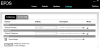
Update your EPOS software, then install the plugin and as a very last step launch the 3CX App.

If the app connected, you will see the green dot

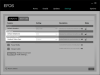
1599566725109.png

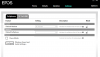
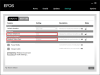
The EPOS software will also show that the 3CX app is connected here and if it looks like this then it should work.
1599566761040.png
 
  • Like
Reactions: Evolute IT
the EPOS connect version that I am using is the latest version 4.1.1.909.
I have also followed the sequence

a. Install EPOS connect
b. Install 3CX plugin
c. Launch 3CX Windows App

Still, i cannot answer the call on the 3CX Window app using the Sennheiser SC165USB.

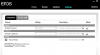
i noticed that the EPOS connect did not detect the 3CX Windows App under "Default Softphone"

Is there any other settings need to configure ?

1599575726630.png
 
If you click the drop down menu of "Default Softphone" do you see 3CX as an option?
 
there are no options in the drop down menu. It seems that the EPOS connect did not detect the 3CX app.
 
Ok try one more time from clean install after you remove everything, just to make sure

  1. uninstall everything
  2. reboot
  3. install 3CX client and shut it down
  4. install EPOS
  5. install the 3CX Plugin (from EPOS website)
  6. reboot
  7. wait for the EPOS icon to appear in your system tray
  8. launch 3CX client
  9. the EPOS icon should light up green
  10. make a couple of test calls
 
i did the steps as you have mentioned. Still EPOS connect did not detect the 3CX Windows App.
The drop down menu does not have 3CX option as well.

Are there any logs that can be referred to find out the reason for not detecting 3cx app ?

1599642398847.png
 
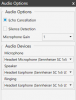
Please show me a screenshot of the audio settings in your 3CX app
 
This is the audio settings :

1599652897175.png
 
Ok looks good, now check here:

C:\ProgramData\3CXPhone for Windows\PhoneApp

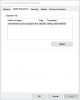
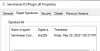
and see if Sennheiser3CXPlugin.dll exists in this folder and if so please check the digital signature matches the date you see below:

1599653259339.png
 
there is Sennheiser3CXPlugin.dll under C:\ProgramData\3CXPhone for Windows\PhoneApp
the date is on 29th May 2020

1599654590614.png
 
Ok, everything looks good up to here.

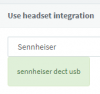
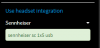
I suggest you also try the webclient now and see if it can talk to the Sennheiser software
1599654915428.png

This will give us an idea as to whether the EPOS software is correctly installed.
You must have an updated version of Chrome
 
No issue for Web Client to interface with EPOS connect

1599656053937.png
 
Does the Epos software show 3CX integration now?
 
no. under default softphone it is still blank after starting 3CX windows App

1599659520135.png
 
Well, at least with the webclient it should appear like my original screenshot on message #2

I would suggest to try it on another PC that has never had Sennheiser or 3CX products installed, and compare the two. You can start with just the webclient and confirm that it appears when you click the drop down list
 
We found the issue is due to the incompatibility of the latest version of 3CX Windows App with EPOS.

Below are our findings :

a. 3CX Windows App version - 16.3.0.179 (latest version)
3CX Plugin – 3.5.0.11
EPOS Connect – 4.1.1.909

For the above versions, when there is an incoming call, call cannot be answered using the call control of Sennheiser headset

b. 3CX Windows App version - 16.3.0.172
3CX Plugin – 3.5.0.11
EPOS Connect – 4.1.1.909

For the above versions, call can be answered using the call control of Sennheiser headset

The older version of 3CX Windows App works with the EPOS Connect. The new version of 3CX Windows App has the issue.

Can anyone advise on this ?

Thanks.
 
Hi Kwang,

16.0.3.179 was released yesterday, but this forum post was from two weeks ago.

Where you using the beta version of 3CX ?
 
As you had mentioned previously to test on another PC, i tested with the latest 3CX Windows App (16.0.3.179) with Sennheiser headset on another PC. The results is the incoming call cannot be answered.

However, when i used the older version of 3CX Windows App (downloaded 2 weeks ago), version 16.0.3.172, it works perfectly.
 
I can confirm today that both work when I test them:

a. 3CX Windows App version - 16.3.0.179 (latest version - works)
3CX Plugin – 3.5.0.11
EPOS Connect – 4.1.1.909

b. 3CX Windows App version - 16.3.0.172 (previous version - works)
3CX Plugin – 3.5.0.11
EPOS Connect – 4.1.1.909


So given that both versions of the 3CX app work, with the same Epos edition, and with the same plugin edition, then something else must be happening in your case. Note that in my case, I can also see and select 3CX as the "Default softphone" and I also see the "Headset Status Sync" option appearing like here:
1600863035409.png

I would suggest to open the Epos window like above, and then launch the 3CX app. You should exit and relaunch the app a couple of times and notice if the above boxes change
 
Status
Not open for further replies.

Forum statistics

Threads
112,349
Messages
592,026
Members
165,512
Latest member
gmacinit