Can't access management console

Status
Not open for further replies.

alfa4

Forum User
Joined
Oct 2, 2013
Messages
20
Reaction score
4
I have been trying for over a month to access the management console in order to perform the update from v18 to v20.

When I try to log in, I get a "server error" and cannot log in.

If I purposely enter a wrong password I get a wrong username and password error.

If I click forgot password and I enter a username I get "502 - ok"

If I click forgot password and enter the my email it says "if there is a user associated with the email you will get a reset link" but I never get an email.

I do however receive emails about sip trunks etc and registrations whenever I reboot the device.

Please help as I am running out of time

The problem is for a customer pbx not mine, but in the select box I can only select my own...
 
Hi @alfa4

When you see a server error when trying to login to the PBX this means a service is not running.
Try to SSH onto the machine and type the below command to restart the service wait for 3-5 minutes and try to log in again.

service nginx restart
 
That, plus password reset emails are sent only if the email address is unique to one extension.

Why are you "running out of time"? If v18 update 9a is installed you have until the end of the year.
 
Thanks for the reply!

Logging in via ssh I ran a services check and all services are running.
However, I still get server error.

I ran "systemctl list-units --type=service --state=failed –all" to find the failed script but none were failed.

Only the 3CXfirewall reported as dead.

I also tried "sudo 3CXStopServices" to stop any remaining services, then "sudo 3CXStartServices" to force a restart of all.

Then again I ran "systemctl list-units --type=service --state=failed –all" with no change... Services were all running (besides dead firewall)

Still server error upon logon attempt

-- about the "running out of time" --

3cx has sent emails to some of my customers stating:

if you don’t renew your license before 27th June 2024, your key will be downgraded to a 1SC. You will no longer receive security updates and your apps will stop working properly

Your key will downgrade to a 1SC key on the 27th of June 2024. UNLESS you update to V20.


You see why I am backed into a corner here...
 
Hi @alfa4

When you see a server error when trying to login to the PBX this means a service is not running.
Try to SSH onto the machine and type the below command to restart the service wait for 3-5 minutes and try to log in again.

service nginx restart
Also, besides restarting any and all services, I have rebooted the device many times.
 
That, plus password reset emails are sent only if the email address is unique to one extension.

Why are you "running out of time"? If v18 update 9a is installed you have until the end of the year.
I get that but why does it throw a
"502 - OK"
message ?

If I try email address it says if a user exists with this email you'll get an email with a reset link

If I try with the username (which is a valid option) I get "502 - ok" error
 
Hello,

I have the same problem as you.
I tried to restart service and STOP and START by nothing change. Can anyone advice how to solve it? Thank you.
 
This might require further investigation here.
I would suggest that if there is a recent full backup to try and re-install otherwise please create a support ticket so we can check it further.
 
Your key will downgrade to a 1SC key on the 27th of June 2024. UNLESS you update to V20.
This is just for the old free pbx.
 
  • Like
Reactions: TheodorosG_3CX
This is just for the old free pbx.
Well the customer is on the forever free (was 8sc) now 4sc and soon to be 1sc.
In any case I'd like to upgrade him to v20 but it's turning out to be a big problem
 
Well the customer is on the forever free (was 8sc) now 4sc and soon to be 1sc.
In any case I'd like to upgrade him to v20 but it's turning out to be a big problem
It will stay at 4sc until the end of the year if you upgrade to v20. But after that you have to upgrade at least to pro for Linux or enterprise for windows.
 
Also, besides restarting any and all services, I have rebooted the device many times.
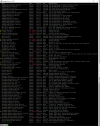
I have run that command. Makes no difference. Attached is a screenshot of the services running (or not) after running the command
 

Attachments

  • ssh-services-capture.PNG
    ssh-services-capture.PNG
    148.2 KB · Views: 15
I have the same problem. I had a v18 running fine on a Win-10 machine where I took a backup and installed it to a Debian v18.
I can log on to the management console at port https://xxx.3cx.se:5001 using username and password defined under Security/Root Credentials. (Certtificates ok)
But if I try to log in to https://xxx.3cx.se:5001/webclient with extension and password for system owner then login screen just returns with credentials cleared. No error message, so credentials are ok because if I enter an invalid password then I get an error message.
On this test "Root Credentials" and "System Owner" used the same email and password. So I change "System Owner" email and password to unique values.while being logged into the management console at port https://xxx.3cx.se:5001 with Root Credentials.
The odd thing is that when I press OK in the extension dialog then I'm immediately logged out. And when I try to login again to management console at port https://xxx.3cx.se:5001, then Root Credentials password no longer works. Instead I have to enter the System Owner password.
So in some way these credentials are linked together. Just unclear how.

And regarding email notification. Email notification emails worked fine, but when in Settings/Email use the Test button to send a test message to the email address that has been working for ages, then I get "! 4.3.2 Service not available"

Update-1: Email problem was caused by Exchange settings which blocked Debian machine from sending SMTP
Update-2: If I log in to management console at https://xxx.3cx.se:5001 with "Root Credentials" username then "Root Credentials" password matches.
If I login with "Root Credentials" email then neither "Root Credentials" password nor "System Owner" password works
If I login with "System Owner" email then "System Owner" password works

But still, if I try to login to webclient at https://xxx.3cx.se:5001/webclient with "System Owner" extension and password then browser immediately returns to login screen without any error message
 
Last edited:
Found the webclient problem.
It turns out that there is a default setting that will block webclient access. But whats worse, it's located in a location that is NOT obvious for a person skilled in the art to find.
In the extension assigned as System Owner, select Phone Provisioning tab, then in Your phones drop down list select 3CX App.
This will open up a different content of the tab where there is a checkbox under Access called Block Access to 3CX Apps / Web Client.
It is by default enabled which means that a fresh install of v18 can't be upgraded to v20 unless you find this setting and unselect it.
And one can really ask what has webclient access todo with 3CX App client access? These are two separate setting where it's crusial that the first is NOT enabled. Otherwise you're locked out from your server forever once upgraded to v20.
3CX really need to update instructions asap
 
Found the webclient problem.
It turns out that there is a default setting that will block webclient access. But whats worse, it's located in a location that is NOT obvious for a person skilled in the art to find.
In the extension assigned as System Owner, select Phone Provisioning tab, then in Your phones drop down list select 3CX App.
This will open up a different content of the tab where there is a checkbox under Access called Block Access to 3CX Apps / Web Client.
It is by default enabled which means that a fresh install of v18 can't be upgraded to v20 unless you find this setting and unselect it.
And one can really ask what has webclient access todo with 3CX App client access? These are two separate setting where it's crusial that the first is NOT enabled. Otherwise you're locked out from your server forever once upgraded to v20.
3CX really need to update instructions asap
This is by default enabled if you create an extension without email address.
 
  • Like
Reactions: TheodorosG_3CX
Seems like a bad default setting since it completely prohibits access to the system on upgrade to v20.
If it is set then the upgrade program nees to make sure this setting is disabled, or stop upgrade and make user aware of setting it can be corrected.
 
Status
Not open for further replies.

Latest Posts

Forum statistics

Threads
111,952
Messages
589,887
Members
164,843
Latest member
sambannoura