Can't add new phone to any new or existing extension

ac3bf1

Free User
Joined
Nov 7, 2024
Messages
6
Reaction score
0
Hello all!

I am using the hosted 3cx version.

I add a new extension, fill in name and last name
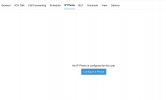
click on IP PHONE, then click "Configure a Phone"
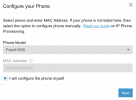
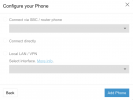
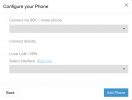
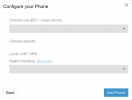
And here, whether I use a specific version (Grandstream GXP-1625 in my case, inserting the MAC address), or I try manually to create a new phone, the next screen has all the options disabled and I cannot proceed forward (see attached screenshots).

I have tried adding an IP Phone to all the existing extensions, creating, deleting and recreating new extensions, but I cannot seem to add the new phone to an extension.

P.S. I did add one phone at the beginning, but I deleted it as I configured it wrongly. Now I cannot add any IP phones.

Any thoughts?
Thanks a lot to all :-)
Jon
 

Attachments

  • Screenshot 2024-11-07 at 22.05.32.png
    Screenshot 2024-11-07 at 22.05.32.png
    66.6 KB · Views: 16
  • Screenshot 2024-11-07 at 22.05.39.png
    Screenshot 2024-11-07 at 22.05.39.png
    79.3 KB · Views: 15
  • Screenshot 2024-11-07 at 22.05.45.png
    Screenshot 2024-11-07 at 22.05.45.png
    57.4 KB · Views: 15
You need to install an sbc before.
 
  • Like
Reactions: JohnS_3CX
I thought so, but the IP Phone I am using is on the supported list (IP Phone OR SBC it says)
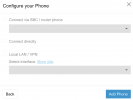
Even if I try add a Fanvil X301 from the list (which is under the Preferred list), I still get a non-clickable form on the next step, see attachment
P.S. tried on Firefox and Incognito, and Chorme and Incognito
 

Attachments

  • Screenshot 2024-11-08 at 17.14.42.png
    Screenshot 2024-11-08 at 17.14.42.png
    56.6 KB · Views: 3
Last edited:
There are no Grandstream phones that can be router phones.

https://www.3cx.com/sip-phones/

If you have a supported phone that can be a router phone then make sure its on the correct firmware version https://www.3cx.com/docs/phone-firmwares/.

Provision it with your extension by adding a phone and setting up a router phone (Connect directly).

Reset the phone and it will provision.
 
I purchased a Fanvil X301P, from the list of recommended.
I try to add a new phone (to a new account), I select the model, input the MAC address, when I proceed it does not allow me to select any further options (see attachment).
This phone should not require and SBC. What should I do?

Thanks
 

Attachments

  • Screenshot 2024-11-13 at 11.47.12.png
    Screenshot 2024-11-13 at 11.47.12.png
    57.7 KB · Views: 4
You will need to set up an SBC before you can add phones to your hosted.
 
This model isnt an routerphone, so you need an sbc to connect it to your pbx.
 
ok thanks, so SBC it is

thanks
 
Last edited:
But the Fanvil X3 series is considered a Router Phone, so no SBC should be required (I purchased it specifically for that)

https://www.3cx.com/sip-phones/

And this is specifically the guide for this phone
https://www.3cx.com/sip-phones/fanvil-x3-x5/
  • Router phones: X4U-V2, X5U-V2, X6U-V2, X7-V2, X7C-V2, X210-V2, X210i-V2, V62, V64, V65.
and also


  1. Go to the Users tab in the Admin Console
  2. Go to the “User” for which you want to add the phone.
  3. Go to the “IP Phone” tab. Click “Configure a phone” to add a phone.
  4. Select Generic IP Phone
  5. Select “Normal Phone” and enable the option to “Configure your phone manually without provisioning”
  6. A pop-up window will appear with the Authentication ID and Password. Depending on your installation you will also see:
1, 2 and 3 ok
4 or 5 (Generic, or Normal) do not exist on the drop down list anymore to configure manually :-(
If I continue manually, I receive the same as attached previously.
<3
J
 

Attachments

  • Screenshot 2024-11-13 at 11.47.12.png
    Screenshot 2024-11-13 at 11.47.12.png
    57.7 KB · Views: 4
Yes, you need to configure this phone over an sbc.
 
@ac3bf1 Let's take it from the start:

- GXP1625 and X301 are not routers as per the guides

- Do not go into manual provisioning, this does not apply to you

- You need to set up an SBC before you proceed any further
https://www.3cx.com/docs/3cx-tunnel-session-border-controller/

When the SBC is ready and shows green, add the MAC on each user from scratch, and then factory reset the phone as per the guide.

If done in this order you will see the phones automatically configure themselves and connect to 3CX.


PS: We recommend you install the firmware on the phones before you provision them, the guides cover that part too and the firmware can be found here https://www.3cx.com/docs/phone-firmwares/
 
Last edited:
  • Like
Reactions: bitn2
I believe that previously it was possible to add an IP phone directly because I was able to connect directly via MicroSIP and Intelbras ATA 200 and TIP125i, but currently on the 3CX Free SMB screen the option to connect directly is no longer avaliable (the option I used when I created the extension), I believe there has been some update in the last few months, remaning only the option to use SBC.View attachment 47456View attachment 47457View attachment 47458
 

Members Online Now

No members online now.

Forum statistics

Threads
111,831
Messages
589,277
Members
164,660
Latest member
RJenkinsROCK