Can't answer calls on Chrome Extension for the 3CX Webclient

Status
Not open for further replies.

SuperTima

Customer
Intermediate Cert.
Joined
May 27, 2020
Messages
29
Reaction score
6
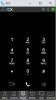
When a call comes in, the Chrome Extension window pops up on the screen, but it does not have the green and the red buttons (see the attachment), so we can't answer calls.
Google Chrome's version is 86.0.4240.75 (Official Build) (64-bit) (the latest available one), the 3CX extension version is 4.3.0.319, 3CX PBX version is 16.0.655.
Re-installing the Chrome plug-in does not help. Clearing Chrome's cache does not help either.
What else can we do?
This issues affects some users in our company only, plus a couple of clients, so it does not happen on every computer.
The 3CX extension for Firefox works OK on the affected computers.
Please advise.
 

Attachments

  • Incoming call no buttons.jpg
    Incoming call no buttons.jpg
    22.4 KB · Views: 91
The browser extension can also control phones via CSTA. Is your webclient set to "Browser Extension" or a supported device?
 
It is set to "Browser extension".
 
Hello @SuperTima ,

The screenshot attached is not from an incoming call. IT is from dialer screen of the chrome extension. As a result it is normal that you do not see red or green buttons.
 
Hi @SuperTima @Constantinos Constantinou

I'm having the same issue. Running the exact same versions as SuperTima
The phone rings but the extension doesn't take focus and if you click on it by hand it shows no buttons.
When you click on the Chrome browser, all of a sudden the buttons appear.

I've downgraded to the previous version of Google Chrome (84.0.4147.135), and this issue seems to be resolved for me. I have another issue with the latest Google Chrome version which was resolved by downgrading. (https://www.3cx.com/community/threads/keyboard-shortcuts-not-working.76758/)
 
We're getting reports of this issue from a customer as well.
They're stating that when it happens, they can minimize the Chrome extension and then restore it and then the incoming call is visible/answerable.
Running Chrome 86.0.4240.111
 
Last edited:
  • Like
Reactions: SuperTima
Hello @SuperTima ,

The screenshot attached is not from an incoming call. IT is from dialer screen of the chrome extension. As a result it is normal that you do not see red or green buttons.
Indeed, this exact screenshot was taken at the time of an incoming call, to indicate what I see on my screen.
I have not tried downgrading my Google Chrome version as suggested by @Smekke, neither I've tried minimizing & maximizing te Chrome window during the call as suggested by @pmterp
Thanks.
 
Hello @SuperTima ,

It is happening all the times? Is it reproducible? If yes then can you please provide some more information via a personal message?

@pmterp can you please proceed and open a support ticket to investigate further those cases?
 
  • Like
Reactions: pmterp
Hi Constantinos,
Yes, it is happening all the times, the very first call in a day, though, most of the times can be answered.
I've also just tried the workaround suggested by @pmterp on my laptop and it has worked - after maximizing the 3CX extension window for the second time I was able to see the Answer & the Reject button and to answer the call.
Yes, I can show you this behavior in action on Wednesday if you wish.
Thanks,
Tim.
 
We have this same issue and have had a few clients report the same issue.
 
Hello @SuperTima ,

It is happening all the times? Is it reproducible? If yes then can you please provide some more information via a personal message?

@pmterp can you please proceed and open a support ticket to investigate further those cases?

Hi Constantinos,
I've removed the production version of 3CX extension from my browser and installed the beta version suggested by the 3CX team - the issue is still there.
I am running Windows 10 Pro 64-bit.
Thanks,
Tim.
 
@Rhys Haskell it is important to see it in action and investigate the environment of those users.
Is it something that they can reproduce, or it is happening randomly?
I suggest you to proceed and open a support ticket to give it a more focused check.
 
@Rhys Haskell it is important to see it in action and investigate the environment of those users.
Is it something that they can reproduce, or it is happening randomly?
I suggest you to proceed and open a support ticket to give it a more focused check.
It is happening fairly randomly but we have also experienced it on our PBX.

We only have the issue in Chrome and not using the web client in firefox (albeit without the extention)

We can hear it ring but the browser extention doesnt popup, we then click the extention at the bottom it shows the dialpad although we can still hear the ringing. We then minimise and click the extention again and we can answer the call.

The issue mainly seems to happen when we have microsoft teams open, I tried a day with teams closed and the issue didnt occur. Normally this issue happens 4/5 times a day. The 1st time in each day this issue happens is normally when sending a message in teams and a call coming in at the same time.
 
  • Like
Reactions: SuperTima
Hi

This is happening to us too, I shall try running with teams closed and see if that resolves the issue.
 
Hi

This is happening to us too, I shall try running with teams closed and see if that resolves the issue.
3CX support have now got some test users on PBX and are working to replicate the issue, I will update the thread once we get a response.
 
  • Like
Reactions: Acribia
Is there a case or bug reference in relation to this? Our suppliers 3cx contact/support are claiming they know nothing of this problem. Thanks
 
Is there a case or bug reference in relation to this? Our suppliers 3cx contact/support are claiming they know nothing of this problem. Thanks

No, I don't think there is. We've just picked it up from one of our customers, then it started happening to own phones, and some other customers started reporting the issue.

Having MS Teams closed does not make any difference.

This morning I've noticed that at random times, the 3CX extension will display the Answer & the Reject buttons if I let the extension window to sit on the screen for about 4-5 seconds while it's ringing (minimizing and maximizing the window usually helps to have the buttons display). Very weird...
I would not blame my laptop or its video card for this issue (it's a pretty high spec'd machine), but you never know...
 
Hi

Has 3cx been able to make any headway made on this issue?

If there isn't soon I'll need to roll out the 3cx windows client across the entire company as it is driving us all bonkers. The 3cx windows client doesn't seem to be effected by the issue, rolling it out company wide won't be a small task.

Thanks

Jeremy
 
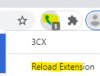
When I was using the Chrome extension, it would occasionally behave oddly right after I let Chrome install an update, and I couldn't pick up a call. If you right click the extension icon in the toolbar and choose Reload Extension does that fix it for you? As I recall that would fix it for the ringing call.
1605651805012.png
 
When I was using the Chrome extension, it would occasionally behave oddly right after I let Chrome install an update, and I couldn't pick up a call. If you right click the extension icon in the toolbar and choose Reload Extension does that fix it for you? As I recall that would fix it for the ringing call.
View attachment 19158
No, reloading the extension does not help, unfortunately...
I have already kind of used to minimizing & maximizing the 3CX extension window when a call comes in, so I guess it's like wearing a mask these days - a new normal :)
 
Status
Not open for further replies.

Forum statistics

Threads
112,025
Messages
590,368
Members
164,978
Latest member
FringeIT-Eric