Can't answer calls on Chrome Extension for the 3CX Webclient

Status
Not open for further replies.

SuperTima

Customer
Intermediate Cert.
Joined
May 27, 2020
Messages
29
Reaction score
6
When a call comes in, the Chrome Extension window pops up on the screen, but it does not have the green and the red buttons (see the attachment), so we can't answer calls.
Google Chrome's version is 86.0.4240.75 (Official Build) (64-bit) (the latest available one), the 3CX extension version is 4.3.0.319, 3CX PBX version is 16.0.655.
Re-installing the Chrome plug-in does not help. Clearing Chrome's cache does not help either.
What else can we do?
This issues affects some users in our company only, plus a couple of clients, so it does not happen on every computer.
The 3CX extension for Firefox works OK on the affected computers.
Please advise.
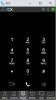
 

Attachments

  • Incoming call no buttons.jpg
    Incoming call no buttons.jpg
    22.4 KB · Views: 91
I've seen some conflicting advice. Can someone verify, is the recommendation to use Chrome with or without the extension? I just had 4 or 5 users with various different webclient issues, it's incredibly hit and miss at times.
 
Hi all,

There is some good insight on this post - thanks for everyone's replies. Thanks also @Nick Galea for the update re: v18. We've had a few different customers that have been affected by this issue, and like most replies in this thread, it's not all of them. I myself even encounter this problem occasionally on my own laptop as I operate every day using the web client.

Although we've been trying to test and replicate as much as possible, the issues do in fact seem to be linked to Chrome more than anything (as has been noted), although it is tough to get concrete info on this issue.

The 1 thing I've been trying to explain to my customers is to either minimise/maximise the window (normally the chrome extension should flash in the taskbar), or to get them to click-and-drag the window after maximising if the answer/end call buttons aren't there. Just as important is ensuring that the customer can in some way hear the calls that are ringing through to them which merely requires a bit of TLC when setting users up.
 
Hi all,

This issue is affecting us so much, I went to the trouble of creating an account. We only started using this setup a weeek ago. It was our partner who told us to best use the exention. Seems afterwards they don't use it themselves.

In any case, I thought this issue wasn't reproducable, but I've had succes trying to do so.
What seems to trigger it for us is following: Establish a call (doesn't matter incoming or outgoing, I mostly did incoming) and accept it. Then let the external caller (mobile phone, ...) disconnect the call. Put something like outlook in front of webclient and extension (so it's on the background) and reinitiate a call. This time, the extension doesn't show the buttons.

It looks like the GUI doesn't react very well to the call being disconnect from the other side, maybe some flag not being set correctly. This would explain why moving the window or minimize/maximize restores the GUI, as it forces a redraw of the interface.

I hope this may help in troubleshooting and resolving the issue, because "moving a window to get it to work" is not a professional solution.
 
For the moment you need to use the extension with the web client. The change is from Chrome side. In v18 we have a new windows app based on the web client that resolves this.
I know I've asked so I am sorry if I am repeating the question and if nothing has changed, but will there be a Mac app as well?
 
Hello, i have the same issue. I think it's a blocking point.

@Terry_S
I will to reproduct your test.


Do you know if 3CX Engineer work on this issue ?

Thanks
 
@Terry_S - We are not aware of this issue but extension will be replaced in v18, so give us a few weeks
@luckstrikes - Yes this is in consideration but we can not give any dates or final decisions yet. Let us get experience on windows first. New webclient will already be very good for mac users we think.
 
@Terry_S - We are not aware of this issue but extension will be replaced in v18, so give us a few weeks
@luckstrikes - Yes this is in consideration but we can not give any dates or final decisions yet. Let us get experience on windows first. New webclient will already be very good for mac users we think.

Nick,

The issue I'm having has been talked about for 5 pages in this thread, so I guess my previous post wasn't 100% clear. It's the "I hear a call but cannot pickup through the extension" issue. What I'm describing is the attempt to reproduce it, as it seems to be very random. This issue has been confirmed and linked to some Google Chrome updates at the end of last year. I just thought that posting extra feedback might trigger something, either at 3CX or Google, as I know how valueable on-field data is.
 
Hi all,

This issue is affecting us so much, I went to the trouble of creating an account. We only started using this setup a weeek ago. It was our partner who told us to best use the exention. Seems afterwards they don't use it themselves.

In any case, I thought this issue wasn't reproducable, but I've had succes trying to do so.
What seems to trigger it for us is following: Establish a call (doesn't matter incoming or outgoing, I mostly did incoming) and accept it. Then let the external caller (mobile phone, ...) disconnect the call. Put something like outlook in front of webclient and extension (so it's on the background) and reinitiate a call. This time, the extension doesn't show the buttons.

It looks like the GUI doesn't react very well to the call being disconnect from the other side, maybe some flag not being set correctly. This would explain why moving the window or minimize/maximize restores the GUI, as it forces a redraw of the interface.

I hope this may help in troubleshooting and resolving the issue, because "moving a window to get it to work" is not a professional solution.
What we've been doing is having the user right click the extension icon at the top of chrome, and select "Reload Extension", after which they're usually fine for the rest of the day.
 
What we've been doing is having the user right click the extension icon at the top of chrome, and select "Reload Extension", after which they're usually fine for the rest of the day.

That was the first "workaround" we used, but in doing so, you lose the current incoming call. Unfortunately, some users had to reload several times a day in our environment. That's why to go to solution, in anticipation of a fix or a new version, is to move the extension window for the buttons to appear.
 
I have a client who is also experiencing this. Chrome on W10P up to date with extension. What is the solution please?
 
The customer I referred to has now asked me to look at alternative systems. Please update us on this issue and provide some indication of a timeline. Many thanks
 
Our users have the same issue so I've switched them back to the Windows client. On the plugin side they found through trial and error that minimising the popup and then opening it again (so click on the icon in task bar twice essentially) allowed them to pick up calls. No obvious pattern as to why, both users on new laptops, clean install etc. (they were my test users for switching to using the web client which I now won't be doing!). I hope their discovery might help people as a workaround for now.
 
  • Like
Reactions: accentlogic
Hello everybody, we have the same issue, but now, we have a 1 week tested Workaround. I know, it is odd but it can help.
We wrote as small snippet that just moves to 3CX-Extension window every 30 sec. at 1pixel to the right or the left, not change the state of the Z-Index.
After install, you need to relogin or reboot. After this, there is a Task Named: "ActivKeeper".
It is running in current user state just from C:\ProgramData\Microsoft\Windows\Start Menu\Programs\StartUp
You can modify the setting, take a look at ActivKeeper.exe -h

HTH
 
  • Like
Reactions: FridayIT
Cause i send 3rd party software to the Forum and it is not allowed, ask me via PM for ActivKeeper download link.
 
@SebastianMüller
As discussed via our private conversation please note that although we appreciate the contribution, as part of keeping an eye on our community, we'd appreciate it if the specific tool was not publicly available via our forum as, whatever the case, it is still considered 3rd party software not developed by 3CX. You can use a link to an external repository if you like, or better yet distribute it to anyone who is interested via PM.

Thank you for understanding.
 
Status
Not open for further replies.

Forum statistics

Threads
112,025
Messages
590,368
Members
164,978
Latest member
FringeIT-Eric