- Joined
- Jan 12, 2023
- Messages
- 45
- Reaction score
- 14
Hello 3CX staff and community,
3CX ENT, V20 last update release
i'm struggling with a simple task of importing a file with DID into a SIP trunk...
i followed the instruction as mentionned on this doc page, https://www.3cx.com/docs/manual/sip-trunks/, using the sample CSV doc, but when i import the file
the result is just empty, or all the data is pasted into DID number column only.
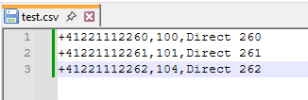
Example according the CSV sample doc, i wrote on my file
+41221112260,260,Direct 260
+41221112261,261,Direct 261
+41221112262,262,Direct 262
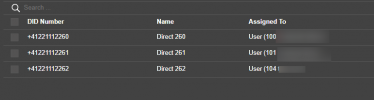
so i'm expecting when importing to have on DID number colum the DID number, and on "assigned to" column the users 260, 261 etc..
but i got just no entries at all.
Or playing a bit with the format of document, type of CSV, i got all text +41221112260,260,Direct 260 only on DID number colum...
have someone an explaination to this behavior?
i just follow the instruction of 3CX website but it doesn't works as described.
many thanks for your feed-backs
Hugo
3CX ENT, V20 last update release
i'm struggling with a simple task of importing a file with DID into a SIP trunk...
i followed the instruction as mentionned on this doc page, https://www.3cx.com/docs/manual/sip-trunks/, using the sample CSV doc, but when i import the file
the result is just empty, or all the data is pasted into DID number column only.
Example according the CSV sample doc, i wrote on my file
+41221112260,260,Direct 260
+41221112261,261,Direct 261
+41221112262,262,Direct 262
so i'm expecting when importing to have on DID number colum the DID number, and on "assigned to" column the users 260, 261 etc..
but i got just no entries at all.
Or playing a bit with the format of document, type of CSV, i got all text +41221112260,260,Direct 260 only on DID number colum...
have someone an explaination to this behavior?
i just follow the instruction of 3CX website but it doesn't works as described.
many thanks for your feed-backs
Hugo