CDR.log file contains blank lines

Status
Not open for further replies.

doganguler

Forum User
Joined
Nov 28, 2019
Messages
6
Reaction score
0
Hi everyone,

we were established an integration with cdr.log file which was "single file for all calls"
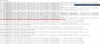
but after switching to socket and switching back to "single file for all calls" now there are blank lines that gives errors during integration packages run.

is there a way to get the no empty line cdr.log file again?

thanks in advance
dogan
 
Socket connections do not have spaces, but files do.

This is the default behavior.
 
Hi Johns,

thank you for your response.

file did not have the empty space before... you can check the file screenshot3cx_cdr_log_new_30032020.png
 
Are you maybe using some other 3rd party solution to capture and reformat the file?
As you can see from our sample here https://www.3cx.com/docs/cdr-call-data-records/ the default behavior inserts the blank lines. Not sure why it was different in your case.
 
thank you for your response.

no we don't use 3rd party app for this purpose.
 
What you are referring to are blank fields, rather than blank lines. The term "blank lines" means something very specific when you are processing CSV files.

You will need to investigate the type of call that is generating missing data. That looks like missing billing information? In any case, you should be looking for the pattern for which calls have missing information. For example, if you don't have billing costs defined in 3CX for that number, the values will be blank. Further, you should consider adding into your processing applications checks for missing data so it doesn't crash your import.
 
Status
Not open for further replies.

Forum statistics

Threads
111,940
Messages
589,850
Members
164,832
Latest member
Boblatino