CFD Count http json response data

Status
Not open for further replies.

Goga

Titanium Partner
Advanced Certified
Joined
Mar 31, 2017
Messages
59
Reaction score
10
Hi,

I am working on 3cx CFD dialer where I am using http Request component to get data , i want to do array count for below data so i can start the loop to make calls.


JSON:
{
    "status": 1,
    "dbresponse": [
        {
            "name": "123456",        
            "mobile": "9235363738",
        },
        {
            "name": "6789",
            "mobile": "0282829272",
        },
        {
            "name": "837373",
            "mobile": "2638378333",
        }
    ],
    "status_code": 200
}
Now I want to count dbresponse array elements , like for above response it is 3 , I cannot find any CFD component apart from Execute C#code, but I am not sure how to do that.

I tried below code but it is not working.

C#:
var test = JObject.Parse (jresponse);
JArray items = (JArray)test["dbresponse"];
int length = items.Count;
return length


tried above code but it is not working.
 
Last edited:
You need to use NewtonsoftJson.

Your C# will need to deserialize, then set a variable to the count and another to 0, increment in a loop until current < count.
 
You need to use NewtonsoftJson.

Your C# will need to deserialize, then set a variable to the count and another to 0, increment in a loop until current < count.
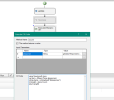
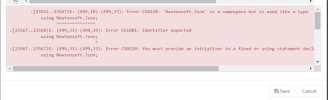
I tried using Newtonsoft,json, it didn't work and show error.
 
cfd_snap.png

Please see attached snap.
 

Attachments

  • cfd_build_error.png
    cfd_build_error.png
    64.4 KB · Views: 7
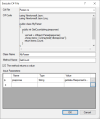
The Execute C# Code component doesn't accept "using" statements. You will need to use the full type names including the namespace if you want to go that way. Other option is that you use the Execute C# File instead. In this component you include a C# file in your project, which will include the class and the method, so you can use the using statement there. For example, you can use this C# code in your file:
C#:
using Newtonsoft.Json;
using Newtonsoft.Json.Linq;

public class MyParser
{
    public int GetCount(string jresponse)
    {
        var test = JObject.Parse(jresponse);
        JArray items = (JArray)test["dbresponse"];
        return items.Count;
    }
}

Then, you invoke this as follows:
1672670448269.png
 
  • Like
Reactions: Goga and Evolute IT
Status
Not open for further replies.

Latest Posts

Forum statistics

Threads
111,973
Messages
590,075
Members
164,895
Latest member
jasonkkrause