CFD MySQL query syntax issue

Status
Not open for further replies.

Aaron_A-COM

Customer
Joined
Oct 9, 2020
Messages
10
Reaction score
0
Hi Guys,

I've got an issue with the syntax of my query that I'm stumped on as when used in something like HeidiSQL as an example It returns the data no worries. When used in the CFD app I get the following:

2021/02/17 18:49:44.867|8736|0028|Trc|CallPair._7001_1.Callflow.2.[C:1.2]-From script: AgedCareDialer - Dialer 1 - CallFlow.CFD.MySqlDatabaseAccessComponent 'getNextNumber' - Command to execute: "SELECT t1.phone FROM acd_3cx_leads t1 WHERE (t1.`active` = 1 AND t1.`name` != "" AND t1.`closeTypeId` IS NULL AND t1.`assignedUserId` IS NULL AND t1.`rowVersion` IS NULL AND t1.`statusId` = 1) ORDER BY t1.`createdOn`;"

2021/02/17 18:49:44.876|8736|0026|Err|CallPair._7001_1.Callflow.2.[C:1.2]-From script: AgedCareDialer - Dialer 1 - Dialer - Error executing last component: MySqlConnector.MySqlException (0x80004005): You have an error in your SQL syntax; check the manual that corresponds to your MySQL server version for the right syntax to use near '"SELECT t1.phone FROM acd_3cx_leads t1 WHERE (t1.`active` = 1 AND t1.`name` != "' at line 1

---> MySqlConnector.MySqlException (0x80004005): You have an error in your SQL syntax; check the manual that corresponds to your MySQL server version for the right syntax to use near '"SELECT t1.phone FROM acd_3cx_leads t1 WHERE (t1.`active` = 1 AND t1.`name` != "' at line 1


Can someone tell what I'm doing wrong here please?
 
Did you use the Expression Editor to create your query? I believe the quotes should be escaped by a backslash.
 
Hey Frederick,

No, I didn't use the expression editor. I copied my query and pasted it in to the query string field. I'll see how I go working through it in there.
 
Can you share a screenshot of how you're configuring your Database Access component? Please hide any passwords from it.
 
  • Like
Reactions: Evolute IT
Hey Ernesto,
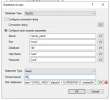
Screenshots attached.

The query I'm entering in the SQL Statement field is:

"SELECT t1.phone FROM acd_3cx_leads t1 WHERE (t1.`active` = 1 AND t1.`name` != "" AND t1.`closeTypeId` IS NULL AND t1.`assignedUserId` IS NULL AND t1.`rowVersion` IS NULL AND t1.`statusId` = 1) ORDER BY t1.`createdOn`;"

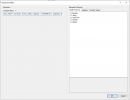
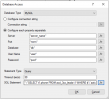
When entered and I go to another field in the editor and it comes up with the error to indicate a syntax issue, then I hit the function button which brings up the Expression Editor and it has the query in the Constant String field. I hit OK there and it returns to the Database Access editor with the query formatted as follows:

"\"SELECT t1.phone FROM acd_3cx_leads t1 WHERE (t1.`active` = 1 AND t1.`name` != \"\" AND t1.`closeTypeId` IS NULL AND t1.`assignedUserId` IS NULL AND t1.`rowVersion` IS NULL AND t1.`statusId` = 1) ORDER BY t1.`createdOn`;\""

When that is built and run we get the error listed in my first post. Clearly there's something not right in the reformatted query but I can't find anywhere documenting exactly how that should be for it to accept it. The only part that stands out to me is this section of the query formatting:

AND t1.`name` != \"\" AND

That's where the syntax error is indicated as being "near" in the call flow log but apart from that I've got no idea.

Screenshots showing my process as described should be attached with this now. Let me know if any of that isn't clear or if you'd like more info.
 

Attachments

  • 1_Paste_Query.png
    1_Paste_Query.png
    236 KB · Views: 77
  • 2_Expression_Editor.png
    2_Expression_Editor.png
    208.3 KB · Views: 72
  • 3_Reformatted_Query.png
    3_Reformatted_Query.png
    229.8 KB · Views: 73
The quotation mark needs to be escaped. That's what the Expression Editor does when it adds the back slash.

You can also try using single quotation marks:
"SELECT t1.phone FROM acd_3cx_leads t1 WHERE (t1.`active` = 1 AND t1.`name` != '' AND t1.`closeTypeId` IS NULL AND t1.`assignedUserId` IS NULL AND t1.`rowVersion` IS NULL AND t1.`statusId` = 1) ORDER BY t1.`createdOn`;"
 
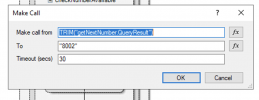
Hey Ernesto, I ended up taking out the extra \'s and quotation marks that had been bookended on to the query which got it resolved. Next step is getting the Make Call element to work. I've changed the TRIM expression to TRIM("getNextNumber.QueryResult") from the ScalarResult that is in the demo CFD when loaded but I'm wondering how best to configure the "Make Call" function.

My screenshot shows how it is at the moment with Make call from set to the TRIM function, and the To destination is set to 8002 which is the extension of the Agent Queue that I'm meant to be getting the next available agent from. I'm not sure that's a logical call setup, though, as the QueryResult isn't an inbound call. Should the TRIM function be in the To: field given it's the number that should be dialled outbound?

Screen Shot 2021-02-23 at 4.12.42 pm.png
 
Also, I'm really not sure what the purpose of the Condition Creation "checkNumberAvailable" is looking at the Condition needing to be met before reaching the Make Call. This is the condition in there by default:

GREAT_THAN(LEN(TRIM("getNextNumber.ScalarResult")),0)

Screen Shot 2021-02-23 at 4.27.45 pm.png

Again, there isn't a ScalarResult in the call flow prior to this so will this even do anything? Should it be QueryResult if I want it to have any impact on the call flow logic? What is the intended purpose of this function and expression?
 
So... I'm guessing that the call flow log isn't meant to look like this when trying to dial.

2021/02/23 16:35:20.132|8280|0015|Trc|CallPair._7001_1.Callflow.71.[C:27420.2]-From script: Dialer - Dialer 0 - CallFlow.CFD.SequenceContainerComponent 'checkNumberAvailable_0' - Start executing component 'doMakeCall'

2021/02/23 16:35:20.132|8280|0015|Trc|CallPair._7001_1.Callflow.71.[C:27420.2]-From script: Dialer - Dialer 0 - CallFlow.CFD.MakeCallComponent 'doMakeCall' - Making call from origin='getNextNumber.QueryResult' to destination='8002'

I'm thinking that's my muffed syntax causing issues again. This is the logging detail showing the result of my 'getNextNumber' DB lookup:

2021/02/23 16:35:20.132|8280|0015|Trc|CallPair._7001_1.Callflow.71.[C:27420.2]-From script: Dialer - Dialer 0 - CallFlow.CFD.MySqlDatabaseAccessComponent 'getNextNumber' - End executing component with queryResult: [+61412345678]

Clearly the number from the DB query isn't getting populated in the Make Call function via this expression. Any direction on resolving this will be greatly appreciated at this point.

Screen Shot 2021-02-23 at 4.46.21 pm.png
 
You're making the call to the static string "getNextNumber.QueryResult". You don't want that. You want to read the value returned by the database.

When your Database Acces component is configured with Statement Type = Query, the result is a table, which is what you can see in the logs:
End executing component with queryResult: [+61412345678]

This is a table with a single row and column. If you want to get the value, you need to use the GET_TABLE_CELL_VALUE function, as follows:
GET_TABLE_CELL_VALUE(getNextNumber.QueryResult,0,0)

Other option, if you will return a single value from the database, is that you change the Statement Type to Scalar. In that case the value getNextNumber.ScalarResult will have the value you need (no quotation marks, otherwise you will convert it to a static string).
 
Hey Ernesto,

Thanks for breaking that down. I changed it to Scalar and reformatted and all good finally.

I'm working through the way it presents the call outbound now. I can see from my capture and the logs that the call setup outbound gets dialled by Make Call@ when it is going out to the number being dialled. I'm not sure how to accomplish it but I need to present the CLI of the agent who is getting the call. Looking at the logs and call flow in the cap, the agent doesn't come in to the call until the call is handed off to the queue, then the queue logic is invoked and the next agent is selected. So, because the agent isn't identified when the call is setup with the external party there's no logical connection between the elements to dictate the CLI that needs to be populated as the call is made. This is a really big problem for outbound calling for this client as the whole interaction needs to present as a specific agent with their number presented and then routing calls back to that agent again for inbound calls. Can you think of any way I could achieve this? If I have to create an individual CFD and queue for each agent then I'll do that regardless of how messy that is and how many times I've got to iterate the dialler etc. Any direction would be greatly appreciated right now.
 
Hey Ernesto,

This is what I've gathered so far from extensive searching and reading in other posts like:

Matthew's comment about adding prefix digits and then his post here, where the 5 outbound CLI control methods are listed.

Your own comment here for caller ID being controlled by the SIP trunks.

Summary points:
  1. Because Make Call component is creating the call outbound there's no extension config in the mix to determine what the outbound cli should be set to.
  2. If you're wanting to set a specific caller ID outbound you can pre-digit the number to be called (example from Mathew of adding 7777) then in the outbound rule after matching those digits, strip them and set the outbound caller ID.
So, armed with the possible control options and the pre-digit scenario, there has to be a way to achieve this. The only logical way I can think of this working, specifically for this scenario where each agent has to have their own cli displayed outbound, is as creating multiple call flow applications on a per agent basis and then having a single agent in a queue for delivering the calls to them. Created individually like this, the logic steps would be as follows:

  1. The individual agent iteration of the call flow application retrieves the next number number to be called from the database. The query will find the next number regardless of which iteration/agent the call flow app is for, the same as if a single instance of the dialler was configured with 10 parallel dialers.
  2. The specific instance of the app is configured to prepend digits in front of the outbound number uniquely from any other instance of the dialler. Setting it to the prepend the agent's four digit extension number for ease of reference in config steps the whole way through would be the simplest to my thinking.
  3. Make Call component sets up the call with agent extension number preset as prepend digits in the to field, with expression set to CONCATENATE("1011",getNextNumber.ScalarResult) where 1011 is this agent's extension number. Using an example phone number retrieved of +61412345678 representing an Australian mobile number FNN, the outbound number to be dialled is then set to 1011+61412345678 for the call.
  4. Outbound rule gets matched to agent extension prepended digits (1011) and steps through the digit strip process leaving +61412345678 and sets the outbound CLI to the specific agent extension CLI as per the outbound rule.
I'm not saying this is an elegant solution by any means, but I think that as things sit right now (as in v18 turns this all on its head from what I've been reading so far...) this is pretty much my only option for how to achieve this. I'm going to have 20-30 agents needing to utilise this so it's a pretty ugly mess looking at the queues and rules that need to be created to achieve this but I can't see another way.

Please let me know your thoughts. Tell me I'm crazy if you think it's appropriate to the circumstances. I'm also very happy for you to show me another way to achieve it.
 
Hello @Aaron_A-COM,

Indeed your analysis is correct. The only way to show a specific CLI when the outbound call is made, is knowing in advance which agent will take this call. So you will need a queue for each agent, and an outbound rule for each agent. This way, your CFD dialer can make the call using the prefix of the agent, and send the call internally to the corresponding queue.

A single CFD dialer can do this, no need to have a separate dialer for each agent. Just ensure that the database gives you the information of the number to call, and the agent to connect the call with. This way you have all the information to start each call.
 
Hey Ernesto,

With your explanation:
A single CFD dialer can do this, no need to have a separate dialer for each agent. Just ensure that the database gives you the information of the number to call, and the agent to connect the call with. This way you have all the information to start each call.
I'm not sure I understand how this would look in the CFD config. The call flow is pointed at a single queue with all agents in there. I haven't seen in any of the call flow logs where the agent is actually identified and transferred to them directly; the Make Call element calls the outbound leg and the internal leg, one to the external number one to the Queue. When the queue gets the call the queue's logic determines which agent gets the next call. Are you thinking that if we use the same logic as the queue we can determine which agent will be next inline for the call and set the outbound prepended digits accordingly?

Thinking of the logic for a call queue that has Polling Strategy of "Fewest Answered" could we actually achieve this through a Queue stat lookup? So the Make Call function would have a setup along the lines of:

From: "8002"
To: CONCATENATE([insert_query_result_getNextAgent.ScalarResult,getNextNumber.ScalarResult)

How could we get the queue stats and determine the next agent before the Make Call function so we can populate it with the correct prepend digits for matching outbound?
 
No, you can't determine which agent will be selected by the queue. You need to decide this in advance. So your database will return:
- Call to: External number
- Call from: Agent extension, or "Personal Queue" extension (i.e. the extension of the queue having a specific single agent inside).

Your logic will decide in advance which agent will take the next call. And the call will wait in their "personal queue".

But you can use a single CFD app for this, no need to have a separate app for each agent. A single app will query the database, will get the details of the external number and the internal agent that will process this call, and this way when making the external call you can use a prefix to set the CLI for this specific agent, that you already know.
 
Status
Not open for further replies.

Members Online Now

No members online now.

Forum statistics

Threads
111,832
Messages
589,286
Members
164,662
Latest member
DejanMDS