Change accountnames in 3CX windows phone

Status
Not open for further replies.

telforce

Customer
Basic Certified
Joined
Feb 7, 2019
Messages
40
Reaction score
2
When i add a new account with the provisioning files i get from 3CX to my windows softphone it uses the name of the PBX to describe the account. So when i switch accounts i see these PBX names and i can't change the description. I have 3 PBX accounts on my phone and their names are very similar. So i was wondering if i can add a line to provisioning file where i can give each account my own custom description?
 
Hi @telforce

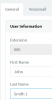
It takes the name from your extension. Simply edit your extension name to include something that helps you tell them apart, like a character or a number for example.

12864

In direct response to your question, no you cannot add a line in provisioning to affect this.
 
What i mean is the second part where it displays the name of the PBX.

12872
 
Hi telforce

No that can't change because it's not actually a name label. It's literally the FQDN of your server.
 
But lets say i add a suffix to my last name in the extension, won't callers see that too when i call them?
 
Yes, it will appear. I'm not sure if there is any solution for what you want unfortunately other than keeping it as it is now.
 
Thanks for clarifying, i think i will just place my fist and lastname in the firstname field and use company name in the last name field.
 
  • Like
Reactions: AWS2P
Not a bad idea actually :)
 
Status
Not open for further replies.

Forum statistics

Threads
111,934
Messages
589,818
Members
164,811
Latest member
aurorasigntrtechitnet