Change call routing based on business "Outage"

Status
Not open for further replies.

Fletcher H

New User
Joined
Dec 20, 2023
Messages
5
Reaction score
0
I am wondering if it's possible for a manager or admin to mark an "Outage" in the system, so that when customers call in, it routes them to an automated message or queue of some sort.

This isn't in reference to a PBX or 3CX outage, just an outage of our provided services. So if our processing systems are down, we want to be able to mark that in some way in the phone system.

I know I can sort of do this with the Out of Office routing, but I am curious if there's a more direct solution.
 
Last edited:
Hi @Fletcher H

If the PBX is down due to an outage the PBX will not be able to route any calls as it is down. The solution for this is to have a failover PBX that monitors the primary PBX and when it goes down, the failover PBX will come up to serve the calls. You can find out more about failover on the link below.

https://www.3cx.com/docs/failover/
 
Hi @Fletcher H

If the PBX is down due to an outage the PBX will not be able to route any calls as it is down. The solution for this is to have a failover PBX that monitors the primary PBX and when it goes down, the failover PBX will come up to serve the calls. You can find out more about failover on the link below.

https://www.3cx.com/docs/failover/
This isn't in reference to a PBX or 3CX outage, just an outage of our provided services. So if our product is offline or down, we want to be able to mark that in some way in the phone system. So that way when we receive an influx of calls, they are routed differently.
 
This isn't in reference to a PBX or 3CX outage, just an outage of our provided services. So if our product is offline or down, we want to be able to mark that in some way in the phone system. So that way when we receive an influx of calls, they are routed differently.
Thank you for the clarifications.

In this case, you will need a failover trunk in case your main trunk is down. For this please check the below guide.
https://www.3cx.com/docs/sip-trunk-failover/
 
Thank you for the clarifications.

In this case, you will need a failover trunk in case your main trunk is down. For this please check the below guide.
https://www.3cx.com/docs/sip-trunk-failover/
Sorry, maybe I'm not explaining very well.

The outage is not/would not be related to the phone system or trunk in any way. I just want a way to change the routing of the phone system, based on a flag that we can enable with a Dial code, or some other way. Specifically for certain Inbound rules.
 
There is this dial code but I think I read it’s not in the upcoming v20…?
https://www.3cx.com/docs/pbx-dial-codes/#h.665f9ex1w4m3

Also IIRC if changing office hours the time has to trigger, so one may need to change it to end “1 minute from now” not “a half hour ago.”
 
Hi @Fletcher H

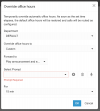
Would this help? From your avatar click "Override Office Hours" and choose the appropriate action.

1703164254389.png
(V20 screenshot above)
 
Hi @Fletcher H

Would this help? From your avatar click "Override Office Hours" and choose the appropriate action.

View attachment 38861
(V20 screenshot above)
It it possible to apply this to an inbound rule, so when people call the DID it follows this route? I assume this only applies to the users of the selected department.
 
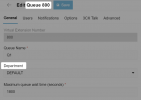
You can think of queues, ring groups and IVRs as users too in this example because they also belong to a department (they are not standalone like they used to be in V18).

So when you override a department, it means that everything under it will follow :)

1703233307233.png
 
Status
Not open for further replies.

Latest Posts

Forum statistics

Threads
111,884
Messages
589,542
Members
164,742
Latest member
Zain101