- Joined
- Sep 22, 2020
- Messages
- 67
- Reaction score
- 13
Good day.
Could you please support me with procedure need to pass for change FQDN
As i understand i need to make:
1. Backup of current installation but without FQDN and License information.
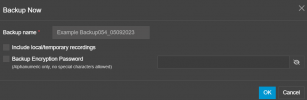
V20 doesn't give a chance to choice what user want to backup ( i can choice only , Do i need a Recorded Voice records or not in final file )
2. Uninstall current installation
3. Install a fresh version of v20 and during Web interface setup enter a License Key and New FQDN.
4 . After restore configuration from Backup.
How i can Delete FQDN information from backup created in V20 ?
Could you please support me with procedure need to pass for change FQDN
As i understand i need to make:
1. Backup of current installation but without FQDN and License information.
V20 doesn't give a chance to choice what user want to backup ( i can choice only , Do i need a Recorded Voice records or not in final file )
2. Uninstall current installation
3. Install a fresh version of v20 and during Web interface setup enter a License Key and New FQDN.
4 . After restore configuration from Backup.
How i can Delete FQDN information from backup created in V20 ?