Change public IP address process on V20

Stephen H

Silver Partner
Basic Certified
Joined
Apr 16, 2025
Messages
25
Reaction score
0
Greetings, I need to change the public IP address on a 3CX v20. Can i please get the process beyond making the change in Advanced>Network> External IP configuration?

Thanks in advance for your assistance
 
Hi,

As a first step you should be changing the IP of the machine via the operating system. If you are using a 3CX FQDN the DNS change should happen automatically and then you can change it in the panel if for some reason it still shows the old one - reloading the PBX services might help to get all parts of the system on the same page.

Best,
K.
 
process beyond making the change in Advanced>Network> External IP configuration?
If set as a dynamic it will update. Note Pro licenses have a 6 hour TTL.
 
  • Like
Reactions: KyriacosS_3CX
Hi,

The issue is that I was trying to update our licence to V20 with a pro licence but I need to upgrade our memory on our EC2 instance first but have now lost access to the management console entirely after a server reboot.

my original post
So I cannot even renew my licence without logging in. Are there any other work arounds or solutions you can think of.
 
Cannot access with public ip at the moment?
 
If set as a dynamic it will update. Note Pro licenses have a 6 hour TTL.
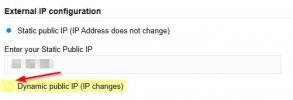
@SteveITS, are you saying to Check the box for 'Dynamic public IP (IP changes)? Should it not be a Static Public IP entry?

2025-05-30 08_06_25-Network - 3CX.jpg
 
As I understand it the 3CX FQDN isn't updated if it's marked as Static. You can change it back after.
 

Latest Posts

Forum statistics

Threads
111,962
Messages
589,995
Members
164,867
Latest member
swegner