Solved Changed System Owner, Now Locked out of Management Console

Status
Not open for further replies.

RTec

Bronze Partner
Basic Certified
Joined
Jan 26, 2023
Messages
10
Reaction score
1
We set up a client 's 3CX system today (version 18 update 6). They needed the System Owner changed. When I changed the System Owner the console logged me out and won't accept the old username and password. I know the email address associated with the new System Owner, but don't know the password. How can I reset the password? Also, when I changed the System Owner, I don't think the box for "allow access to management console" was checked. (I didn't see that till after I clicked save). Does that mean the new System Owner won't be able to log in even with a password reset? If so, what are my options for fixing it?
 
The management console admin is different from the system owner/web client login. Did you try from another IP in case yours was blacklisted?
 
  • Like
Reactions: YiannisH_3CX
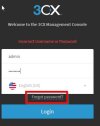
1.Navigate to the 'Management Console' Login page.
2.Enter credentials
User: admin
Password: any password
3. 'Forgot Password' button should appear after the 2nd attempt.
4. click 'Forgot Password'

This should send the new system owner an email with a password reset email.1.jpg
 
  • Like
Reactions: Yellow_Flash
Thank you for your help. I used the password reset to log into the Admin account. From there I was able to reset the new System Owner's web client password. I can now log into the management console as the System Owner. Apparently, it didn't matter that the "allow access to management console" button wasn't selected.
 
Status
Not open for further replies.

Forum statistics

Threads
111,974
Messages
590,081
Members
164,899
Latest member
mazet