Changing the Webmeeting Profile Default Values

Status
Not open for further replies.

kriley87

Silver Partner
Advanced Certified
Joined
Jul 24, 2019
Messages
108
Reaction score
22
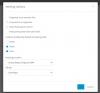
Is there a way to modify the default values of the Webmeeting profile? Currently, when a video conference is scheduled using the Webmeeting profile, it enables audio, video, and chat. We want to disable audio system wide for the Webmeeting profile because we are using external Yealink CP960 conference room phones and don't want or need audio output through our conference room TV when joining conferences?
1592423224353.png

Thank you
 
Hi,

Currently no, there is no default way to "preset" them.
 
So what's the solution? User education sounds great when your users are competent. This isn't one of those cases.

If they dial into a conference via the Yealink CP960 conference room phone and join the web meeting where audio is enabled by default it creates a lot of confusion when audio is coming through the phone and the conference room TV at the same time.

Is there not a parameter for this setting anywhere?
 
Sorry this is not customizable with any parameters at the moment.
We may consider it as a future improvement though.
 
It's not an actual fix, but a note/label/sign near the phone saying 'Mute TV during conference call' might help to solve the problem?
 
Status
Not open for further replies.

Forum statistics

Threads
111,953
Messages
589,913
Members
164,848
Latest member
latoya@bautistafamilycare