Chat - option to see who is 'online'

Status
Not open for further replies.

Parslej

Forum User
Joined
Jun 16, 2021
Messages
62
Reaction score
18
My users really miss option similar to other chats showing who is really online (actively using PC)
Thats why there is another chat app used in parallel .. (Id love to keep only 3cx)

Currently if someone has desk phone logged in it is being shown always 'green'
Ideally 3cx chat should recognize if someone is typing / moving mouse (when logged to Desktop app) and show that adequately

Would it be possible ?

PS Id add that as an idea but seems I do not have enough privileges
 
Typing will show below the user name, where the status shows.

There's nothing for active/away auto detect.
 
  • Like
Reactions: VasilisV_3CX
Hi @Parslej,

As @ConceptsWeb mentioned, when a user types it will show "typing..." under the username.

If you'd like to have the feature request added to the Ideas section, feel free to contact a 3CX Partner to post it on your behalf.
 
  • Like
Reactions: Evolute IT
Thanks - Im not thinking about notification when user is typing in 3cx app.
I would like to see green lights for users I know they have active windows session, using computer actively

Currently 90% users are 'green' (because left desk phones logged or Windows session locked) - so I dont know who is currently at desk
Im sure you know what I mean - 90% of instant messaging application has this feature
 
Hi @Parslej,

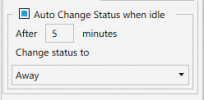
The 3cx Windows Client has the option to Automatically Change your Status when idle. This can be found by clicking
Settings
2017-08-07_10h02_30.png
> Configure Accounts > Double click on preferred account > Advanced Settings

1641546856568.png
 
Thanks @VasilisV_3CX !

This looks interesting but I cant find this option in app (v18) nor in 3cx Management console
Can you please guide me where this can be found ?
 
Hi @Parslej,

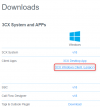
If you log in to your Customer Portal, you can download the Windows App from the Downloads section:

1641550571879.png
 
But this seems to be legacy v16 app.
We did a lot of effort to migrate / convince users to migrate to v18.
Cant roll this back :(

Any chance to have this feature in v18 as well ?
 
Hi @Parslej,

The Windows App is marked as Legacy but works with v18 users. It has not been entirely deprecated and can still be used. You can send a Welcome Email to a v18 user, then download and open the attached config file which should open with the installed v16 Windows Client.
 
  • Like
Reactions: Evolute IT
Even with the windows app installed though, if the PC isn't used for a period, the extension state will change to away (which will prevent calls being received by another desktop device on the same extension) I think. We use the windows/desktop app and also users have a DECT handset and have this "issue"...
 
Even with the windows app installed though, if the PC isn't used for a period, the extension state will change to away (which will prevent calls being received by another desktop device on the same extension) I think. We use the windows/desktop app and also users have a DECT handset and have this "issue"...
Yes, this is true so in this case changing the User Profile Status of the extension when the PC is idle wouldn't be a good idea.
 
Status
Not open for further replies.

Forum statistics

Threads
111,974
Messages
590,083
Members
164,901
Latest member
Silent_Guru