Chrome "Click to call" setup

Status
Not open for further replies.

HARVINDER SINGH

SMB User
Basic Certified
Joined
Jul 28, 2022
Messages
40
Reaction score
1
How to resolve this , my understandings it should open the dialet automatically.

TIA

1633522274366.png
 
Can you please tell us the following so we can help?

- what version is your 3CX system? (ie. V18 Update 2)
- what are you using as a dialler? (Webclient / Windows app)
- what version your your dialer app?
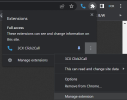
- what version is your extension? (Chrome > Manage extension)
1659942197758.png
 
3CX:- 18.0 (Build 965)
Desktop APP
Dialer:- 3CXDesktopApp-18.9.933
version is your extension- 5.0.0.100
 
1. Uninstall the extension, and then reinstall it from your webclient or desktop app from the bottom left icon. You should receive a newer version 5.0.0.111
1659946034582.png


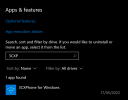
2. Can you check whether you still have the old 3CX application installed and remove it?
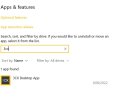
Chrome seems to know about it so it is probably still on your PC

1659945926573.png

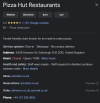
3. What numbers are you clicking to dial?
Are the already hyperlinked like Google results numbers?
1659948656699.png
 
I can see one one app installed,
still the same issue, updated to new extesion 5.0.0.111, this one is workign fine on Edge.
3cx app.JPG
 
You did not answer what numbers you are clicking to dial.

Can you give us a an example, a link to a public website where we can click to dial a number that doesnt work for you.
 
I Did try dial on multiple sites, it didnt work an one of them, it didint open teh Dialer , when I click on 3CX phone for windows only then it will show the dialer
 
You have to provide us with an example to test, so find a site that doesnt work for you (and used to work before for example) and share the link so we can also test it.
 
Ok I think I understand now. Try this:

1. Uninstall the 3CX Desktop App
2. Install the legacy app from https://portal.3cx.com/partner/dashboard
3. Now uninstall the legacy app and it should remove the association that appeared in the screenshot you first shared
4. Now you can install the Desktop app again
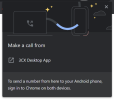
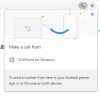
5. Restart your browser, and click on a phone link, it will show you the same "Make Call from" prompt like your screenshot, but if you click it now it will let you select a new phone app
6. Select the 3CX Desktop app and from now on it will be the default


Whenever you click a number, the Chrome prompt will appear, and will now show the 3CX desktop app, which when clicked, will launch our dialler.

1659956643375.png
 
so dialer shouldnt open automatically ? always need to click on 3cx Deskto app?
 
Yes you do - this is imposed by the Chrome browser and we cannot control it from the extension.
 
need to enable this
 
Thanks mate solution worked
 
  • Like
Reactions: Tyler.Calhoun
Status
Not open for further replies.

Members Online Now

Forum statistics

Threads
111,832
Messages
589,286
Members
164,662
Latest member
DejanMDS