- Joined
- Sep 4, 2025
- Messages
- 13
- Reaction score
- 1
Dear Team ,
I am trying to configure a Cisco CP-6921 phone with the 3CX system. I am using a TFTP server on an Ubuntu machine. The phone is running SIP firmware version 9-3-3-2, but the device is not registering.
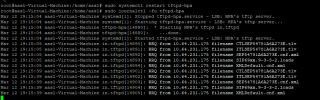
I have also used an XML configuration file (shown below) and attached the log file for reference.
Could you please review this and assist us in resolving the issue? If there are any dependencies or prerequisites required for configuring this phone, kindly let us know.
Phone Mac and file name - SEP54781A6A273E.cnf.xml
<device>
<deviceProtocol>SIP</deviceProtocol>
<devicePool>
<dateTimeSetting>
<name>GMT</name>
<dateTemplate>Y-M-D</dateTemplate>
<timeZone>GMT Standard/Daylight Time</timeZone>
<ntps>
<ntp>
<name>172.25.30.69</name>
<ntpMode>Unicast</ntpMode>
</ntp>
</ntps>
</dateTimeSetting>
<callManagerGroup>
<members>
<member priority="0">
<callManager>
<name>172.25.35.100</name>
<ports>
<sipPort>5060</sipPort>
</ports>
<processNodeName>172.25.35.100</processNodeName>
</callManager>
</member>
</members>
</callManagerGroup>
</devicePool>
<sipProfile>
<transportLayerProtocol>2</transportLayerProtocol>
<sipProxies>
<registerWithProxy>true</registerWithProxy>
</sipProxies>
<sipLines>
<line button="1">
<featureID>9</featureID>
<featureLabel>1001</featureLabel>
<proxy>172.25.35.100</proxy>
<port>5060</port>
<name>1001</name>
<displayName>1001</displayName>
<authName>oCIZy8ybdn</authName>
<authPassword>9vtHEHxFTL</authPassword>
<contact>1001</contact>
<autoAnswer>
<autoAnswerEnabled>2</autoAnswerEnabled>
</autoAnswer>
<callWaiting>3</callWaiting>
<maxNumCalls>2</maxNumCalls>
<busyTrigger>1</busyTrigger>
</line>
</sipLines>
<preferredCodec>g711ulaw</preferredCodec>
<dtmfAvtPayload>101</dtmfAvtPayload>
<dtmfOutofBand>avt</dtmfOutofBand>
<startMediaPort>16384</startMediaPort>
<stopMediaPort>32766</stopMediaPort>
</sipProfile>
<loadInformation>SIP69xx.9-3-3-2</loadInformation>
</device>
Thank you .
I am trying to configure a Cisco CP-6921 phone with the 3CX system. I am using a TFTP server on an Ubuntu machine. The phone is running SIP firmware version 9-3-3-2, but the device is not registering.
I have also used an XML configuration file (shown below) and attached the log file for reference.
Could you please review this and assist us in resolving the issue? If there are any dependencies or prerequisites required for configuring this phone, kindly let us know.
Phone Mac and file name - SEP54781A6A273E.cnf.xml
<device>
<deviceProtocol>SIP</deviceProtocol>
<devicePool>
<dateTimeSetting>
<name>GMT</name>
<dateTemplate>Y-M-D</dateTemplate>
<timeZone>GMT Standard/Daylight Time</timeZone>
<ntps>
<ntp>
<name>172.25.30.69</name>
<ntpMode>Unicast</ntpMode>
</ntp>
</ntps>
</dateTimeSetting>
<callManagerGroup>
<members>
<member priority="0">
<callManager>
<name>172.25.35.100</name>
<ports>
<sipPort>5060</sipPort>
</ports>
<processNodeName>172.25.35.100</processNodeName>
</callManager>
</member>
</members>
</callManagerGroup>
</devicePool>
<sipProfile>
<transportLayerProtocol>2</transportLayerProtocol>
<sipProxies>
<registerWithProxy>true</registerWithProxy>
</sipProxies>
<sipLines>
<line button="1">
<featureID>9</featureID>
<featureLabel>1001</featureLabel>
<proxy>172.25.35.100</proxy>
<port>5060</port>
<name>1001</name>
<displayName>1001</displayName>
<authName>oCIZy8ybdn</authName>
<authPassword>9vtHEHxFTL</authPassword>
<contact>1001</contact>
<autoAnswer>
<autoAnswerEnabled>2</autoAnswerEnabled>
</autoAnswer>
<callWaiting>3</callWaiting>
<maxNumCalls>2</maxNumCalls>
<busyTrigger>1</busyTrigger>
</line>
</sipLines>
<preferredCodec>g711ulaw</preferredCodec>
<dtmfAvtPayload>101</dtmfAvtPayload>
<dtmfOutofBand>avt</dtmfOutofBand>
<startMediaPort>16384</startMediaPort>
<stopMediaPort>32766</stopMediaPort>
</sipProfile>
<loadInformation>SIP69xx.9-3-3-2</loadInformation>
</device>
Thank you .