Cloud -> Cloud Failover help

Status
Not open for further replies.

MARLEY JAFFE

Customer
Joined
Oct 20, 2018
Messages
44
Reaction score
3
I have the Enterprise License and am trying to setup Google Cloud (Primary) -> AWS (Backup) failover. I used the PBXExpress to setup the AWS server (Google cloud server was setup with PBXExpress months ago) and followed the failover documentation (https://www.3cx.com/docs/failover/#h.swsrxd9plt4u). I successfully linked and restored the backup file from Google Drive on the backup server, reset the FQDN to the primary and even set the SBC Failover IP (not listed in the failover documentation). To test I Stopped the Google Server and expected the FQDN to reroute to the secondary server but that never happened (I waited about 4 minutes). After Starting the Google server again, the FQDN started working again and inbound calls started working again also. What am I missing to get the AWS server to become active? See the Backup (Primary server)/Failover (Backup server) settings below. Any assistance appreciated.
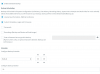
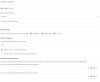
1245712456
 
Wait 5 mins not 4.
 
  • Like
Reactions: MARLEY JAFFE
Waiting the full 5 min did solve my initial problem, thanks for bringing that up. Unfortunately, a new problem has arisen during a real world failover, meaning, the main server (ServerA) had a blip, the transfer to the backup server (ServerB) completed, then the ServerA came back online.

The system successfully failed over to ServerB, all phones connected to the ServerB 3CX instance and outbound calls were working correctly, but inbound calls go straight to VoiceMail and after initial troubleshooting Flowroute is still sending the calls to the ServerA 3CX instance (I logged into it via the IP instead of the FQDN and saw my inbound call there). I see both 3CX instances registered under Flowroute’s active SIP registration list. To temporarily fix the problem, I disabled the SIP trunk on the ServerA and that removed it from Flowroutes Active SIP list and that fixed the issue.

Questions:
  1. How can I ensure that in this failover the SIP trunk moves to the passive server?
  2. After the ServerA server comes back online after a failure, how can I migrate everything (SBC’s, mobile app, SIP Trunk, etc) back to the main server gracefully?

Thanks for the help.
 
3CX does not support automatic fail-back, that is a manual process. So if the primary server goes down, it's expected it stays down. So you don't want it to fail-over due to a 30 second blip.

When the active server (#1) fails, the passive detects this and takes over. With the backup already restored, the failover action triggers the 3CX DNS Servers to update the FQDN to the IP address of the new active server (#2).

It is important that the previously active server (#1) is shutdown to avoid conflict with the server that just took over
 
Do you know what steps I can take to manually fail back? Do I have to manually power off ServerB so it’ll fail back to ServerA? Or is there a more graceful set of steps I can take?
 
Status
Not open for further replies.

Forum statistics

Threads
111,934
Messages
589,818
Members
164,811
Latest member
aurorasigntrtechitnet