


- Joined
- Nov 11, 2021
- Messages
- 11
- Reaction score
- 3
Hi All,
Firstly, Loving the AI progress! Well done!
Just trying to figure out where im going wrong, when i first called in on my new AI agents DID, after the introduction welcome message and subsequent questioning of how they can help.
they were more than happy to share first name, last name, department members.
I've Sanitized the transcript to give you an idea of what is happening at the bottom of this post
Reading through the online guide, I've enabled - Confidentiality Mode under call routing within my AI Agent however it still doesn't stop.
I tried a few combinations
1. only having Extensions for my Queues , and allow extensions and enabled con
2. No Extensions and only Allow Extension Routing by name + Confidentiality Mode Enabled.
3. Having Extensions for my Queues ,then ticking allow extension routing by name so i can tick Confidentiality Mode enabled then unchecking extension by name
4. Tried calling in from private callerID to ensure no trusted caller was overwriting rules.
Any tips would be greatly appreciated or if i can share any more info to assist let me know
Cheers
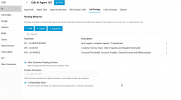
I'm running the default Agent Instruction Prompt, when i expand it via the customise button i can see the rules for {{#confidential_mode_enabled}}
[00:00:15] Caller ([PHONE_1]): Hi, it's [CALLER_FIRSTNAME] from [COMPANY_B] [LOCATION_1].
[00:00:21] AI Agent: Welcome [CALLER_FIRSTNAME] from [COMPANY_B] [LOCATION_1]. This is [AGENT_ALIAS] from [COMPANY_A]. How may I assist your company today?
[00:00:29] Caller ([PHONE_1]): I've got a problem with one of our orders. It hasn't turned up.
[00:00:36] AI Agent: It sounds like your best point of contact might be someone in the supply chain department, as they typically handle order issues. [EMPLOYEE1_FIRSTNAME] [EMPLOYEE1_LASTNAME] or [EMPLOYEE2_FIRSTNAME] [EMPLOYEE2_LASTNAME] in supply chain are available. Would you like to be connected to one of them or would you prefer to leave a message?
[00:00:49] Caller ([PHONE_1]): I would like to leave a message. Sure.
[00:00:53] AI Agent: Could you please provide the details of your message, including any specifics about the order issue, so I can make sure the team gets the information?
[00:01:02] Caller ([PHONE_1]): Hello, it is [CALLER_FIRSTNAME] and I need a follow up on purchase order [ORDER_NUMBER]. Thank you for the details [CALLER_FIRSTNAME].
[00:01:16] AI Agent: Here's what I have so far. You'd like to leave a message regarding the follow up on purchase order [ORDER_NUMBER_PARTIAL] with reference to [ORDER_REFERENCE]. Could you confirm if you'd like me to include any more details or is that everything?
[00:01:34] Caller ([PHONE_1]): That's all. That's all.
[00:01:42] AI Agent: It seems the destination is ambiguous, because there are multiple possible contacts in the supply chain department. Could you let me know if you prefer [EMPLOYEE1_FIRSTNAME] [EMPLOYEE1_LASTNAME] or [EMPLOYEE2_FIRSTNAME] [EMPLOYEE2_LASTNAME]? Once I have that detail, I can proceed with leaving the message.
[00:01:55] Caller ([PHONE_1]): I don't want either of them. Can you send it to [EMPLOYEE3_FIRSTNAME] [EMPLOYEE3_LASTNAME]?
[00:02:18] Caller ([PHONE_1]): Hello.
then the call hung with no feedback and dropped
Firstly, Loving the AI progress! Well done!
Just trying to figure out where im going wrong, when i first called in on my new AI agents DID, after the introduction welcome message and subsequent questioning of how they can help.
they were more than happy to share first name, last name, department members.
I've Sanitized the transcript to give you an idea of what is happening at the bottom of this post
Reading through the online guide, I've enabled - Confidentiality Mode under call routing within my AI Agent however it still doesn't stop.
I tried a few combinations
1. only having Extensions for my Queues , and allow extensions and enabled con
2. No Extensions and only Allow Extension Routing by name + Confidentiality Mode Enabled.
3. Having Extensions for my Queues ,then ticking allow extension routing by name so i can tick Confidentiality Mode enabled then unchecking extension by name
4. Tried calling in from private callerID to ensure no trusted caller was overwriting rules.
Any tips would be greatly appreciated or if i can share any more info to assist let me know
Cheers
I'm running the default Agent Instruction Prompt, when i expand it via the customise button i can see the rules for {{#confidential_mode_enabled}}
Sanitised Chat Transcript
Placeholder Key
| Placeholder | Description |
|---|---|
[AGENT_ALIAS] | AI agent short name |
[COMPANY_A] | Receiving company |
[COMPANY_B] | Caller's company |
[LOCATION_1] | Store/branch location |
[PHONE_1] | Caller's phone number |
[CALLER_FIRSTNAME] | Caller's first name |
[EMPLOYEE1_FIRSTNAME] [EMPLOYEE1_LASTNAME] | Staff member #1 |
[EMPLOYEE2_FIRSTNAME] [EMPLOYEE2_LASTNAME] | Staff member #2 |
[EMPLOYEE3_FIRSTNAME] [EMPLOYEE3_LASTNAME] | Staff member #3 |
[ORDER_NUMBER] | Full purchase order number |
[ORDER_NUMBER_PARTIAL] | Partial order number |
[ORDER_REFERENCE] | Order reference code |
Transcript
[00:00:00] AI Agent: Hello, welcome to [COMPANY_A]. This is [AGENT_ALIAS]. I'm an AI agent covering the phones while our customer service team is in a meeting. Can I please take a message on how they can help you today? They can also return your call after 1pm today.[00:00:15] Caller ([PHONE_1]): Hi, it's [CALLER_FIRSTNAME] from [COMPANY_B] [LOCATION_1].
[00:00:21] AI Agent: Welcome [CALLER_FIRSTNAME] from [COMPANY_B] [LOCATION_1]. This is [AGENT_ALIAS] from [COMPANY_A]. How may I assist your company today?
[00:00:29] Caller ([PHONE_1]): I've got a problem with one of our orders. It hasn't turned up.
[00:00:36] AI Agent: It sounds like your best point of contact might be someone in the supply chain department, as they typically handle order issues. [EMPLOYEE1_FIRSTNAME] [EMPLOYEE1_LASTNAME] or [EMPLOYEE2_FIRSTNAME] [EMPLOYEE2_LASTNAME] in supply chain are available. Would you like to be connected to one of them or would you prefer to leave a message?
[00:00:49] Caller ([PHONE_1]): I would like to leave a message. Sure.
[00:00:53] AI Agent: Could you please provide the details of your message, including any specifics about the order issue, so I can make sure the team gets the information?
[00:01:02] Caller ([PHONE_1]): Hello, it is [CALLER_FIRSTNAME] and I need a follow up on purchase order [ORDER_NUMBER]. Thank you for the details [CALLER_FIRSTNAME].
[00:01:16] AI Agent: Here's what I have so far. You'd like to leave a message regarding the follow up on purchase order [ORDER_NUMBER_PARTIAL] with reference to [ORDER_REFERENCE]. Could you confirm if you'd like me to include any more details or is that everything?
[00:01:34] Caller ([PHONE_1]): That's all. That's all.
[00:01:42] AI Agent: It seems the destination is ambiguous, because there are multiple possible contacts in the supply chain department. Could you let me know if you prefer [EMPLOYEE1_FIRSTNAME] [EMPLOYEE1_LASTNAME] or [EMPLOYEE2_FIRSTNAME] [EMPLOYEE2_LASTNAME]? Once I have that detail, I can proceed with leaving the message.
[00:01:55] Caller ([PHONE_1]): I don't want either of them. Can you send it to [EMPLOYEE3_FIRSTNAME] [EMPLOYEE3_LASTNAME]?
[00:02:18] Caller ([PHONE_1]): Hello.
then the call hung with no feedback and dropped


