Solved Configuring a WatchGuard for 3CX

Status
Not open for further replies.

Fred2k

Free User
Joined
Oct 30, 2018
Messages
39
Reaction score
4
I have followed this article regarding configuring a Watchguard for 3CX. I have a T10 unit running Fireware v12. Here is my config from WG Policy Manager:

upload_2018-11-8_14-46-50.png

I'm running 3CX 15.5.0 on Win 10 (with Windows Firewall turned off) but when I run the 3CX Firewall Check I get these results:
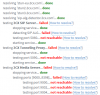
upload_2018-11-8_14-50-20.png

Any ideas?
 
...Well, after posting that I checked the logs (which to be fair I should have done earlier) and saw lots of outbound traffic on port 3478 (STUN?) being blocked.

So I added an outbound rule on port 3478 (UDP) from my 3CX server to any external, which fixed most of my problems, expect the SIP ALG. For that I needed an outbound SIP rule (port 5060)

Hope this may help others - and might be worth updating that article too.
 
  • Like
Reactions: Fred19
Glad to see the issue has been resolved and thank you for the feedback. Port 3478 is used for STUN requests.
 
Status
Not open for further replies.