Solved Configuring a WatchGuard for 3CX

Status
Not open for further replies.

Fred2k

Free User
Joined
Oct 30, 2018
Messages
39
Reaction score
4
I have followed this article regarding configuring a Watchguard for 3CX. I have a T10 unit running Fireware v12. Here is my config from WG Policy Manager:

upload_2018-11-8_14-46-50.png

I'm running 3CX 15.5.0 on Win 10 (with Windows Firewall turned off) but when I run the 3CX Firewall Check I get these results:
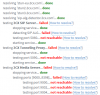
upload_2018-11-8_14-50-20.png

Any ideas?
 
...Well, after posting that I checked the logs (which to be fair I should have done earlier) and saw lots of outbound traffic on port 3478 (STUN?) being blocked.

So I added an outbound rule on port 3478 (UDP) from my 3CX server to any external, which fixed most of my problems, expect the SIP ALG. For that I needed an outbound SIP rule (port 5060)

Hope this may help others - and might be worth updating that article too.
 
  • Like
Reactions: Fred19
Glad to see the issue has been resolved and thank you for the feedback. Port 3478 is used for STUN requests.
 
Status
Not open for further replies.

Forum statistics

Threads
111,901
Messages
589,634
Members
164,768
Latest member
Eagle Man