- Joined
- Sep 16, 2021
- Messages
- 5
- Reaction score
- 0
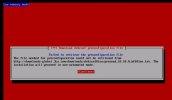
I downloaded recent ISO of 3cx to be installed on my vmware virtual machine. After loading ISO i got message that installaion do not find preconfigured installation files and quit. I follwed another posting on this forum and installed debian 10 OS and followed the postd 3cx installation command but on last command it failed with some error related to dependencies not found. Can some one please give me the step by step commands which i can run on cli and be able to start the 3cx installation wizard. I will be thankful for this.
Here are the errors I got during running those installation commands:
Ign:4 http://downloads-global.3cx.com/downloads/debian Jessie InRelease
Err:5 http://downloads-global.3cx.com/downloads/debian Jessie Release
404 Not Found [IP: 104.22.xx.xx]
Reading package lists... Done
E: The repository 'http://downloads-global.3cx.com/downloads/debian Jessie Release' does not have a Release file.
N: Updating from such a repository can't be done securely, and is therefore disabled by default.
N: See apt-secure(8) manpage for repository creation and user configuration details.
Note: i tried the hosted version but it doesn't have generic sip trunk provider option available. Will I be able to reach my goal of installing generic and non 3cx listed trunk provider if i install on my premises ?
Here are the errors I got during running those installation commands:
Ign:4 http://downloads-global.3cx.com/downloads/debian Jessie InRelease
Err:5 http://downloads-global.3cx.com/downloads/debian Jessie Release
404 Not Found [IP: 104.22.xx.xx]
Reading package lists... Done
E: The repository 'http://downloads-global.3cx.com/downloads/debian Jessie Release' does not have a Release file.
N: Updating from such a repository can't be done securely, and is therefore disabled by default.
N: See apt-secure(8) manpage for repository creation and user configuration details.
Note: i tried the hosted version but it doesn't have generic sip trunk provider option available. Will I be able to reach my goal of installing generic and non 3cx listed trunk provider if i install on my premises ?