Connect my Yealink T26P phones to 3CX

Status
Not open for further replies.

anilkumar

New User
Joined
Nov 22, 2021
Messages
5
Reaction score
0
I would like to know how can I connect my Yealink T26P phones to 3CX.

Firmware Version 6.73.193.50
Hardware Version 4.0.0.3
 
I have seen this link. Even though it says T26P it is for new phones.
I have the latest firmware.
I am not using SBC. I am using in system mode.
I don't know what is the stun address for 3CX.
I have disabled ssl as per some suggestion somewhere in the net
 
3CX it seems doesn't want a customer. I have almost 100 Yealink T26P phones which I cannot throw away because I am moving to 3CX. The 3CX customer service is not supporting at all. They are pushing it to partners and forums and youtube.
 
The 3CX customer service is not supporting at all. They are pushing it to partners and forums and youtube.
We do in fact have a partner program and 3CX Support is indeed offered to partners depending on their partner level: https://www.3cx.com/partners/channel-partner-program/
That said you can always purchase a support case should you wish to do so as mentioned here: https://www.3cx.com/support/

If you don't our community members on this forum are extremely knowledgeable and are more than willing to help but so are we to the best of our ability. We might need a bit more information if we are to do so though so please let us know of the following:

• What version of 3CX are you running. Check under in the Management Console under "Dashboard >> Information >> Version/License"

• Where is the PBX in respect to the IP Phones, is it on the same LAN, is it remote in the Cloud with a hosting provider, etc?

• Are all IP Phones on the same LAN/Site?

• Are all IP Phones running the mentioned firmware? Do bear in mind that the firmware you mentioned might be the latest one but not the 3CX Supported one. You can find a list of our supported firmware versions here: https://www.3cx.com/support/phone-firmwares/

• Are you using a 3CX FQDN or a custom one?
 
Please don't take it wrong. I am doing POC with another cloud PBX providers also and had the same issue. They about half an hour back connected and with just 10 minutes they rectified the issue with my version of firmware.

• What version of 3CX are you running. Check under in the Management Console under "Dashboard >> Information >> Version/License"

The latest downloaded two days back from your site after registering

• Where is the PBX in respect to the IP Phones, is it on the same LAN, is it remote in the Cloud with a hosting provider, etc?

the PBX and Phones are in the same LAN in the same switch in one office in one floor in one building in one place

• Are all IP Phones on the same LAN/Site?

the PBX and Phones are in the same LAN in the same switch in one office in one floor in one building in one place

• Are all IP Phones running the mentioned firmware? Do bear in mind that the firmware you mentioned might be the latest one but not the 3CX Supported one. You can find a list of our supported firmware versions here: https://www.3cx.com/support/phone-firmwares/

The phones are Yealink T26P running the latest firmware available on Yealink site which is Firmware Version 6.73.193.50 Hardware Version 4.0.0.3

It seems your supported version is as below. I will upload the firmware and see.


Yealink T26P
6.73.0.60
Yealink T26P FW: Added support for Lets Encrypt

• Are you using a 3CX FQDN or a custom one?

I am not using any FQDn as of now. I need DynDNS or port forwarding with my custom domain. But before all that I need the device connected to the internal 3CX. If this works then only FQDN and all these things come into picture.
 
I am not using any FQDn as of now. I need DynDNS or port forwarding with my custom domain. But before all that I need the device connected to the internal 3CX. If this works then only FQDN and all these things come into picture.
3CX actually asks for an FQDN to install so the installation cannot be completed if you do not provide one. It should say what FQDN is bound to your License key in the "Management Console >> Dashboard >> Information >> FQDN" field(For security reasons please do not post your FQDN in this public thread).

Regardless, if the IP Phones are on the same LAN, their provisioning can be completed without involving the FQDN at all.

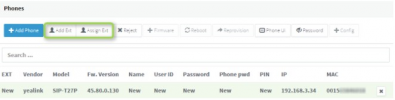
First off, you should try PnP which is the easiest and fastest way to provision an IP Phone. This will only work if the IP Phones are on the same subnet as the PBX. If they are, factory reset one of them and then, when it comes up and reaches an idle state, access the Management Console and go to the "Phones" section on the left. Do you see the IP Phone here? it should look something like this:
1637670319463.png
If it does, follow Step 3 of our guide to complete provisioning: https://www.3cx.com/sip-phones/yealink-t20p-t22p-t26p-t28p/

If it does not, try using the "Manual Link Provisioning" method for which we have a step-by-step guide here: https://www.3cx.com/sip-phones/manually-provision-yealink/

Please let me know what happens and which of the two methods works for you.
 
  • Like
Reactions: Evolute IT
I have done and gone through all these.
 
I have done and gone through all these.
Just to understand, you're crying about the fact you waste your time in the testing of a new product ?

There is only three webinar to know the basic of 3CX to achieve what you wanted to.

This kinda ironic that you seems to know everything ("I have done and gone trough all these") but in fact, we don't know you and you don't know me, so if you are not explicit on what you did, we can just tell you the basic checks to do.
 
Hello,

1. 3CX only supports these phones when using firmware version 6.73.0.60 as per out guide. If you use a different version we do not know whether it will work or not. Please try on phone with our supported version during your PoC testing, and then see which direction to go from there.

2. If the PBX and phones are on the same LAN, there should not be any problems since FQDN and SSL does not get involved at all.

3. Does a phone (with FW 6.73.0.60) appear in the management console as "New" after you factory reset it?

4. If yes, then you should be able to assign it successfully to an extension. Were you able to configure one phone using this method? If not, can you try again from scratch and let us know if this was successful?
 
Status
Not open for further replies.

Members Online Now

Forum statistics

Threads
111,832
Messages
589,278
Members
164,662
Latest member
DejanMDS