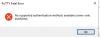
Okay, I see what is happening.
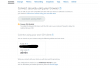
Your host name should be your public IP for your instance. Username should be ec2-user. Leave password field blank. Then go to Advanced. In the left-hand pane, under SSH, select Authentication.
Then click the 3-dot menu next to the Private key file field and browse to your key file or input the path to your private key there. Click OK. Then click save back on the main screen again. You should now be able to connect.
Putty has a similar setup procedure for private key files.
If you do not have a private key, then you might be out of luck or need to generate one within the lightsail dashboard. I am unfamiliar with lightsail, but pretty well-versed in SSH and SFTP.