Connect Wise integration

Status
Not open for further replies.

Pranash

Silver Partner
Advanced Certified
Joined
Jun 27, 2019
Messages
7
Reaction score
0
Good Day

I need some advise on the 3cx Connect Wise integration.
I have enabled and set this up on our companies 3CX,
I have tested this and noticed that the call popup only works when using Connect Wise via the web.

We are a support company and all customers are listed on Connect Wise.
Under each customer all their staff members are listed.
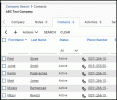
The companies primary phone number is listed for all staff (example attached)

Example: Customer is ABC Company -0312661500
ABC Company has these contacts listed
Fred -0312661500
Jordge -0312661500

All these contacts have synced to 3cx via the CRM
The problem is when calling 0312661500 or 0312661500 calling in 3cx does like a wildcard search and shows the staff members names and not the company name.
We with like for the company name to show, Is there any way to correct this.
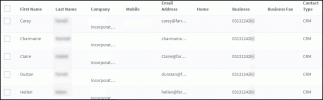
 

Attachments

  • contacts in 3cx.gif
    contacts in 3cx.gif
    20.2 KB · Views: 10
  • CW customer.gif
    CW customer.gif
    13.9 KB · Views: 10
Hello @Pranash,

First, please note that the contact popup is launched by the 3CX Web Client or the 3CX Chrome Extension, and this is always an URL which is launched in a browser tab.

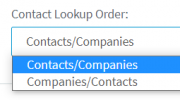
Regarding the contact lookup ordering issue, you can select a different option in the 3CX configuration:
1612357781314.png

If you select Companies/Contacts there, when there are multiple matches, 3CX will select the company instead of the contact. Then you will see the company name, and not a contact name.

In order to apply this change, after you make the change to the configuration from the 3CX Console > Settings > CRM Integration, you will need to delete all the CRM contacts from the 3CX Console > Advanced > Contacts. This way, 3CX will start synchronizing contacts again, and get companies instead of contacts.
 
Hi Ernesto

Thank you so much for your response i have made the changers and its working 100 %.
much appreciated.

Can i please ask you about Call Journaling
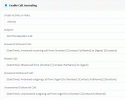
i have it active on the CRM (attached screenshot)
My extension number is set under in Connect Wise under > System > Members
im using Connect wise Via the web login and 3CX web client/browser extension
Where should i see this Journaling notes, when i check the "Activities" or "Notes" Tab under a customer i dont see anything.
 

Attachments

  • CW call Jorn.gif
    CW call Jorn.gif
    15 KB · Views: 6
  • CW system extension.gif
    CW system extension.gif
    13.2 KB · Views: 6
Search up the company and click the Activities or Notes tab
 
Try to manually make one, could be API key permissions.
 
Hi Ernesto

Thank you so much for your response i have made the changers and its working 100 %.
much appreciated.

Can i please ask you about Call Journaling
i have it active on the CRM (attached screenshot)
My extension number is set under in Connect Wise under > System > Members
im using Connect wise Via the web login and 3CX web client/browser extension
Where should i see this Journaling notes, when i check the "Activities" or "Notes" Tab under a customer i dont see anything.
According to your configuration, it should be created under "Activities". Please note that the call must be sent to your extension (242 from the screenshot), otherwise it will not be reported. Only calls to or from extension numbers associated to system users are reported.

In any case, in order to troubleshoot this, please enable verbose logs from the 3CX Console > Dashboard > Activity Log > Settings. Then make a test call, and check the 3cxSystemService.log. That file contains all the interactions between 3CX and the CRM, so any error will be visible there.
 
Status
Not open for further replies.

Latest Posts

Forum statistics

Threads
112,324
Messages
591,897
Members
165,475
Latest member
lastshadow