Connecting 3CX to Google Voice via OBI200

Status
Not open for further replies.

pinoycalifornia

Free User
Joined
Mar 29, 2020
Messages
25
Reaction score
0
Can someone share a complete guideline or at least screenshot of their settings how you connected 3CX to Google Voice?

There is a thread here but its difficult to follow as they are diagnosing slowly how to make incoming and outgoing work:
https://www.3cx.com/community/threads/3cx-with-google-voice-via-obi200.62660/

If someone can compile or at least share theirs, it would be helpful.
Thanks!
 
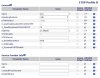
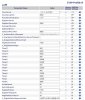
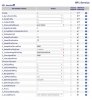
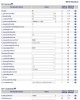
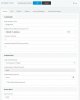
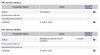
That post has screen shots of pretty much all of the settings Do you have Google voice working on the Obi using a phone plugged into the device? Have you tried changing the Obi settings to those shown on the posts?
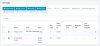
Post your 3CX trunk settings and the same OBi pages that were previously posted and I will compare to what I have. Some of the settings seem to work, even if not exactly the same. What are you getting in the Activity Log when placing/ receiving calls? Does the Obi show as registered with 3CX?
 
Last edited:
  • Like
Reactions: pinoycalifornia
I faithfully followed the guide, successfully receiving inbound calls. However, I cant do outgoing calls, like im in the stage where the thread was left off.

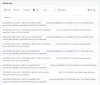
[CM503003]: Call(C:9): Call to <sip:[email protected]:0> has failed; Cause: 486 Busy Here/INVITE from 127.0.0.1:5483
 
Last edited:
Is the Obi local to the 3CX server? If not, then it is probably not going to work for outbound unless the Obi has a public IP (not behind a router). The 3CX trunk settings (for the Obi trunk), has both the IP setting and a port. For outbound calls to work, the Obi must be reachable using these settings. While it may register with 3Cx, that will allow incoming calls, even with port forwarding, the other direction becomes tricky for the voice port.
 
  • Like
Reactions: pinoycalifornia
Sorry for a dumb question but here is it:
How can I make OBI200 a local to the 3CX server in a home setup? My Obi is connected to a router as of now.
 
To work properly (as with any trunk gateway and 3CX), the Obi and the 3CX server should be on the same subnet behind a router (not a hosted 3CX install)...example, 3CX server-192.168.1.200, Obi- 192.168.1 15. Both devices should be using static IPs.
 
I see, what would be a possible solution to make obi outbound calls working with a self-hosted 3cx?
 
Where is your 3CX server located, at home, or in the cloud? "Self hosted", meaning the 3CX server is located at your home, or business, on your machine, is what you want.
 
On the cloud, on a virtual machine in azure
 
Then it's probably not going to work. Some people had had (some) success getting (trunk) gateways to work on a hosted installation but you will have to do a lot of trial and error. I don't hold out much hope, but you can try configuring port forwarding to, first get the SIP messaging working (port 5061) and then work on getting the voice ports to go through correctly. If you really want this to work, you might consider hosting 3CX locally (on your own machine), especially if this is just for home use. The Obi would probably work if it were on it's own , pubic IP, as well (not behind a router)

As it stands, you seem to be able to get incoming calls, and could probably place outgoing through a phone, plugged into the Obi.
 
I hope people who had (some) success getting (trunk) gateways to work on a hosted installation share their setup as well here...
 
Not entirely home use, we have remote people who will be using the platform as well. I am setting this up because we are looking for solutions to communicate well with this COVID-19 outbreak.
 
You might use VPN, if available.
 
Oh, we have VPN. How can i use that with obi at home + azure hosted 3cx?
 
Your would have to VPN the Obi so that it appears to be on the same network as the 3Cx host. However...the Obi is also connecting to GV, so you "break" that part. I have only used the Obi on the same network as the 3CX server.
 
would "directly" connecting the obi without the router may work?

Is the Obi local to the 3CX server? If not, then it is probably not going to work for outbound unless the Obi has a public IP (not behind a router). The 3CX trunk settings (for the Obi trunk), has both the IP setting and a port. For outbound calls to work, the Obi must be reachable using these settings. While it may register with 3Cx, that will allow incoming calls, even with port forwarding, the other direction becomes tricky for the voice port.
 
If the Obi was assigned a (static) public IP, and some ISPs even allow home users two public IPs, then I don't see why it wouldn't. Before you go out and "buy" one, try doing port forwarding on the local router to the Obi IP. Start with 5061, then the required voice ports. Having any other local SIP devices, may cause issues.
 
So that can be option A.

Next probable setup... I have a VPN that provides static IPs. If the router is configured with a VPN with a static IP then I connect obi there, would that work?
 
The Obi would need to appear to be on the same subnet as the 3CX server (but this may cause the GV registration to fail, I don't know), or, the Obi would need to be connected directly to the Internet, with its own public (hopefully static) IP.

I must say that you are going to an awful lot of trouble to avoid subscribing to someone like Voip.MS, for a single outgoing line at about one cent per minute. If you look around there are probably companies that charge even less. You could even send caller ID to match your Obi number, and have one incoming and one outgoing call at the same time.
 
Status
Not open for further replies.