Under Review Connection for pickup is not found

Status
Not open for further replies.

BryanN

Customer
Advanced Certified
Joined
Feb 25, 2021
Messages
13
Reaction score
3
Hi good day,

We're having an issue when picking up calls, with an Error saying "Connection for pickup is not found", not sure why is this message showing up, their internet connection is not a problem also they are having that problem on the webclient. What could be the reason of this Error?
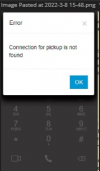
1646782268404.png

Thanks in advance,

Bryan
 
Hi good day,

We're having an issue when picking up calls, with an Error saying "Connection for pickup is not found", not sure why is this message showing up, their internet connection is not a problem also they are having that problem on the webclient. What could be the reason of this Error?
View attachment 28507

Thanks in advance,

Bryan
Hello there, this was reported by one of our users too. Not much information provided but this is a remote worker using the webclient (Chrome) and I suspect she was trying to answer an inbound queue call. I am curious if you found the root cause for your situation?
 
Hi,

Yes for sure:
  • 3CX Version, Professional Annual 18.0 (Build 450)
  • Server OS, Not sure right now
  • Is the 3CX Server Hosted and where? Hosted
  • IP Phone Make/Model/Firmware version, WebClient
  • Provisioning Method: VPN
  • Trunk Provider Not supported SIP trunk
  • Has the Firewall Checker passed: YES
  • Are custom Phone Templates being used: NO
This is not happening to all users, but it is becoming an error that more and more people are experiencing. People that are having this issue are working from home and offices as well, all of them using webclient. As I said before, not all of them are having this issue, and this error is happening sporadically.

The people experiencing this issue are using only browser, haven't recieved information from people using the Desktop App.

Where is the call coming from? Does this happen with internal calls (extension to extension)? External calls? All calls? This is just happening with external calls coming in, internal calls are working just fine.

Bryan
 
  • Like
Reactions: jed
Only one user has so far complained and she is using webclient and from what it sounds its affecting calls coming to her from a Queue. I will switch her to Desktop client (Windows OS) and see if that makes a difference.

Thank you for sharing your notes.


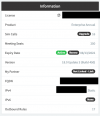
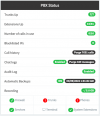
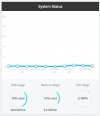
Our system information:

3CX Version: 18.0 Update 3 (Build 450)
Server OS: Debian Linux
Server Environment: vSphere Hypervisor
3CX License: Enterprise
Provisioning metod: VPN
Firewall status : Green
 

Attachments

  • Screen Shot 2022-03-09 at 10.45.25 AM.png
    Screen Shot 2022-03-09 at 10.45.25 AM.png
    16.6 KB · Views: 18
  • Screen Shot 2022-03-09 at 10.51.59 AM.png
    Screen Shot 2022-03-09 at 10.51.59 AM.png
    36.9 KB · Views: 19
  • Screen Shot 2022-03-09 at 10.51.36 AM.png
    Screen Shot 2022-03-09 at 10.51.36 AM.png
    45 KB · Views: 17
  • Screen Shot 2022-03-09 at 10.51.42 AM.png
    Screen Shot 2022-03-09 at 10.51.42 AM.png
    33.7 KB · Views: 17
Hi,

an update, people using the desktop app are also having that issue
 
same here. I tried to isolate the user by asking her to only use Desktop App and she reported that it got worse. Not sure what to do next :(
 
Hi @VasilisV_3CX ,

Please let me know if you need me to provide additional information regarding this issue. Any help will be much appreciated Also, is there any other channel besides this where users might be talking about post 18.0 U3 update issues?
 
Hi all,

Same here, I'll be updating and please ask anything you need for this problem to be solved.

Thanks in advance,
Bryan
 
I see that the one thing you both have in common is the use of a VPN. Is this a site-to-site VPN configured on the network level or are the PC's actually running VPN clients? If the latter, I recommend you have these users both test without having the VPN connection established, do you still get the same behavior?
 
Still having that problem
 
actually to clarify. what I meant by VPN was the 3CX Desktop App/Webclient running over 3CX Tunnel. No third-party VPN involved.
 
Still having that problem
You mean with the VPN off? So are your users indeed using a VPN client on their PCs?

• Once this problem occurs, does the next call work or does that fail too?
• If it fails, how do you fix the problem, do you have to restart the browser?
• Do you know if this is a normal incoming call that the user is trying to answer or is the user trying to perform a call pickup(*20*)?
• Is this something you can replicate at will or after a a reasonable number of attempts?
 
In my case the user that is complaining of this error is an assigned agent to an inbound Queue. She is the only agent in the queue.

Inbound call lands at a Digital Receptionist, plays the welcome greeting and after 2-seconds of input delay forwards to the Queue. There is no user input expected at this stage.

Queue is configured as follows:

Polling Strategy: Prioritized Hunt
Ring Time (14 seconds)
Max Queue Wait Time (60 seconds)
Callback enabled
Callback timeout 30 seconds


I have a suspicion that it has something to do with callback timer being to low but I am not sure.
 
actually to clarify. what I meant by VPN was the 3CX Desktop App/Webclient running over 3CX Tunnel. No third-party VPN involved.
Same here, people are using webclient from their browsers or desktop app - just by sending the welcome e-mail, that means we are running over 3CX tunnel. Sorry for not specifying this before. Regarding the questions:

• Once this problem occurs, does the next call work or does that fail too?
Some users say that they can't pick up any inbound call, another ones say that the error occurs sporadically, sometimes it fails, sometimes it doesn't.
• If it fails, how do you fix the problem, do you have to restart the browser?
Not sure about this one, have to check
• Do you know if this is a normal incoming call that the user is trying to answer or is the user trying to perform a call pickup(*20*)?
User trying to pickup a normal incoming call.
• Is this something you can replicate at will or after a a reasonable number of attempts?
After a reasonable number of attempts
 
Hi @BryanN & @JJ-3CX-TX,

To try to nail this down to more specific scenarios to reproduce, I'd like you both to answer the following questions when you can. For both of you:
  1. Are the users using more than one client? i.e They have an open PWA client while using the Desktop App or WebClient and Desktop App open at the same time?
  2. This happens to all users, both local to the PBX and connecting externally?
  3. Is there any VPN connection being used by the people experiencing this? Yes or No?
  4. Does this happen for all users at the same time or is it happening at random?
  5. This ONLY happens when you try to pickup a call normally, and not with *20*?
  6. After you answer a call when this happens, the next immediate call does not work? I see above that you mentioned it happens sporadically, but what do those users do to continue receiving calls? Does the error occur then stop on its own?
  7. @JJ-3CX-TX, does this error occur outside of Queues in your case? Is the queue using a Ring All polling strategy?
 
Last edited:
We are having this same issue with the desktop client.

The calls will answer fine on an internal call - but calls coming from a ring group are giving this error (latest v18)
 
Hi @ignoble,

If you don't mind, please answer the same questions I posed to the others?
 
Hi @BryanN & @JJ-3CX-TX,

To try to nail this down to more specific scenarios to reproduce, I'd like you both to answer the following questions when you can. For both of you:
  1. Are the users using more than one client? i.e They have an open PWA client while using the Desktop App or WebClient and Desktop App open at the same time?
  2. This happens to all users, both local to the PBX and connecting externally?
  3. Is there any VPN connection being used by the people experiencing this? Yes or No?
  4. Does this happen for all users at the same time or is it happening at random?
  5. This ONLY happens when you try to pickup a call normally, and not with *20*?
  6. After you answer a call when this happens, the next immediate call does not work? I see above that you mentioned it happens sporadically, but what do those users do to continue receiving calls? Does the error occur then stop on its own?
  7. @JJ-3CX-TX, does this error occur outside of Queues in your case? Is the queue using a Ring All polling strategy?
First of all thank you @VasilisV_3CX for your continued support.

My answeres

1. until yesterday for some reason one user was showing webclient AND DesktopApp. She claimed that she had rebooted her computer (they always claim to follow instructions) after a screenshare, I closed all of her Chrome windows and she only had DesktopApp registered. With only Desktop App registered today she claimed she had same error today.

2. I have not heard back from the user they were supposed to test ext-to-ext call and DID call. So far the problem has been reported for inbound queue calls

3. No VPN

4. happening to two users on the system. both members of same queue

5. normal pickup. No *20 required

6. haven't been able to get this info yet.

7. Queue is Priority Hunt but I will switch it to Ring All since there is only one agent logged in and will see if it makes difference. I increased the queue ring timer from 12 seconds to 14 seconds to see if helped. I will increase the ring timer to 20 seconds to see if it helps.
 
Hi good day, for sure:
  1. Are the users using more than one client? i.e They have an open PWA client while using the Desktop App or WebClient and Desktop App open at the same time?
They are just using their webclient.
  1. This happens to all users, both local to the PBX and connecting externally?
This is happening to users connecting locally and connected externally.
  1. Is there any VPN connection being used by the people experiencing this? Yes or No?
No
  1. Does this happen for all users at the same time or is it happening at random?
Happening at ramdom
  1. This ONLY happens when you try to pickup a call normally, and not with *20*?
This is only happening when trying to pickup a call normally.
  1. After you answer a call when this happens, the next immediate call does not work? I see above that you mentioned it happens sporadically, but what do those users do to continue receiving calls? Does the error occur then stop on its own?
Asking they tell me that it sometimes happens, as well that sometimes happens many times in a row. The error stops on its own
 
Status
Not open for further replies.

Forum statistics

Threads
111,973
Messages
590,079
Members
164,898
Latest member
grahamaskew