Under Review Connection for pickup is not found

Status
Not open for further replies.

BryanN

Customer
Advanced Certified
Joined
Feb 25, 2021
Messages
13
Reaction score
3
Hi good day,

We're having an issue when picking up calls, with an Error saying "Connection for pickup is not found", not sure why is this message showing up, their internet connection is not a problem also they are having that problem on the webclient. What could be the reason of this Error?
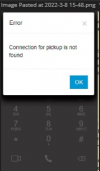
1646782268404.png

Thanks in advance,

Bryan
 
  • 3CX Version, Enterprise Annual 18.0 Update 3 (Build 461)
  • Server OS, Debian GNU/Linux 10 (buster),4.19.0-18-cloud-amd64
  • 3cx hosted
  • Provisioning Method: Cloud?
  • Trunk Provider: Call Centric
  • Has the Firewall Checker passed: YES
  • Are custom Phone Templates being used: NO
I had a user experiencing this issue.

While doing some testing, I realized that both the windows app and the web client both take 2-3 seconds to register that you hit the answer button. This happens on several users so far, including myself. If I had to guess, this is the client securing a connection to the call or server to handle the call, as it reminds me of answering a skype call, but Im grasping at straws here.

So my problem is that there is this gap, and there's no way to know if the client is frozen or something while you wait for it to register that you have hit the answer button, which might be a source of the issue. Is this normal? is there a way to shorten this time? For now, Im telling users to give it 2-3 seconds to pick up.
 
I don't think I've seen a delay. In general though I've seen web UIs that, when a button is clicked, either disable the button and/or change its label to something like "Answering..." so it's apparent something is happening, and so prevent the person from double clicking.
I also haven't run into this error since that one time I posted.
 
  • Like
Reactions: Evolute IT
I don't think I've seen a delay. In general though I've seen web UIs that, when a button is clicked, either disable the button and/or change its label to something like "Answering..." so it's apparent something is happening, and so prevent the person from double clicking.
I also haven't run into this error since that one time I posted.
Is that something we can change or a request we need to ask for?
 
Is that something we can change or a request we need to ask for?
I was just talking about web sites/buttons in general, not 3CX software.
 
Dang. Ok. But that seems to be the source of the issue here, or at least /A/ source. The one person who has reported this particular issue has also seen an lag between clicking the button and the call connecting, and I was able to spam it and get the same thing. Ive heard the lag happening on the android app, but from what Ive seen, its generally quick.
 
Dang. Ok. But that seems to be the source of the issue here, or at least /A/ source. The one person who has reported this particular issue has also seen an lag between clicking the button and the call connecting, and I was able to spam it and get the same thing. Ive heard the lag happening on the android app, but from what Ive seen, its generally quick.
The lag on mobile apps is to be expected because of the way the call gets answered. However, on the DesktopApp, it is slow but a disabled button while it answers.
 
The lag on mobile apps is to be expected because of the way the call gets answered. However, on the DesktopApp, it is slow but a disabled button while it answers.
At least as of late, we aren't always seeing a disabled button when the call is connecting. Its just a flat green button. Hence the multiple presses.

Just testing it on my ext, it shows gray for a moment, then goes back to green. On others, the gray never shows.
 
3CXDesktopApp_NQezaRF413.gif
This is what Im seeing, but today its moving faster than yesterday.
 
Oh I understand. My bad.

Yes, it would be a nice touch.
 
  • Like
Reactions: Evolute IT
Hello, the customer of ours experience the same issue: Connection for pickup is not found.

The issue affect external inbound calls for call queue agents.
It is not constant, so some calls going through fine, others calls
Issue appears for agents, that work both remotely and in office.

So, user is receiving a call, they are answering, and then the pop up error screen would appear. Once they exit the pop-up message the 3CX page returns and the call is visible on the top right however no audio is heard.

3CX Version Professional Annual 18.0 (Build 461)
Server OS
Is the 3CX Server Hosted and where? Hosted in Google
Webclient is used
VPN is used
Has the Firewall Checker passed: YES
Are custom Phone Templates being used: NO


Additionally, I've created a support ticket as it seems to be an issue inside 3CX.
 
@antonina_cmplte Did you happen to get any info from your ticket you created? I have a customer experiencing the same issue as everyone else in this thread.
 
Hello, the customer of ours experience the same issue: Connection for pickup is not found.

The issue affect external inbound calls for call queue agents.
It is not constant, so some calls going through fine, others calls
Issue appears for agents, that work both remotely and in office.

So, user is receiving a call, they are answering, and then the pop up error screen would appear. Once they exit the pop-up message the 3CX page returns and the call is visible on the top right however no audio is heard.

3CX Version Professional Annual 18.0 (Build 461)
Server OS
Is the 3CX Server Hosted and where? Hosted in Google
Webclient is used
VPN is used
Has the Firewall Checker passed: YES
Are custom Phone Templates being used: NO


Additionally, I've created a support ticket as it seems to be an issue inside 3CX.
Good day, All --

It's basically been a month since this was reported. and our users are still experiencing this and more people are reporting the same issue. Has anything been identified?

I've even re-installed the OS on the affected computer, but the exact same thing happens. But only on this specific user.

Regards,
 
@Total Tech Relief
That is the reply I get from support, but haven't done it yet.


Support reply:

Since this is an intermittent issue please run the following Tshark command which will create Wireshark traces of 10MB. Once the issue is reproduced write down the date, time, and a screenshot of the error in the web client (with the time on the PC visible) and attach the relevant Wireshark traces along with the 3CX support info files in verbose mode and the requested data from the PC.

What is needed after the issue occurs and after setting the logging to verbose, restarting services, and replicating the issue.


From the PBX

• Packet capture that will display the described behavior
• Support Info files in Verbose logging level and synchronized with the packet capture


From the PC

• Save the MSInfo32 of the PC used for testing - in .nfo format

When the issue occurs press F12 on the web client, select the elements tab and take a screenshot, and also of the console tab.


Steps to reproduce
• Set the PBX in Verbose and restart all services
• Start a packet capture on all NIC's (step 3 of instructions below)
• replicate the issue
• End the call and stop/save the packet capture
• Generate the Support Info files and gather all other requested data.

Below are the steps in order to switch the logging level of the PBX to verbose and run Tshark:
  1. Go in Dashboard -> Activity Log -> Settings, set the Logging Level to "Verbose".
  2. Set WebRTC extended logging:
    - ensure that under Activity Log / Settings / Parameters the logging level is Verbose,
    - go in Settings / Parameters,
    - add parameter "WEBRTC_EXTENDED_LOG_LEVEL" with value "3" and validate
    - add parameter "WEBRTC_EXTENDED_LOG" with value "/var/lib/3cxpbx/Instance1/Data/Logs/webrtc.log" (without quotes)

  3. Restart all 3CX services.
  4. Install Tshark and start capture doing the below:
    apt-get install tshark
    mkdir pcap
    chmod +7777 pcap
Run this capture through the SSH terminal :
  1. tshark -i any -b filesize:10240 -w pcap/capture.pcap
  2. wait for the issue to occur.
  3. Stop capture by pressing Ctrl+C
  4. Once the issue occurred go to Support (in the top right corner) -> "Generate Support Info".
    (An email with a link to download the support bundle is sent to the configured administrator email address)
  5. Attach the support bundle and PCAP file with the relevant timestamp in its filename (you should pick the file with the closest timestamp previous to the issue).
  6. You may upload directly to the support portal if the size is below 15MB or use a Dropbox account of your own.
 
  • Like
Reactions: Total Tech Relief
Same here when picking up from an IVR Queue. Only 1 user affected, on both her Laptop and Dekstop, happens in different locations (at the office and at home). Issue started with version 18.
  1. Are the users using more than one client? i.e They have an open PWA client while using the Desktop App or WebClient and Desktop App open at the same time?
She was mainly using Web client, Now we are trying only with the new Desktop App.
  1. This happens to all users, both local to the PBX and connecting externally?
3CX PBX is installed in VM Externally, no NAT on the PBX instance. Firewall Checker says it's all OK.
  1. Is there any VPN connection being used by the people experiencing this? Yes or No?
No
  1. Does this happen for all users at the same time or is it happening at random?
Happening at random.
  1. This ONLY happens when you try to pickup a call normally, and not with *20*?
This is only happening when trying to pickup a call normally, No issue dialing out.
  1. After you answer a call when this happens, the next immediate call does not work? I see above that you mentioned it happens sporadically, but what do those users do to continue receiving calls? Does the error occur then stop on its own?
Not always, sometimes yes.

 
@VasilisV_3CX & @ChrisC_3CX
How is the Status of this issue, we also have the problem with a important customer of us.
 
Any status update on this issue? We are unsure when it comes to updating clients because of this issue and we have a profile with over 300 3cx users. I don't have the time to support 300+ users complaining because of a bug.
 
  • Sad
Reactions: amannick and MoserR
is this resolved as I am also facing the same problem :(
 
My users have same problem - very annoying.
 
Status
Not open for further replies.

Forum statistics

Threads
111,973
Messages
590,079
Members
164,898
Latest member
grahamaskew