Connectwise Manage - Desktop app - TAPI

Status
Not open for further replies.

Alphabetic

3CX MVP
Silver Partner
Advanced Certified
Joined
Jul 1, 2016
Messages
6,672
Reaction score
2,663
Has anyone managed to get it so you're able to click to call numbers from the Connectwise desktop app?

if so, can you tell me how?

thanks.
 
Hi
i've installed that and configured my EXT.
When I click the phone button it opens up a new note in the ticket.
Do i need to configure something else?
Does this only work for the Connectwise Manage web client or the desktop client too?
 
Actually, the web client doesn't support TAPI, so you need to use the desktop client for that.

Did you configure the phone integration on ConnectWise?

In ConnectWise, click the small arrow near your name on the right up corner. In the pulldown menu, select "Phone Integration". Select "TAPI" and set the source to 3CX.
 
Right now i've got the web client (3CX) and desktop app open if that matters.
I always use Connectwise desktop app.
Yes that is set up to use my extension.
Now im finding nothing at all happens when I press the phone button.
 
In order to use TAPI, you need to use the 3CX client for Windows, not the 3CX Web Client.

Actually, if you are also using the server side integration with ConnectWise, then you will need to 3CX Web Client as well. You can have both clients (Web and Windows) running, the Web Client configured in CTI mode, and the Windows client configured in softphone mode.
 
Yes i've uninstalled and installed the Multi TAPI again to no avail.
CW is configured for TAPI, 3CX Desktop app is open and i've tried in deskphone and softphone mode.

Is 3CX desktop app supposed to populate the number? Nothing is happening.
 
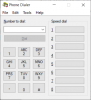
First, check if TAPI is working. To do this, open the Windows "dialer.exe" application which looks like this:
1605716150944.png

Go to Tools > Connect Using, and select your extension.

Please note, that your 3CXPhone for Windows client must be using this extension.

Then dial a number and click "Dial". 3CXPhone for Windows should start the call.
 
Ok so the dialer says "Currently dialing: xxx"

3CX Desktop client doesnt do anything
 
Is your 3CX desktop client configured with the same extension than TAPI?

Also, is your 3CX PRO or STD? This is a feature that requires a PRO license.
 
Yes my desktop client is configured to the same extension.

its an ENT license we have.
 
Yes my desktop client is configured to the same extension.

its an ENT license we have.
Then the license is fine.

Can you send me the log file "C:\Users\USER_NAME\AppData\Roaming\3CXPhone for Windows\Logs\3CXPhoneForWindows.log" in a private message?
 
Sent
 
From the logs I can see that the 3CX client for Windows is having problems making the call:
[18.11.2020 16:19:40.922][22] Error occurred when trying to initiate call in plugin handler
[18.11.2020 16:19:40.933][22] System.TimeoutException: Timeout while making a call
at _3CXWin8Phone.CallHandler.MakeCallAction(Assembly callingAssembly, Action action)

And it looks like the problem is related to the client not finding a suitable audio device:
[18.11.2020 16:19:30.943][25] 16:19:30.943 pjsua_aud.c ..Error retrieving default audio device parameters: Unable to find default audio device (PJMEDIA_EAUD_NODEFDEV) [status=420006]


Can you make normal calls with this client? Can you configure it in softphone mode and make calls?
 
That would make sense then, does it only work in softphone mode?
 
Outbound calls from TAPI are supported in CTI mode only in a few desk phones which support CSTA integration. In softphone mode it's fully supported. So in your case quite sure the phone you're using is not supported for this.
 
Actually I would like to reference this thread for the issue as we had ours break earlier this year and I am just getting around to fixing it. It seems this is a known issue:

https://www.3cx.com/community/threa...-version-16-3-0-111-update.72729/#post-326751

This is kind of a serious issue for us, is there any resolution that has been found yet?
The thread you linked is old, that issue has been fixed. If you're experiencing an issue with TAPI, please describe it with all the details you can provide.
 
Having same issue. Cant get this thing to work. Tapi has been setup but can make the call, also wanted the time entry to get updated with the call info. I know it did this in the crm part but i also want it in the notes of a ticket. Any one have any other suggestions other then whats posted above? Im setup the same.
 
Having same issue. Cant get this thing to work. Tapi has been setup but can make the call, also wanted the time entry to get updated with the call info. I know it did this in the crm part but i also want it in the notes of a ticket. Any one have any other suggestions other then whats posted above? Im setup the same.
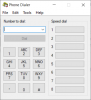
In first place, you need to check if the issue is on the ConnectWise side, or the 3CX TAPI side. To do this, launch the Windows Dialer application, go to Tools > Connect Using, and configure 3CX TAPI. Then try to make a call. This is the app I'm referring to, just in case you don't know it:
1608296610767.png

Ensure that you're running the 3CX Windows client, because TAPI only works with it.

Also, ensure that you have a PRO or ENT license activated in your 3CX server, otherwise TAPI will not work.
 
Status
Not open for further replies.

Forum statistics

Threads
112,248
Messages
591,486
Members
165,341
Latest member
ricky