CRM Create Contact and Inbound Call Journaling not working

Status
Not open for further replies.

salesdash

New User
Joined
Jun 21, 2024
Messages
2
Reaction score
0
Hello Support Team,

I hope this message finds you well. I am currently working on integrating our 3CX Phone System with our Salesdash CRM application. For this project, I am using our salesdash API endpoint to manage and track all HTTP requests between the two systems.

While I can confirm that the call journal requests for outbound calls are successfully reaching the "https://api.salesdashcrm.com/v1/3cx/activity" endpoint,
But we are not receiving any HTTP requests related to Create contact and Inbound calls. We want Create contact and both inbound and outbound activities to maintain an updated and comprehensive record in our CRM.

To summarize, here are the details of the issue:
We have triple-checked our 3CX configuration and CRM settings to ensure that Inbound call journaling should be activated, but we have not been able to resolve the issue.

I attached 3cx_template.xml file and all the info that I have about this:
Please let me know if any other details are required from me.

Thanks!
 

Attachments

Hello @salesdash,

You will need to ensure that inbound calls are matching an existing contact in the CRM. If there is no match, your agents need to create the contact using the "Add contact" link that shows in the Web Client when they receive the call.

It is important to note that only calls matching a CRM contact will be logged. So if you're receiving calls from unknown numbers, and you're not creating these contacts from the Web Client, then those inbound calls will not be logged.

Checking your XML template, I can see that you have a scenario named "CreateContactRecord", but not "CreateContactRecordFromClient". Maybe your template was created for 3CX v18, and this has changed with v20. You will need to adjust it to use the "CreateContactRecordFromClient" scenario. Here you have more information about the details of the XML template:
https://www.3cx.com/docs/crm-template-xml-description/
 
I'm using the 3CX template generator to generate the 3CX template. I downloaded the 3CX template generator again from this link: "https://downloads-global.3cx.com/downloads/3CXCRMTemplateGenerator.exe" and generated a template, and again, it is showing the scenario name as "CreateContactRecord." I don't have any idea about v18 and v20.

Please let me know what I need to do. If you have a V20 template generator link, please provide me that link.


Our requirements are:


I'm a Salesdash CRM developer, and our CRM customers want to connect their 3CX accounts with Salesdash CRM so that they can create contacts and inbound and outbound call activity in Salesdash. I want to give them a 3CX template so that they can import the template into their 3CX account and communicate with Salesdash.

Thanks.
Hello @salesdash,

You will need to ensure that inbound calls are matching an existing contact in the CRM. If there is no match, your agents need to create the contact using the "Add contact" link that shows in the Web Client when they receive the call.

It is important to note that only calls matching a CRM contact will be logged. So if you're receiving calls from unknown numbers, and you're not creating these contacts from the Web Client, then those inbound calls will not be logged.

Checking your XML template, I can see that you have a scenario named "CreateContactRecord", but not "CreateContactRecordFromClient". Maybe your template was created for 3CX v18, and this has changed with v20. You will need to adjust it to use the "CreateContactRecordFromClient" scenario. Here you have more information about the details of the XML template:
https://www.3cx.com/docs/crm-template-xml-description/
 
I'm using the 3CX template generator to generate the 3CX template. I downloaded the 3CX template generator again from this link: "https://downloads-global.3cx.com/downloads/3CXCRMTemplateGenerator.exe" and generated a template, and again, it is showing the scenario name as "CreateContactRecord." I don't have any idea about v18 and v20.

Please let me know what I need to do. If you have a V20 template generator link, please provide me that link.


Our requirements are:


I'm a Salesdash CRM developer, and our CRM customers want to connect their 3CX accounts with Salesdash CRM so that they can create contacts and inbound and outbound call activity in Salesdash. I want to give them a 3CX template so that they can import the template into their 3CX account and communicate with Salesdash.

Thanks.
It seems the latest version of the CRM tool, which generates the templates for v20, has not been published yet... You will need to manually edit the generated XML template. The change is pretty simple, just change the scenario ID CreateContactRecord to CreateContactRecordFromClient, and from this scenario use the variables [FirstName] and [LastName].

You will need to test the template with real calls, as you can't use the tool in this case.
 
It seems the latest version of the CRM tool, which generates the templates for v20, has not been published yet... You will need to manually edit the generated XML template. The change is pretty simple, just change the scenario ID CreateContactRecord to CreateContactRecordFromClient, and from this scenario use the variables [FirstName] and [LastName].

You will need to test the template with real calls, as you can't use the tool in this case.
Hello! I am working with them on this now and yes, its v20 phone system. The "outbound call" and "not answered calls" are registering, just not inbound calling / missed calls. I am calling from a contact (my cell phone) that is already in the CRM and registered in 3CX as a CRM contact as well, just for some additional information. I looked into what you mentioned but that seems to have to deal with Creating the contact rather than sending the Inbound Call or Missed call information. The other stuff seems to be working.

Here is the template now:
 

Attachments

Last edited:
Hello! I am working with them on this now and yes, its v20 phone system. The "outbound call" and "not answered calls" are registering, just not inbound calling / missed calls. I am calling from a contact (my cell phone) that is already in the CRM and registered in 3CX as a CRM contact as well, just for some additional information. I looked into what you mentioned but that seems to have to deal with Creating the contact rather than sending the Inbound Call or Missed call information. The other stuff seems to be working.

Here is the template now:
Hello Jessy,

Please note that in order for the call to be registered, you need a matching contact. If the contact is not in the CRM when you receive the call, you need to create it while the call is active, so the details are attached to the call, and then when the call ends the call will be logged.

If the call is not being logged for inbound calls, but it is for outbound calls, then maybe the format of the incoming number is different than the format for outgoing numbers, and then the lookup doesn't find the contact. If that's the case, something you can try is doing the lookup using the last X digits, instead of the full number.

In any case, it's better if you have the 3cxSystemService.log file in verbose mode after making a call, so you can tell what's happening.
 
  • Like
Reactions: jessy.paconnect
Ohhhhh, it does a full number match, The contact itself would be a 10 digit number in the format of 000-000-0000 or 1234567890. Yes the number coming into the phone system is +11234567890. I did a quick lookup in that format and you are correct, it did in fact NOT find the lookup. That said I would want more than last 4 of a number, thats too easy. Maybe last 7 of the number would be enough.

When troubleshooting with SalesDash, I do throw the logs into verbose for a short time make the call and send the logs over, but I dont think either of us knew about the number matching issue.
 
Now I guess the big question here is, how would you set the template to ONLY look at the last 7 digits of the number? Where might that part be.
 
Now I guess the big question here is, how would you set the template to ONLY look at the last 7 digits of the number? Where might that part be.
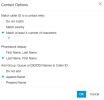
Admin > System > Phonebook > Options > Match 7 digits for example.
1719602293338.png
 
Ohhh, not part of the template, part of the options. Got it! Lemme test.
 
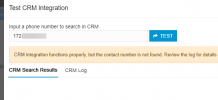
So this is interesting. Its set currently for 7 digit match already. so I search for the last 7 or full 10 digit number it works, but the moment I add the 1 to the start

1719602572742.png

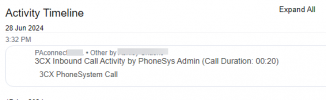
It does this. This seems to tell me its checking the string from the beginning? Not from the end and working backwards. Thats completely backwards from how the Phone numbers string lookup should be, no?
 
1719603410145.png

So I modified the Phone number in the CRM to have the full E164 number and now it works! but that also confirms its doing the string parsing from the beginning and not the end. In my opinion here programming wise it would make WAY more sense to do it from the last number and going backwards because the start of a number has way to many variables. Or at least let that be an option.

Hmmm. @3CX Support, do you think this is possible, or can you explain you are doing it this way?

On that note, it seems that Contact Creation is not working.
 
Definitely the last N digits are sent. You can confirm this in the Logs tab when you run a test. There must be something else causing the contact not to match.
 
  • Like
Reactions: Evolute IT
Status
Not open for further replies.

Latest Posts

Forum statistics

Threads
111,973
Messages
590,075
Members
164,895
Latest member
jasonkkrause