CRM integration: need help with "Automatically open Contact URL when CRM Integration is Enabled"

Status
Not open for further replies.

Christian Fuchs

Platinum Partner
Advanced Certified
Joined
Apr 13, 2021
Messages
8
Reaction score
4
Hi community,

I'm very new to crm integration with 3CX and hope you are able to help me on this:

For weclapp crm integration I wrote a small template using 3CX CRM Template Generator. As scenario "contact lookup" is used, which works fine regarding getting caller details from crm and putting them to 3CX' phone book.

When a call comes to my extension, I can now see the caller name which 3CX got from my crm - yay :-)

But there a two things bothering me:

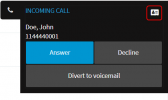
1. It won't show any of those other outputs set, e.g. "ContactID", "CompanyName" or "Email". How can I get the webclient to show them as well?
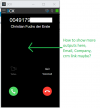
webmail browser extension on incoming call.png

2. It won't open the "ContactUrl" given in the template, how do I achieve that?
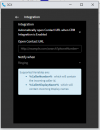
In 3CX webclient I went to "Settings" > "Integration" and ticked "Automatically open Contact URL when CRM Integration is Enabled" which didn't help.
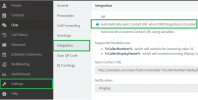
webmail settings_integration_automatic open contact URL.png

May all of you have a wonderful day & kind regards,
Chris.
 
1. It won't show any of those other outputs set, e.g. "ContactID", "CompanyName" or "Email". How can I get the webclient to show them as well?
Only the name will be shown. Any information that you need to show should be added to the name.

2. It won't open the "ContactUrl" given in the template, how do I achieve that?
In 3CX webclient I went to "Settings" > "Integration" and ticked "Automatically open Contact URL when CRM Integration is Enabled" which didn't help.
I don't see the CRM contact icon in that screenshot, so probably this is a normal contact being matched, and not a CRM contact. Ensure that you don't have a normal contact for this same phone number.
 
Hi Ernesto,

thank you for your reply, that solves my first issue somehow. I guess I need to string append everything I want to show to the (first or last) name variable, then.

Regarding my second question: Originally my contact's name in crm was only "Christian Fuchs" and 3CX web client showed "Christian Fuchs" when calling.

At first I wasn't sure if this came from crm or from 3CX, my mobile phone number is set in web client for my extension with the same first and last name as well.

But I changed crm to "Christian Fuchs der Erste" to test that, next call the web client showed the new string. I guess this tells me that it has to be a crm contact. It also shows as crm contact in 3CX' phone book.

Any more ideas?

Kind regards,
Chris.
 
What I can see in the screenshot you sent is that there is no contact card:
1618348530673.png

So I would recommend that you delete any contact in 3CX Contacts and your personal phonebook having this phone number, so you're 100% sure that it's being taken from the CRM.
 
Hi Ernesto,

I did as you said, but had zero success :-(

I deleted name & phone mobile number from my extension and made sure there is no contact with any of my details in 3CX:

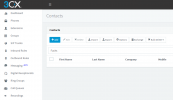
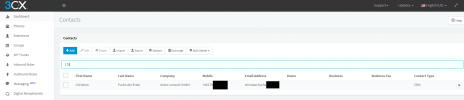
3cx' contacts - no hits with my name:
No contact with name.PNG

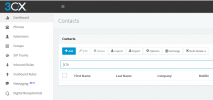
3cx' contacts - no hits with my number or parts of it:
...or phone number.PNG

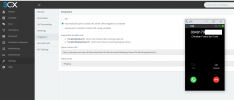
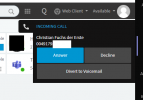
This happens when I call my extension from my mobile - contact details are retrieved from crm again, but no contact card is shown:
Call signalization.PNG

And that is the 3CX's contacts after call:
3CX phone book after call.PNG

Kind regards,
Chris.
 
Please check the settings from the 3CX Chrome Extension, instead of the Web Client. Please note that they have separate settings.
 
Hello again,

I hope you had a nice day so far?

You're absolutely right with the extension having its own settings, but I already ordered my chrome extension to open Contact URL when CRM integration is on, this didn't open the ContactURL.
Settings in Chrome Extension.PNG

I now uninstalled the extension and tested with web client instead, looks a bit different but doesn't open that crm link / ContactURL, either.

Using Web Client_uninstalled extension.PNG

Furthermore I logged out of the webclient in chrome and used the client in edge, without extension, That browser doesn't open a page with ContactURL, either.

Kind regards,
Chris.
 
Can you check what happens if you login to the Web Client with a different extension? I would like to see if this is related to a specific extension or not.
 
Hi Ernesto,

I'm sorry for answering that late, I again had no success.

One of my colleagues now enabled the open Contact URL on call feature in his web client and browser addon as well. When calling, he sees the caller's name from crm, but there is no page with Contact URL beeing opened, just like with my extension.

Kind regards,
Chris.
 
The popup only works for inbound calls. Are you receiving inbound calls or making outbound calls?
 
It's inbound, I'm calling SIP trunk numbers leading to 3CX's extensions from my mobile phone, using my mobile provider, not 3CX app of course.
 
Looks like we found a possible bug here. The problem is probably that you have a 3CX extension configured with the same mobile number from which you're making these tests. Try testing from a different number, or remove the mobile number from the extension settings, and the issue should be fixed.

We will be reporting this internally so it gets fixed in the next release of 3CX.
 
  • Like
Reactions: it-thomas
Thank you for your support, Ernesto.
Have a nice weekend.
 
Status
Not open for further replies.

Latest Posts

Forum statistics

Threads
112,324
Messages
591,897
Members
165,475
Latest member
lastshadow